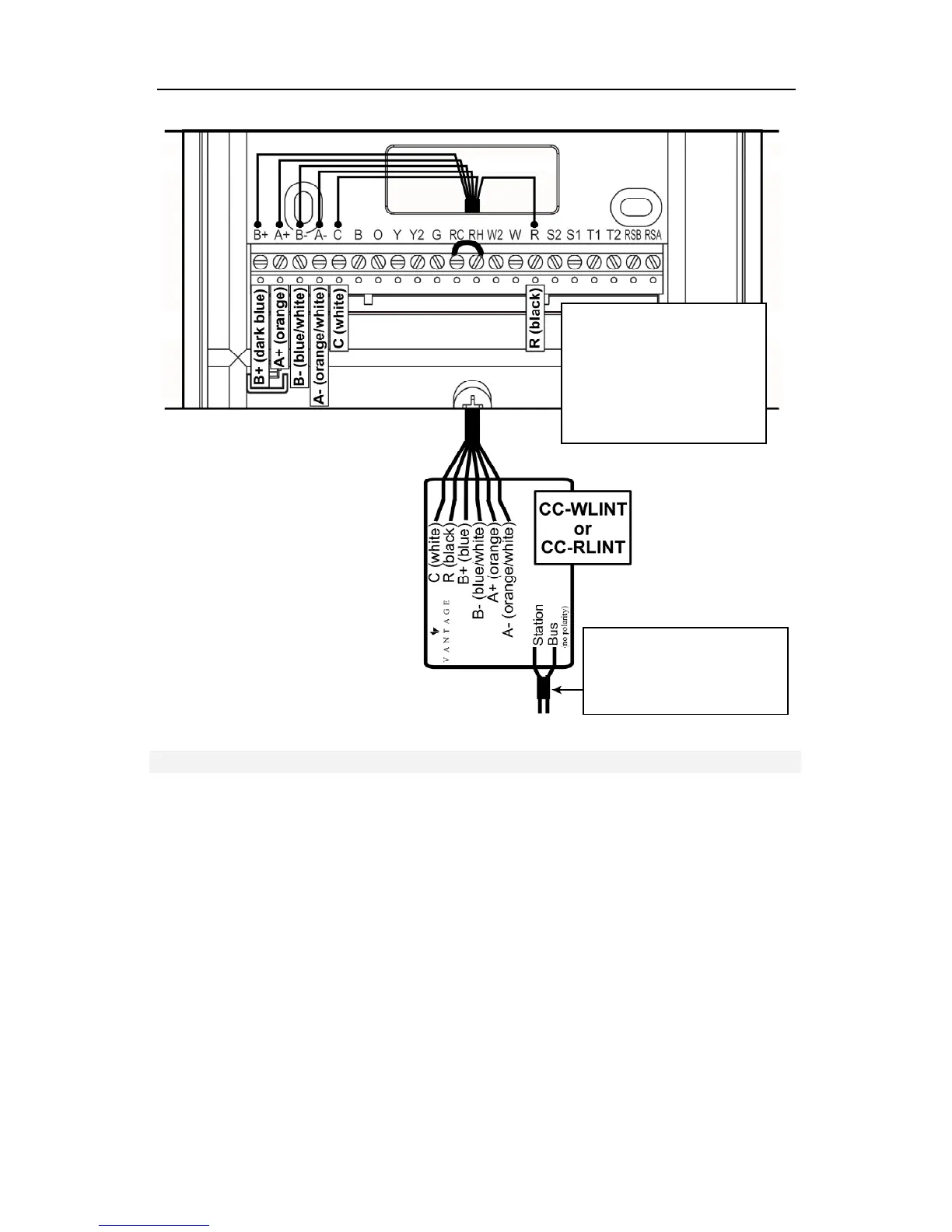
SECTION ONE - Installation CC-STAT
©Vantage, 41184 / IS-1308191-A page 10 of 23
Note: If model CC-RLINT
this side is the antenna; do
not cut, strip, or bend
antenna
The R terminal must be
powered from an external
24VAC source or by
jumping power from RC or
RH to R. The R terminal
must only have power
from a single source.
Wiring to CC-WLINT or CC-RLINT For HVAC or Humidity Control
Design Center Integration Overview
Thermostat Setup with InFusion
In Area View select the floor and room for the thermostat. Click on Vantage Objects in the Object
Explorer and expand Stations, WireLink or Stations, RadioLink and double click on the thermostat
station to add it to the room. In the Object Editor name the station and make sure it is on the
correct station bus. At the bottom of the Object Explorer Check boxes are provided for external
sensors, etc.
Globally Display Outdoor Sensor
In Design Center, click on Settings | Project Preferences | Thermostat and the Global Sensor drop
down list. Select the thermostat that has the external sensor. This will broadcast the value of the
external sensor to all thermostats connected to the Vantage System, as long as they do not
already have an outdoor sensor directly connected. If no thermostat is selected only the
thermostats with an outdoor sensor connected will display the outdoor temperature. Remember
to enable the outdoor sensor in the Installer Setup Menu on the thermostat’s local interface.
Network Override
Network Override uses boolean logic – set to True or False. Compare this new command to
previous thermostat states of Day/Night or Occupied/Unoccupied. When the thermostat is in
Network Override, InFusion time controls, etc. are ignored – unless the command also sets the
Network Override state to False. When Network Override is disabled the last commands sent will
be executed. For example, while in Network Override the cool or heat setpoints may be changed
and the thermostat’s operation mode may be changed, when Network Override is returned to



 To Next Page