Shift
Setup
Review
Display
METERS
SPM
/100M
WATTS
i6:40
i000
I:40
30
65
Shift
Setup
Review
Display
AVG WATTS
SPM
/100M
WATTS
i6:40
63
I:40
30
65
Shift
Setup
Review
Display
CAL
SPM
CAL/HR
WATTS
i6:40
366
i320
30
65
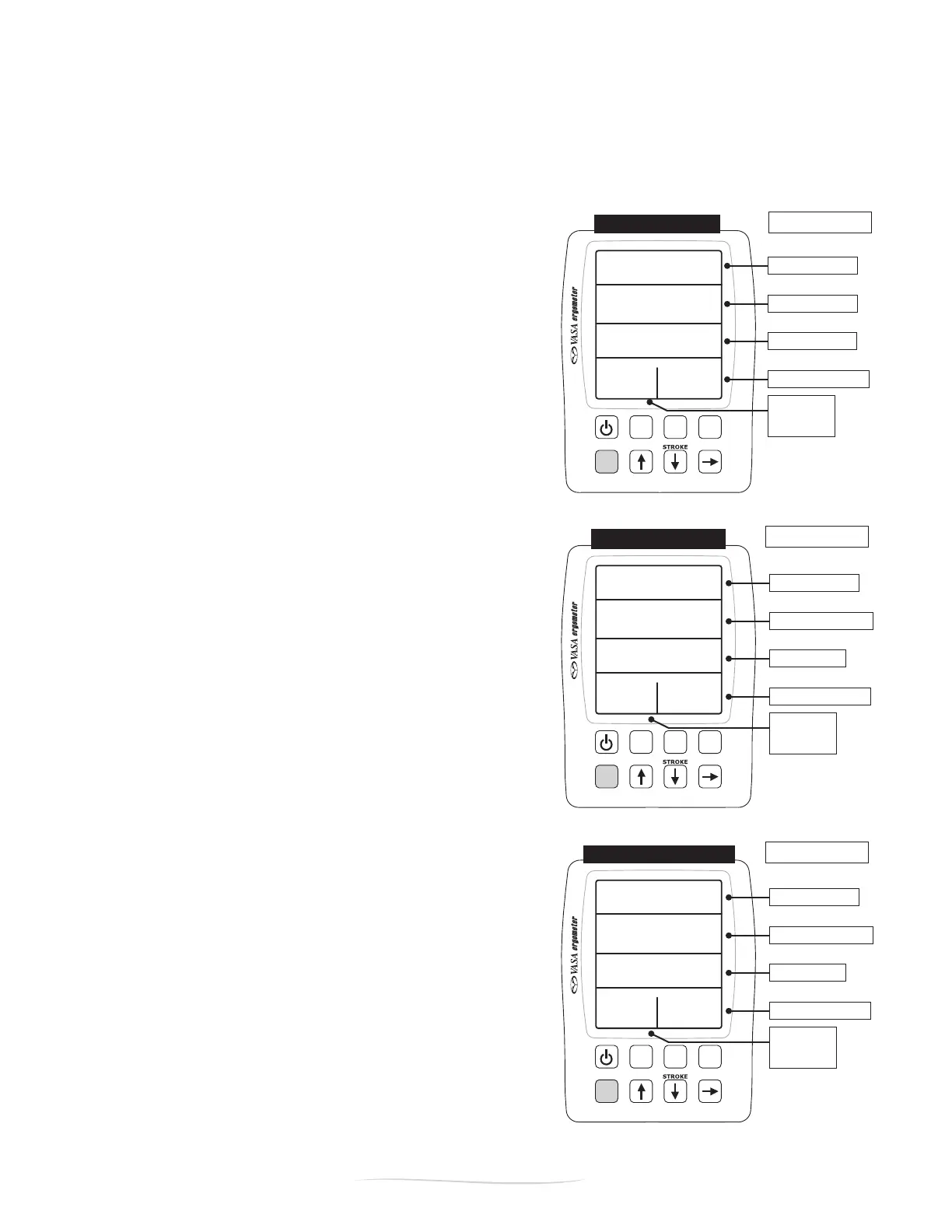
BASIC MODE > PACE
BASIC MODE > POWER
BASIC MODE > CALORIE
ELAPSED TIME
TOTAL METERS
PACE
STROKE POWER
STROKES /
MINUTE
ELAPSED TIME
AVERAGE POWER
PACE
STROKE POWER
STROKES /
MINUTE
ELAPSED TIME
TOTAL CALORIES
AVG CAL / HR
STROKE POWER
STROKES /
MINUTE
22 August 2022
Vasa SwimErg User’s Manual
Figure E
Figure F
Figure G
PART 2 - Using the SwimErg
BASIC MODE SUB-DISPLAYS (pace, power, calorie)
Note:Inallofthesub-displays,thetop,bottomleftandbottomrighteldsalwaysdisplaythesame
information.Onlythetwomiddleeldswillchangeasyoupressthe“Display”button.
BASIC MODE > PACE (Figure E)
Inthepacedisplay,theeldsareasfollows:
Top: ELAPSED TIME since start of workout
Second: TOTAL METERS since start of workout
Third: PACE per 100 METERS* for the last stroke (Swim)
Bottom Right: STROKE POWER (watts) for the last stroke
Bottom Left: STROKE RATE in strokes per minute
* IN KAYAK/SUP VIEW: the power meter will calculate PACE
/500M even though it denotes it as /100M on the screen.
BASIC MODE > POWER (Figure F)
Inthepowerdisplay,theeldsareasfollows:
Top: ELAPSED TIME since start of workout
Second: AVERAGE POWER in watts since start
Third: PACE per 100 METERS* for the last stroke
Bottom Right: STROKE POWER (watts) for the last stroke
Bottom Left: STROKE RATE in strokes per minute
* IN KAYAK/SUP VIEW: the Power Meter will calculate PACE
/500M even though it denotes it as /100M on the screen.
BASIC MODE > CALORIE (Figure G)
Inthecaloriedisplay,theeldsareasfollows:
Top: ELAPSED TIME since start of workout
Second: TOTAL CALORIES since start of workout
Third: AVG CAL / HOUR for the last stroke
Bottom Right: STROKE POWER (watts) for the last stroke
Bottom Left: STROKE RATE in strokes per minute
*For more information on meters and pace, see the end of
this section.


 To Next Page