Shift
Setup
Review
Display
00000
Shift
Setup
Review
Display
REST
0:00
Shift
Setup
Review
Display
METERS
SPM
REST
WATTS
i:22.3
i00
:30
27
68
Shift
Setup
Review
Display
METERS
SPM
/100M
WATTS
:00
i00
0:00
0
0
➋
➊
➌
26 August 2022
Vasa SwimErg User’s Manual
Figure A
SETUP
BUTTON
Setup
Review
Display
METERS
SPM
/100M
WATTS
5:48
I05
I:25
30 45
push “setup”
then use arrows
to set distance
press “display”
to set rest
interval
Display 1
DISTANCE
Display 2
REST INTERVAL
Display
METERS
SPM
/100M
WATTS
5:48
I05
I:25
30 45
after programming distance
and rest interval, press setup
to exit
Setup
Review
Display
METERS
SPM
/100M
WATTS
5:48
I05
I:25
30 45
Figure B
the monitor will stay
ready until you begin
your workout
------
once you pull on the
drive cords, it will
begin counting down
the distance
after completing the
distance, the monitor
will count down the
rest interval and display
results from recent
interval workout
Figure DFigure C
REST
INTERVAL
DISTANCE
PART 2 - Using the SwimErg
SETTING UP WORKOUT INTERVALS:
pre-set distance or time with rest interval
for interval training, race simulations and distance workouts
You can use the Power Meter to do interval training, race simulation and pre-set distance workouts.
You can pre-set a DISTANCE (in meters) or a TIME (in minutes/seconds) for your workout. For interval
training you can pre-set a REST INTERVAL between your exercise intervals. The Power Meter will count
down the distance or time and rest intervals. When the workout is complete, the Power Meter will
display the total time and distance covered. If you want to pre-set SPLITS and REVIEW each interval,
see“SettingSplitTimes”and“WorkoutReview”onpage23.
INTERVAL TRAINING:
pre-set distance with rest interval
Note: you must be in BASIC MODE to program intervals.
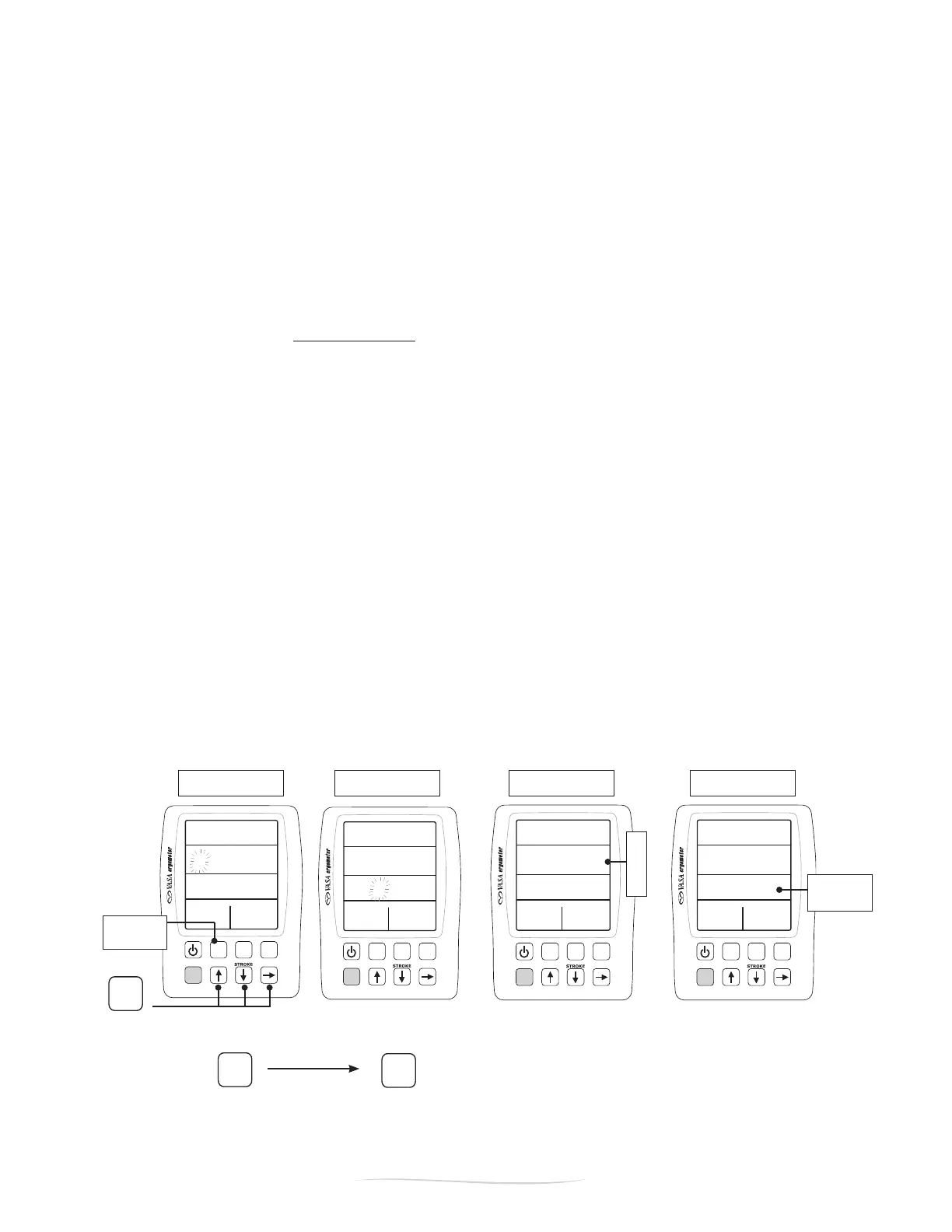
Tosetthedesireddistance,pressthe“SETUP”button.TherstdisplaywillbeDISTANCE(FigureA).
With DISTANCE in the display (Figure A), use the up
➞
down
➞
and right
➞
arrows to change the
ashingnumbertothedesireddistance.
After setting the desired distance, ➋ press“DISPLAY”tosettheRESTinterval.WithRESTinthedisplay
(Figure B), use the arrows to set the desired rest time. Once you have set the desired workout, ➌ press
“SETUP”toexit.
As soon as you pull on the drive cords the monitor will start counting down the distance (Figure C).
Whentherstdistanceintervaliscompleted,themonitorwillcountdowntherestinterval(FigureD).
When the rest interval is complete, the monitor will stay ready for the next distance interval (Figure C).
Whenyouhavecompletedyourworkout,youcanreviewallintervalsbypressing“REVIEW”(see
“WorkoutReview”onp.23).Presstheup/downarrowstoseethenextinterval.
NOTE:Topre-setsplitsforyourintervalworkout,see“SettingSplitTimes/Distances”onp.23.


 To Next Page