Shift
Setup
Review
Display
METERS
SPM
/100M
WATTS
5:00
0000
0:00
0 0
Shift
Setup
Review
Display
0:00:00
Shift
Setup
Review
Display
REST
0:00
Shift
Setup
Review
Display
METERS
SPM
REST
WATTS
5:00
409
I:00
30
65
➋
➊
➌
27
Vasa SwimErg User’s Manual
August 2022
Figure A
SETUP BUTTON
Setup
Review
Display
METERS
SPM
/100M
WATTS
5:48
I05
I:25
30 45
push “setup” then
“display” until time
appears in top eld
then use arrows to
set numbers
press “display” to
set rest interval
Display 3
TIME
Display 4
REST INTERVAL
Display
METERS
SPM
/100M
WATTS
5:48
I05
I:25
30 45
Setup
Review
Display
METERS
SPM
/100M
WATTS
5:48
I05
I:25
30 45
Figure B Figure C Figure D
after programming time and rest
interval, press setup to exit
the monitor will stay
ready until you begin
your workout
------
once you pull on the
drive cords, it will
begin counting down
the time
after completing the
time interval, the
monitor will count down
the rest interval
PART 2 - Using the SwimErg
INTERVAL TRAINING:
pre-set time with rest interval
Note: you must be in BASIC MODE to program intervals.
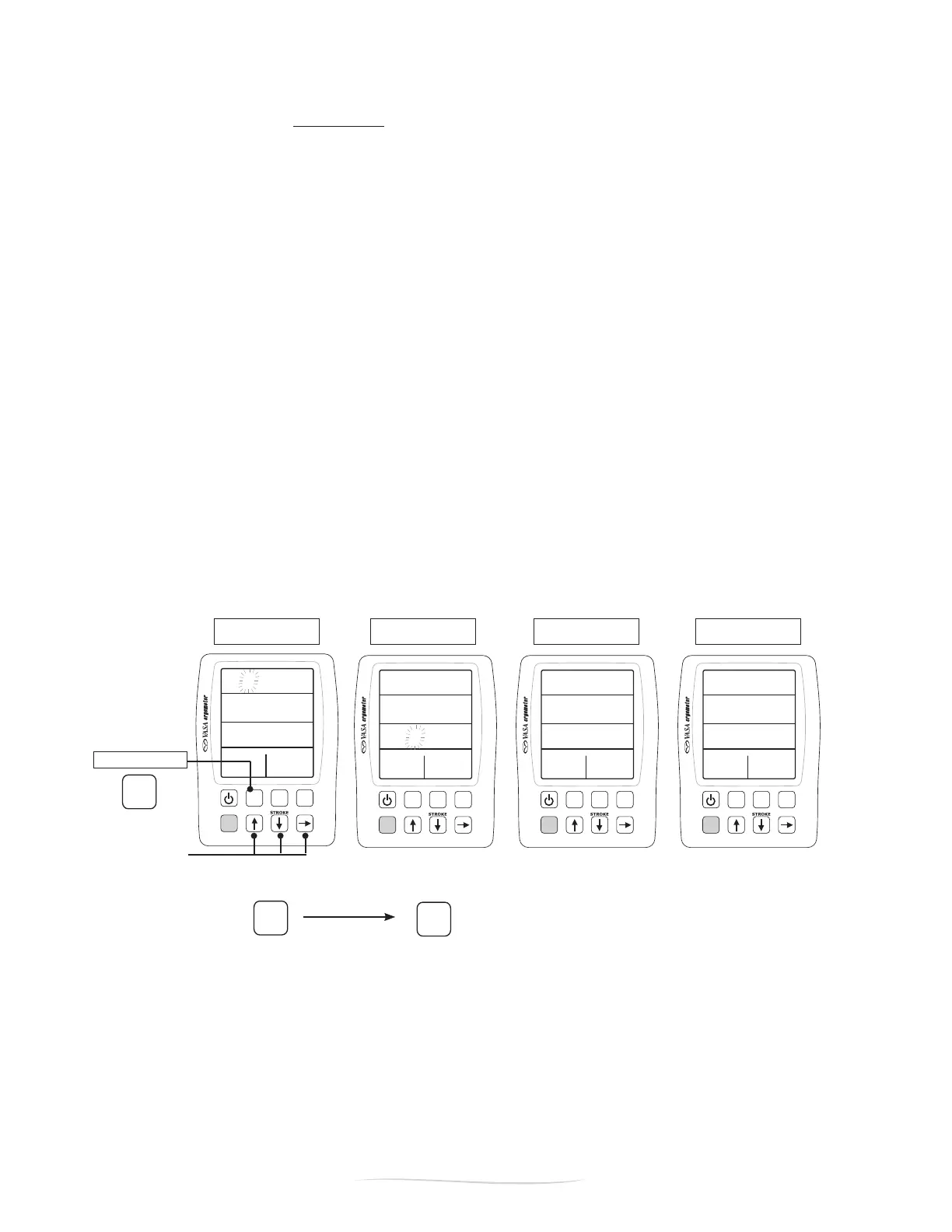
➊Tosetthedesiredtime,pressthe“SETUP”button,thenpress“DISPLAY”(twice)untiltimeisdisplayed
inthetopeld(FigureA).Usethearrowstochangetheashingnumbertothedesiredtime.
After setting the desired time, ➋ press“DISPLAY”(once)tosettheRESTinterval.WithRESTinthe
display (Figure B), use the arrows to set the desired rest interval. Once you have set the desired
workout, ➌ press“SETUP”toexit.
As soon as you pull on the drive cords the monitor will start counting down the time (Figure C). When
therstintervaliscompleted,themonitorwillcountdowntherestinterval(FigureD).Whentherest
interval is complete, the monitor will stay ready for the next time interval (Figure C).
Whenyouhavecompletedyourworkout,youcanreviewallintervalsbypressing“REVIEW”(see
“WorkoutReview”onp.23).Presstheup/downarrowstoseethenextinterval.
NOTE:Topre-setsplitsforyourintervalworkout,see“SettingSplitTimes/Distances”onp.23.


 To Next Page