Shift
Setup
Review
Display
METERS
50
SPL
Shift
Setup
Review
Display
0:30
SPL
Shift
Setup
Review
Display
METERS
/100M
52.0
25
I
2.28
Shift
Setup
Review
Display
METERS
SPM
/100M
2:06.5
i 00
29
2:06
➋➊
Shift
Setup
Review
Display
METERS
/100M
i:i7.0
50
2
i:40
Shift
Setup
Review
Display
METERS
/100M
i:4i.5
75
3
i:38
Shift
Setup
Review
Display
METERS
/100M
2:06.5
i00
4
i:40
28 August 2022
Vasa SwimErg User’s Manual
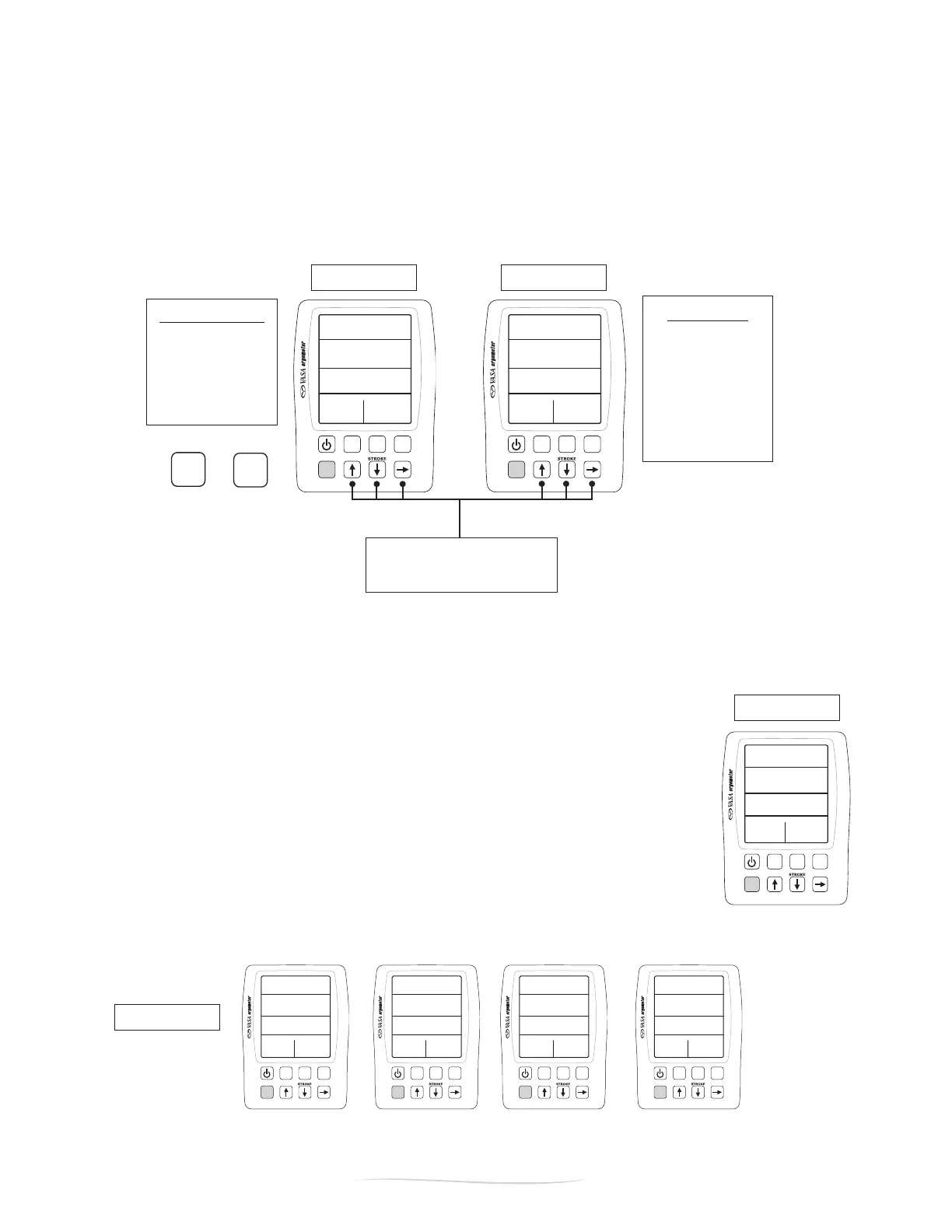
Figure C
Figure A
Figure D
Split Distances:
25M
50M (default)
100M
200M
1000M
Split Times:
:30 sec (default)
1:00 min
2:00 min
3:00 min
4:00 min
5:00 min
10:00 min
DISTANCE TIME
use arrows to set desired splits
press “display” to toggle between
distance and time splits
Figure B
Setup
Review
Display
METERS
SPM
/100M
WATTS
5:48
I05
I:25
30 45
push “setup” then
“review” to change
defaults
Review
Display
METERS
SPM
/100M
WATTS
5:48
I05
I:25
30 45
Example of a 100M
workout with 25M
splits.
Split #1 Split #2 Split #3 Split #4
PART 2 - Using the SwimErg
SETTING SPLIT TIMES / DISTANCES
Default split times are pre-set at 50 meters and 30 seconds. If want to change the defaults, press
“SETUP”then“REVIEW”.Thedistancesplitintervalisshownrst(FigureA).Press“DISPLAY”toshow
the time split interval (Figure B). Use the arrow buttons to select a different split interval.
NOTE: The split times will reset back to the defaults when the Power Meter is turned off.
WORKOUT REVIEW
The Power Meter contains a workout review feature that will store up to 20 splits +/or intervals. After
you complete your workout, the Power Meter will display (Figure C) your TIME, DISTANCE, AVERAGE
PACE* and STROKES / MINUTE for the most recent interval.
* Pace is dependent on which view (Swim vs. KAYAK/SUP) you are in. Swim
view will display pace /100M while KAYAK/SUP view will display pace /500M
Toreviewtheinformationforeachsplit,pressthe“REVIEW”button.Toreview
next split, press the UP and DOWN arrows. The split information shown is (Figure
D):
Top: TIME of the interval
Second: distance of the interval
Third: average pace / 100m (or /500M) for the interval
Bottom Left: INTERVAL number
Note: After 5 minutes of inactivity, the monitor will auto shut off and clear your workout data.


 To Next Page