OPERATING
OPTIONS
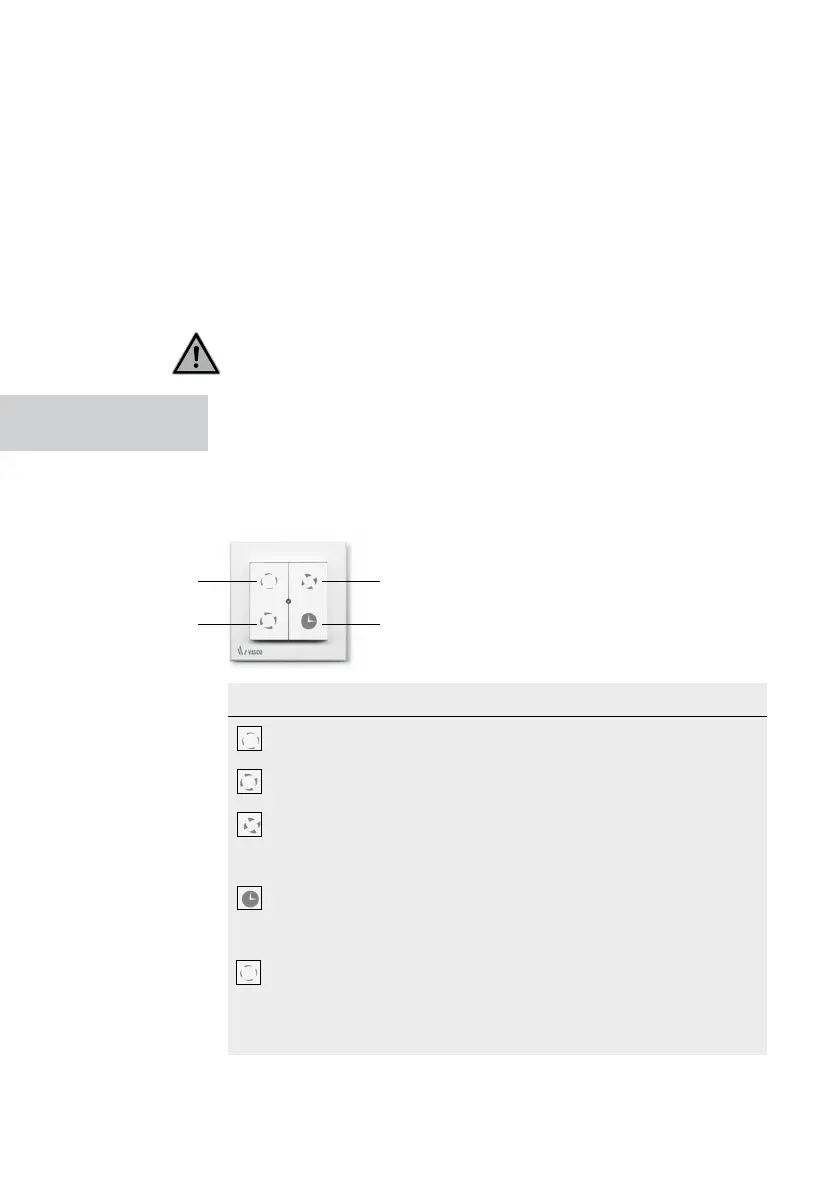
position 1
position 2
position 3
timer function
5. An automatic frost protection system allows the ventilation unit to
operate frost-free to ensure proper ventilation during the winter period
6. The ventilation unit can be operated in several ways:
- In 3 positions using different wireless or mechanical switches;
- Demand-controlled via sensors in the RF switches;
- Stepless adjustment, which corresponds to a zero to ten volt
control that allows the ventilation unit to be controlled by a home
automation system or other building management system.
It is not permitted to connect a cooker hood with a motor or a dryer
to the ventilation unit.
RF SWITCH
The ventilation unit can only be operated by a connected switch. More
instructions on how to link the switch can be found in the installation
manual page 16. The ventilation unit is standardly provided with a linked
RF switch with LED indication.
Key Description
1x press Device runs in position 1 (low)
Vasco recommends using this mode during absences.
1x press Device rotates in position 2 (center)
This is the default position during attendance.
1x press Device turns in position 3 (high)
This is the recommended setting when showering and
bathing. Can also be used with increased ventilation
needs (visitors, family party, etc.).
1x press Device runs for 30 minutes in position 3
After this period, the device switches back to the
previous mode. Premature termination can be done
by pressing a booth.
Press for 3 sec Appliance turns in automatic mode
If you combine the ventilation unit with a CO2 RF switch,
a RH RF switch or a home automation system
(0-10V control) the ventilation unit returns to automatic
mode.
An LED is provided in the center of the switch that lights up green 1x when
the requested position is correctly communicated.
OPERATING OPTIONS 03



 To Next Page