Home
Vatech
Medical Equipment
EzSensor Classic
Page 20
Vatech EzSensor Classic - Page 20
69 pages
Manual
Save Page as PDF
To Next Page
To Next Page
To Previous Page
To Previous Page
Loading...
17
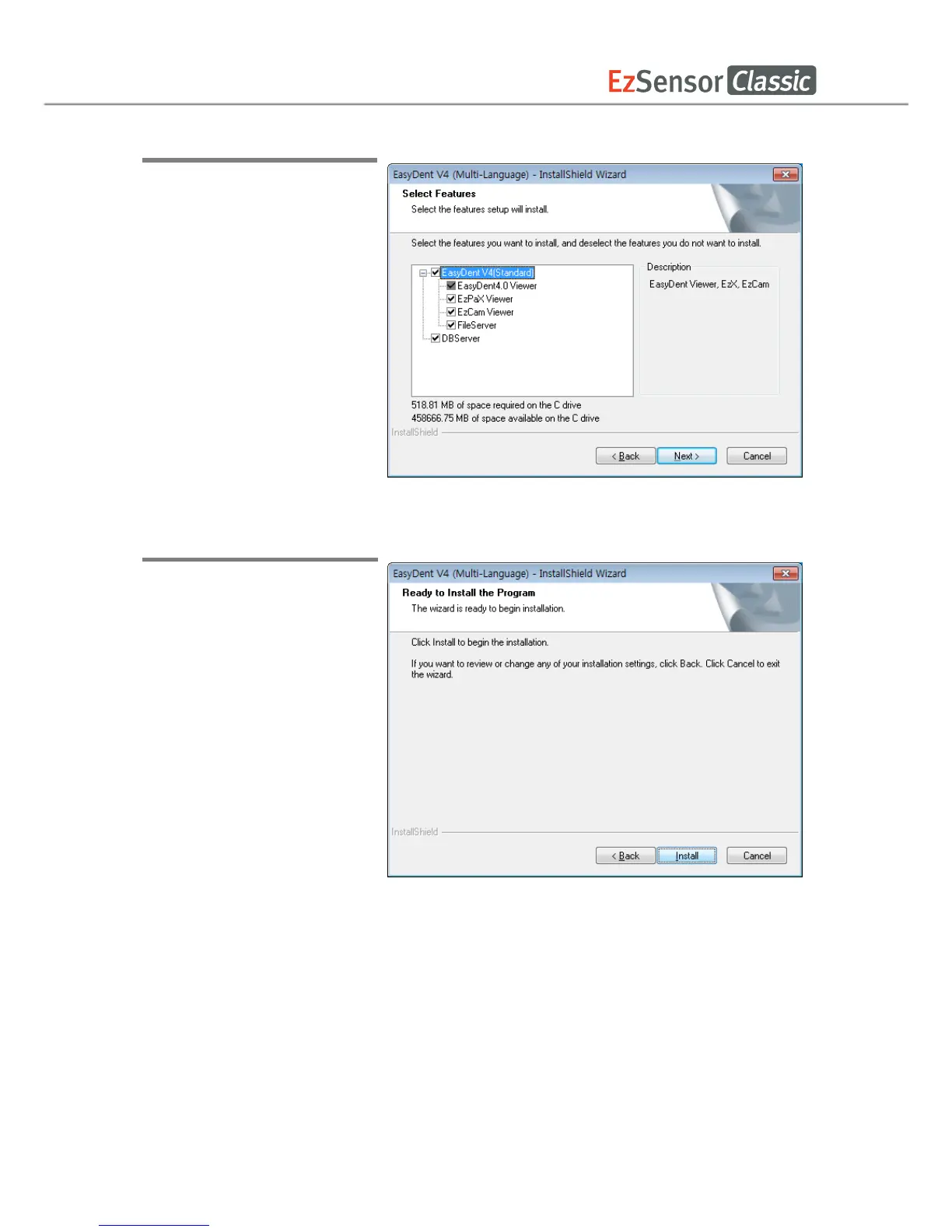
Step 5
Select the features that
you
want to install. Cli
ck the ‘Next’
button.
EasyDent
V
iew
er is the
minimum requiremen
t for
EzSensor Classic
use
.
Step 6
Now you are ready to ins
tall.
If you woul
d like to review any
of your installation settin
gs,
click ‘Back’.
T
o proceed
with
the installation, clic
k ‘Install’.
Click ‘Cancel’
to exit the
wizard.
19
21
Table of Contents
Main Page
Default Chapter
2
Table of Contents
2
Chapter 1 Introduction
4
Notice
4
Conventions and Symbols
4
Safety Instructions
6
Disposing of the Product
8
Chapter 2 System Overview
9
System Description
9
Product Components
11
Chapter 3 Installation
12
PC Specifications
12
Installation of Software Driver
13
Ezsensor Classic(IOS-U20VB, IOS-U15VB, IOS-U10Vb)Driver Setup
13
Cable Connection & Driver Installation
15
Installation of the Ezsensor Classic Holder
17
Chapter 4 Image Acquisition by Using Easydent
18
Installation of Easydent
18
Image Acquisition Overview
23
Running the Easydent
24
Patient Registration and Device Selection
24
Single Shot
26
Multi Shot
30
Sequence Shot
34
Chapter 5 Image Acquisition by Using Ezdent-I
37
Installation Ezdent-I
37
License Activation
43
Consult DB License Activation
46
Preparing for Image Acquisition
49
Running the Ezdent- I
50
Patient Registration
50
Acquiring Image
51
Image View
54
Chapter 6 Maintenance
55
Visual Inspection
55
Periodic Maintenance
55
Test List
56
Connection
56
Cable
57
Resolution
57
Care and Cleaning
58
Precautions
58
Product Complaint
59
Appendix
60
X-Ray Exposure Guide
60
Error Message
62
Troubleshooting
64
Electromagnetic Compatibility Information
65
Related product manuals
Vatech EzSensor
58 pages
Vatech EzSensor HD
74 pages
Vatech EzRay Air Wall
85 pages
EzRay Air Portable VEX-P300
104 pages
Vatech A9
196 pages
Vatech PAX-I
137 pages
Vatech PaX-i3D
167 pages
Vatech Green 16
162 pages
Vatech PHT-30CSS
196 pages
Vatech PaX-Primo
98 pages
Vatech GREEN SMART
200 pages
Vatech Pax-i PCH-2500
200 pages














 To Next Page