PaX-i3D Green (PHT-60CFO) User Manual
38
3 PaX-i3D Green Imaging System Overview
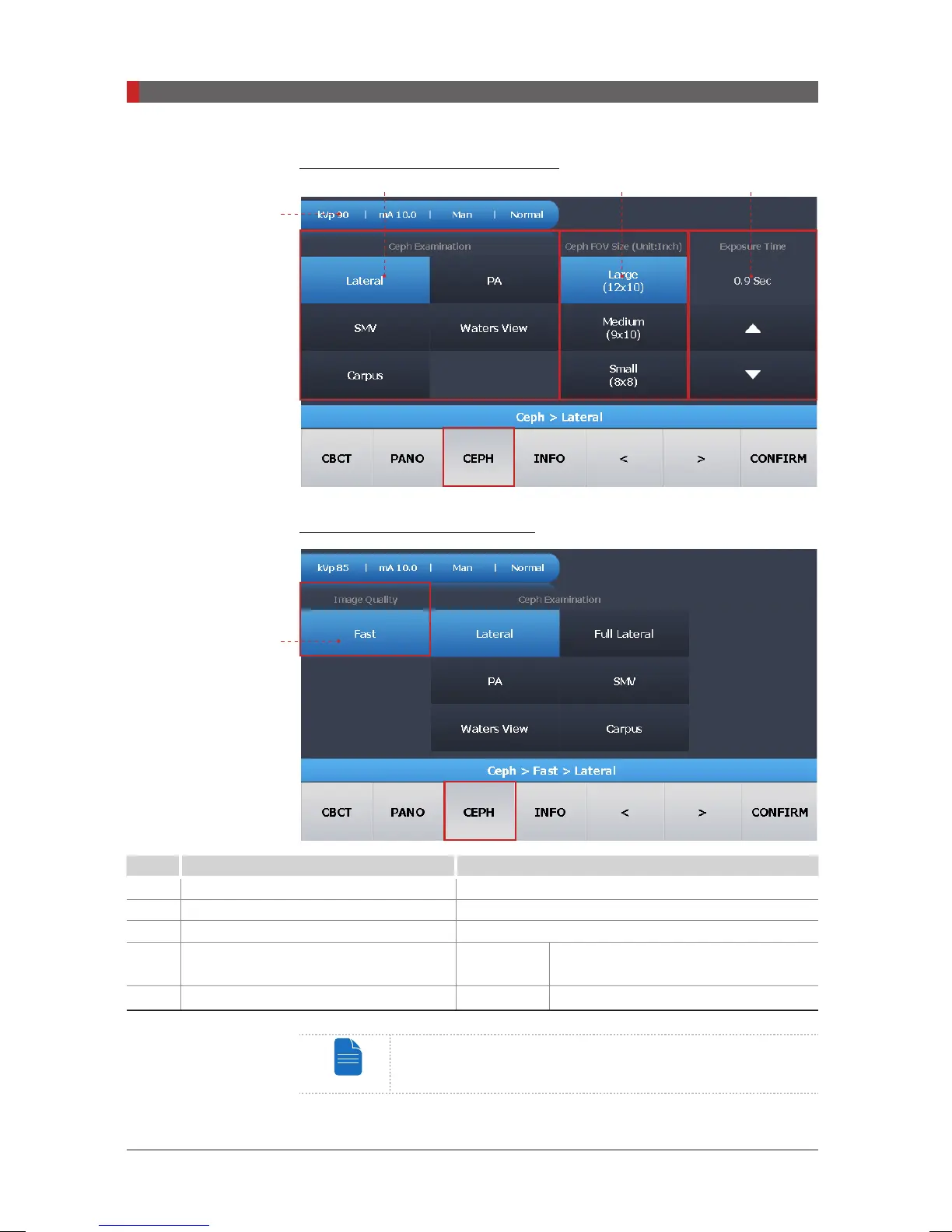
CEPH: OP Model (Oneshot type)
CEPH: SC Model (Scan Type)
No. Function Description
1
Imaging parameter settings information _
2
CEPH Examination _
3
CEPH FOV Size (inches) _
4
Exposure Time Adjustment
Oneshot
type
Enable the user to adjust the exposure
time with the UP and DOWN buttons.
5
Image Quality Fast Fast Scan
Exposure time can be adjusted by resolution of 0.1 s in the
range of 0.5 s to 1.2 s (One shot type only).
5
1
2 3 4
[PI3DG_130U_44A_en]User Guide.indd 38 2016-05-24 오후 4:18:33













 To Next Page