K5/K5N Vacuum Packaging Machine
Operation
2002-04-25 Art. no. 519.340 Page 27/56
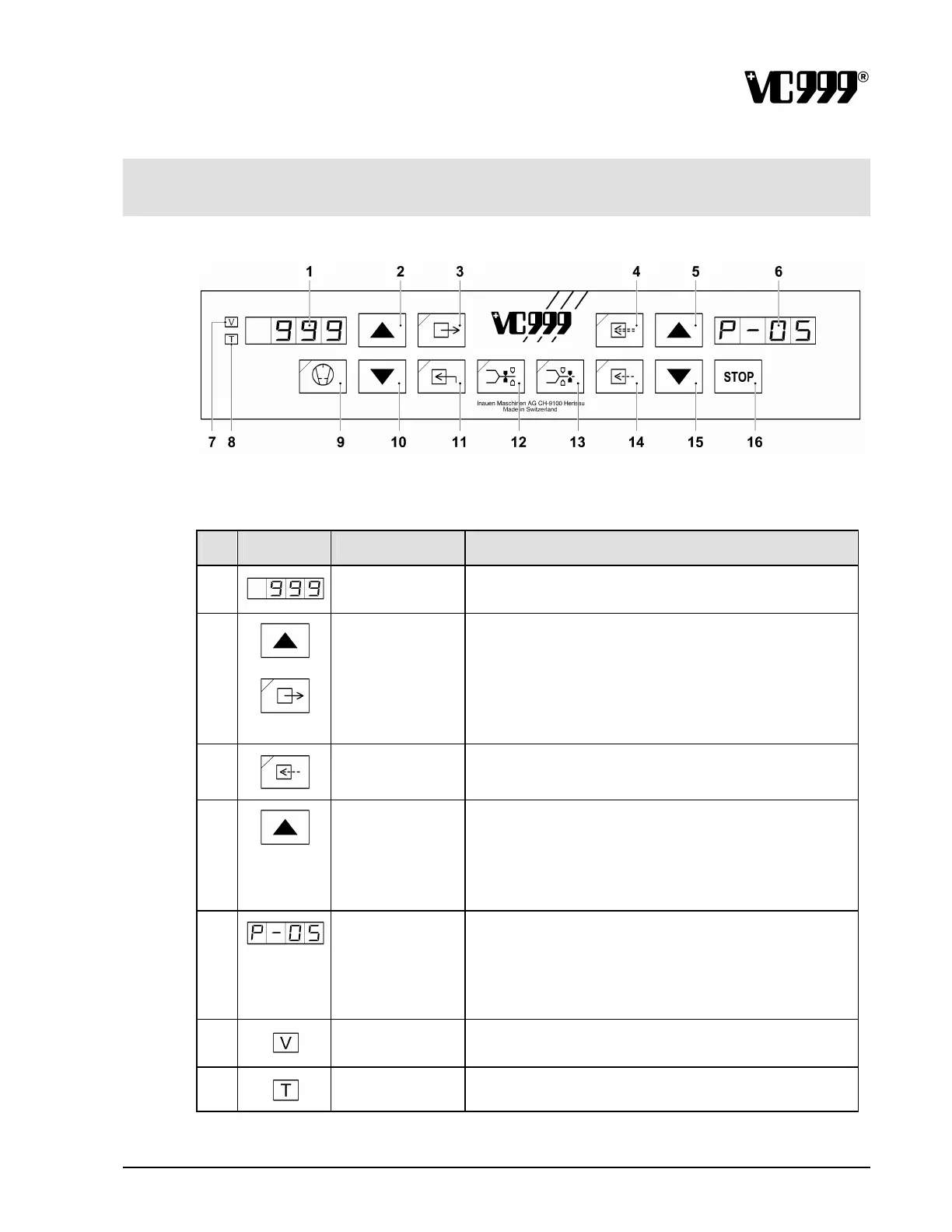
9.4 Controls
9.4.1 Control panel
Fig. 9/7
Controls
No.
Symbol Name Function
1
LED display 1
Displays the set value or the setting.
2
UP arrow button Raises the value shown on LED display 1 or changes to
other possible settings.
3
Vacuum The possible settings for the vacuum are called up in
succession.
If you press this button during programming, this leads to
the next parameter.
4
Preventilate
(Soft air)
The setpoint value input may be between 400 and 999.
999 means “no preventilation (Soft air)”.
5
UP arrow button Packaging program:
Select the requested program number, ascending.
Service program:
Select parameter levels S-01, S-02, S -03 ..... in ascending
order. The parameter levels are displayed on LED display
2.
6
LED display 2 Packaging program:
Displays the number of the selected program.
Service program:
Displays the selected parameter level, S-01, S-02 etc. The
meanings of each of the levels are described in the
section on the “Service program”.
7
Vacuum display The setting depends on the pressure. (‰)
8
Time display
The setting depends on the time. (sec.)



 To Next Page