ENGLISH
4948
BIKETPC
SET
BIKETPC
SET
ALTI
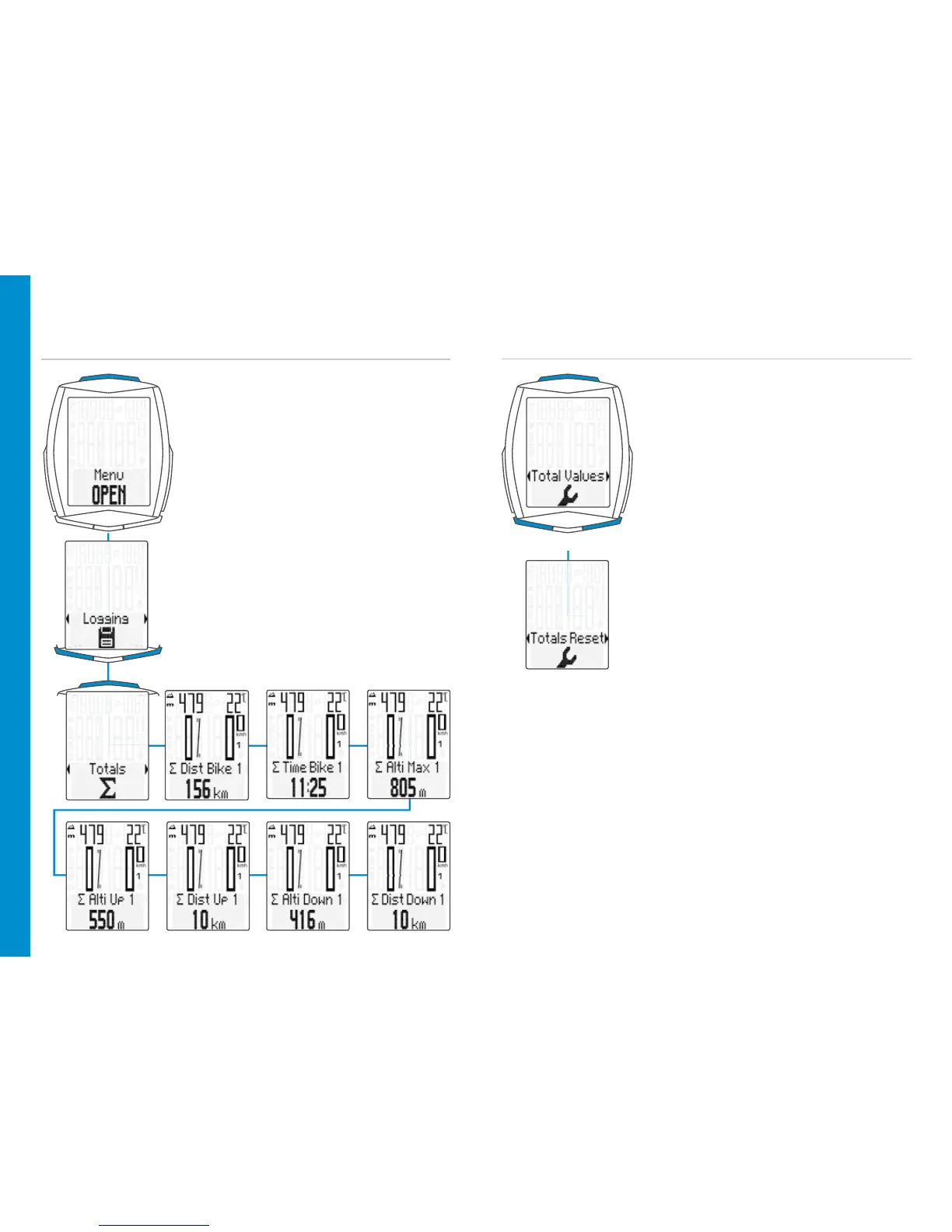
Accessing the total values with the
heart rate/cadence option activated
– Open the menu:
Press and hold the SET button until
the menu opens
– Scroll from Logging to Totals:
Press the BIKE or TPC button
– Open the total values:
Press the SET button
– Scroll through the total values:
Press the BIKE or TPC button
– Close the total values/back to the
function menu:
Press and hold the SET button
Resetting all total data
E.g. at the start of the next season.
– Open the menu:
Press and hold the SET button until
the menu opens
– Scroll from Logging to Settings:
Press the BIKE or TPC button
– Open the settings menu:
Press the SET button
– Scroll to the total values:
Press the BIKE or TPC button
– Open the settings:
Press the SET button
– Scroll to Totals Reset:
Press the BIKE or TPC button
– Open Totals Reset:
Press the SET button
– Selection:
Press the BIKE or TPC button
– Confirm the selection:
Press the SET button
– Close the settings menu/back to the
function menu: press and hold the
SET button
ATTENTION: The reset procedure cannot be undone.












 To Next Page