Issue 08/2023 © Continental Automotive 91
2.4 Summary of menu functions
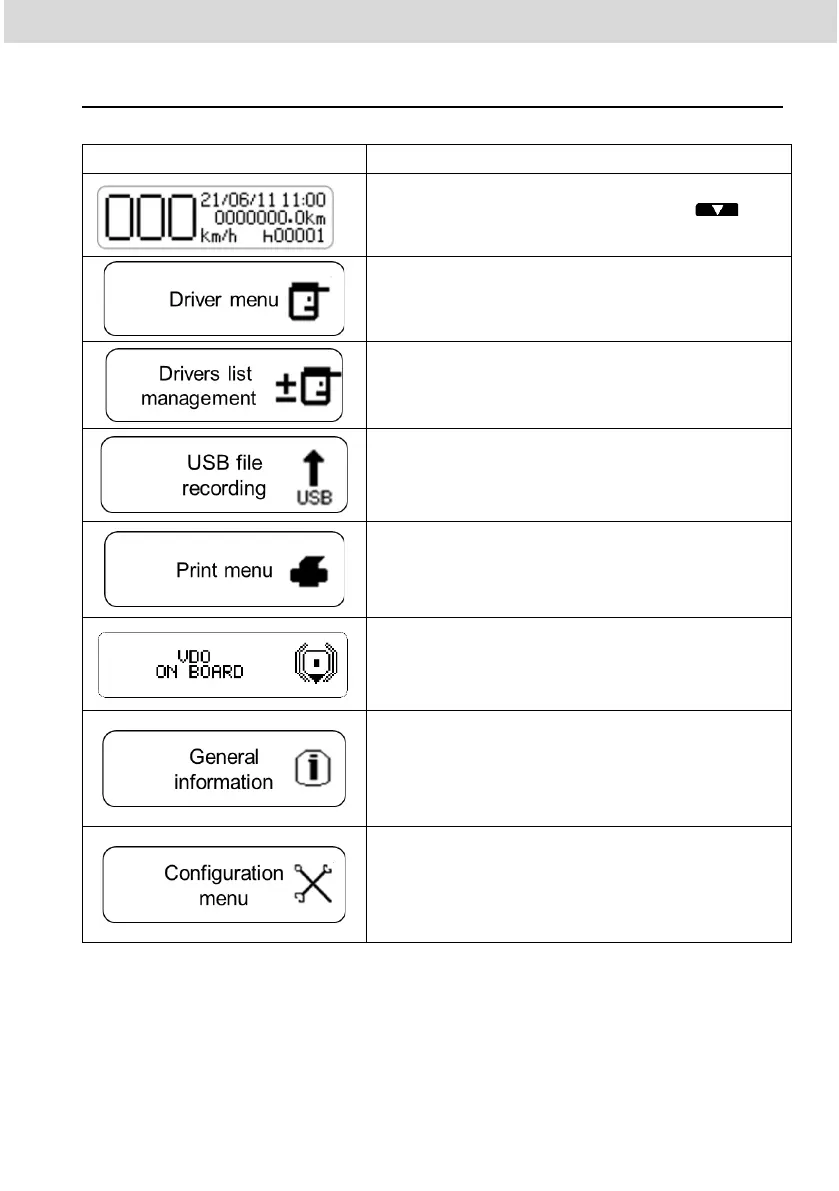
Main screen.
In this screen by pressing the the
following screens will be shown.
Access to functions such as registering a new
driver code, changing driver position, driver
login and logout.
Access to the function for registering and
removing driver code, with the respective
driver licenses
Access to the data recording on the USB stick
from the last 24 hours, the last 7 days, the last
30 days, all files in the memory, since the last
collection, and the specific date of an upload..
Access to the print function, where you can
print the running data of the last 24 hours of
the vehicle and/or a specific date.
Access to functions linked to the telematics
device. It will be displayed only when a
telematic module VDO On Board is connected
to BVDR.
Access to information such as: active errors,
last 10 errors, vehicle information, driver
information, second driver information,
speeding records, over speeding set up,
tachograph label information.
Access to information such as: enable/disable
second driver connection, enable/disable
activity selection, clock setting, daylight saving
time adjustment, time zone adjustment, and
language selection.



 To Next Page