DLKPro Inspection Key • Operating Instructions – Edition 03/2012 17
6 The screen – the first data check
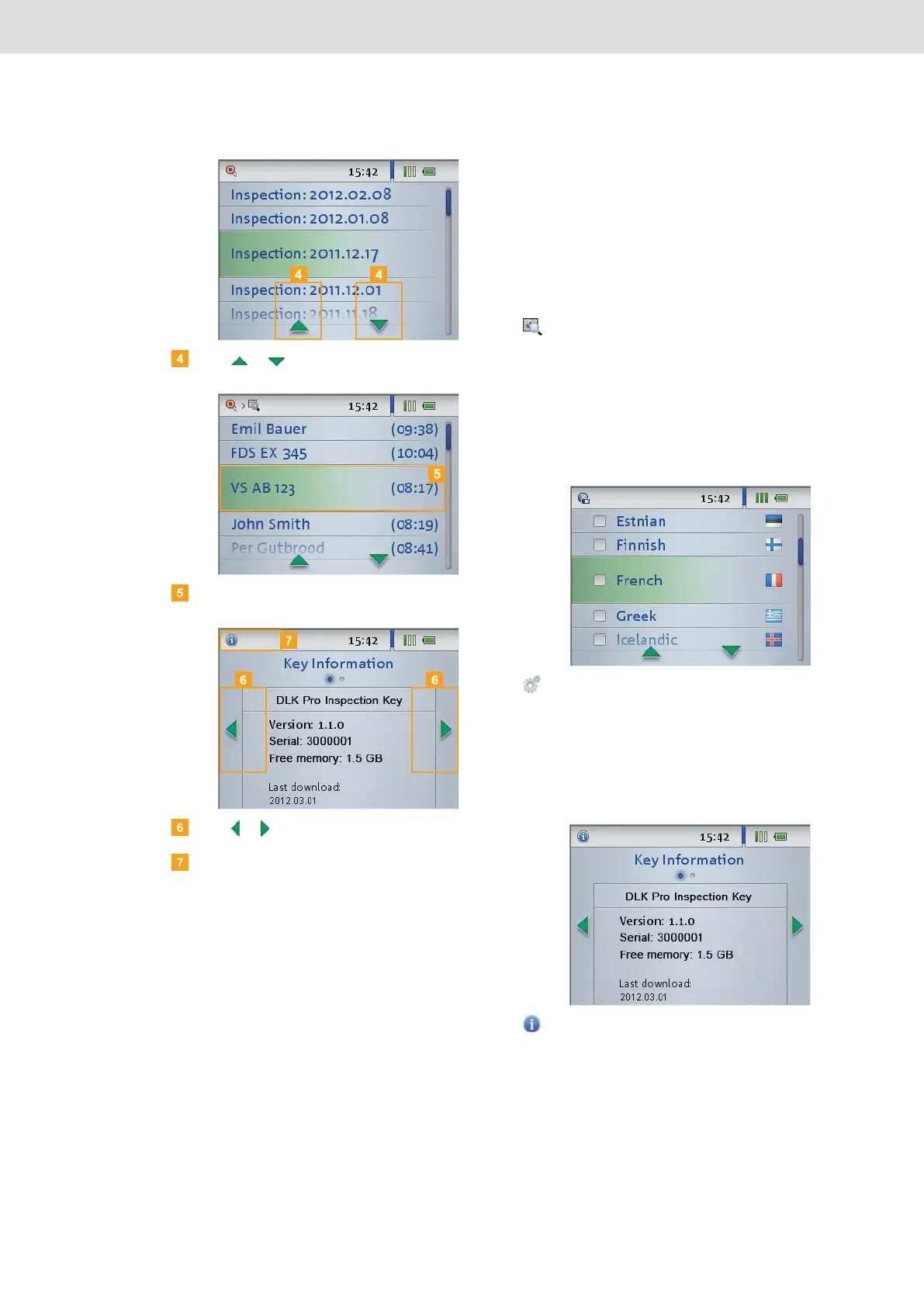
Press or to select an item from a list.
Confirm your selection with your finger.
Press or to scroll.
Press the navigation bar to return to the higher level
menu.
The menu
You can select one of the following menus:
• Viewer
• Settings
• Info
• Infringements
The Viewer menu shows you information about the
mass memory and driver card files stored on the
DLKPro.
You can check
• when the DLKPro was last used to download
data from a specific vehicle or driver card.
• when the next download of a specific vehicle or
driver (card) is due.
Use the Settings menu to select
• the screen dialogue language.
• the tolerance values to be used for the quick
check and the infringement (breach) analysis.
Any changes are applied immediately and the new
settings will be valid each time you switch on the
device.
The Info menu provides the following information:
• DLKPro version used
• Firmware version
• Serial number
• Free memory capacity on the DOWNLOADKEY
partition that is available for further downloads


 To Next Page