DLKPro Inspection Key • Operating Instructions – Edition 03/2012 2
Content
Content
1 General information .............................................3
2 DLKPro Inspection Key .......................................5
Package contents .................................................5
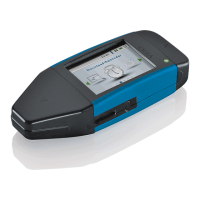
Product overview ..................................................5
3 Getting started with the DLKPro .........................6
Synchronising the clock and
downloading data for the first time ........................6
Switching on the DLKPro ......................................7
Switching off the DLKPro ......................................7
Charging the battery ..............................................7
Creating a backup copy on the SDHC™ card .......8
4 Performing a (roadside) inspection .....................9
5 Downloading data ..............................................12
Downloading mass memory and driver cards ......13
Downloading a driver card
with the DTCO 1381, Rel. 1.4 and later releases .14
Downloading a driver card
using the integrated chip card reader ..................15
6 The screen – the first data check ......................16
The screen elements ...........................................16
Screen navigation ................................................16
The menu ............................................................17
Selecting the tolerance profile ..............................18
Displaying possible infringements
(driver card data) .................................................19
Displaying suspicious events
(mass memory data) ............................................19
The icons and what they mean ............................20
7 Connecting to the computer..............................23
8 “DownloadTools” PC programme.....................26
Displaying, checking and
printing suspicious events ...................................28
Configuring the DLKPro
and the infringement analysis ..............................32
Getting support ...................................................37
9 Technical specifications.................................... 41
System requirements .......................................... 41
File extensions .................................................... 41
UTC time ............................................................ 41
Cleaning and maintenance ................................. 42
Reset function .................................................... 42
Disposal ............................................................. 42
Declaration of Conformity ................................... 42
Technical data .................................................... 43


 To Next Page