DLKPro Inspection Key • Operating Instructions – Edition 03/2012 26
8 “DownloadTools” PC programme
8 “DownloadTools”
PC programme
The “DownloadTools” PC programme stored on your DLKPro lets you
• perform a detailed check of infringements or suspicious events detected during a driver or vehicle check.
• create and print infringement reports,
• archive, copy, move and delete download files,
• specify tolerance values for the driver or vehicle check.
• configure the download,
• perform any support tasks via the software.
Please remember: The PC programme can only be started from the DLKPro.
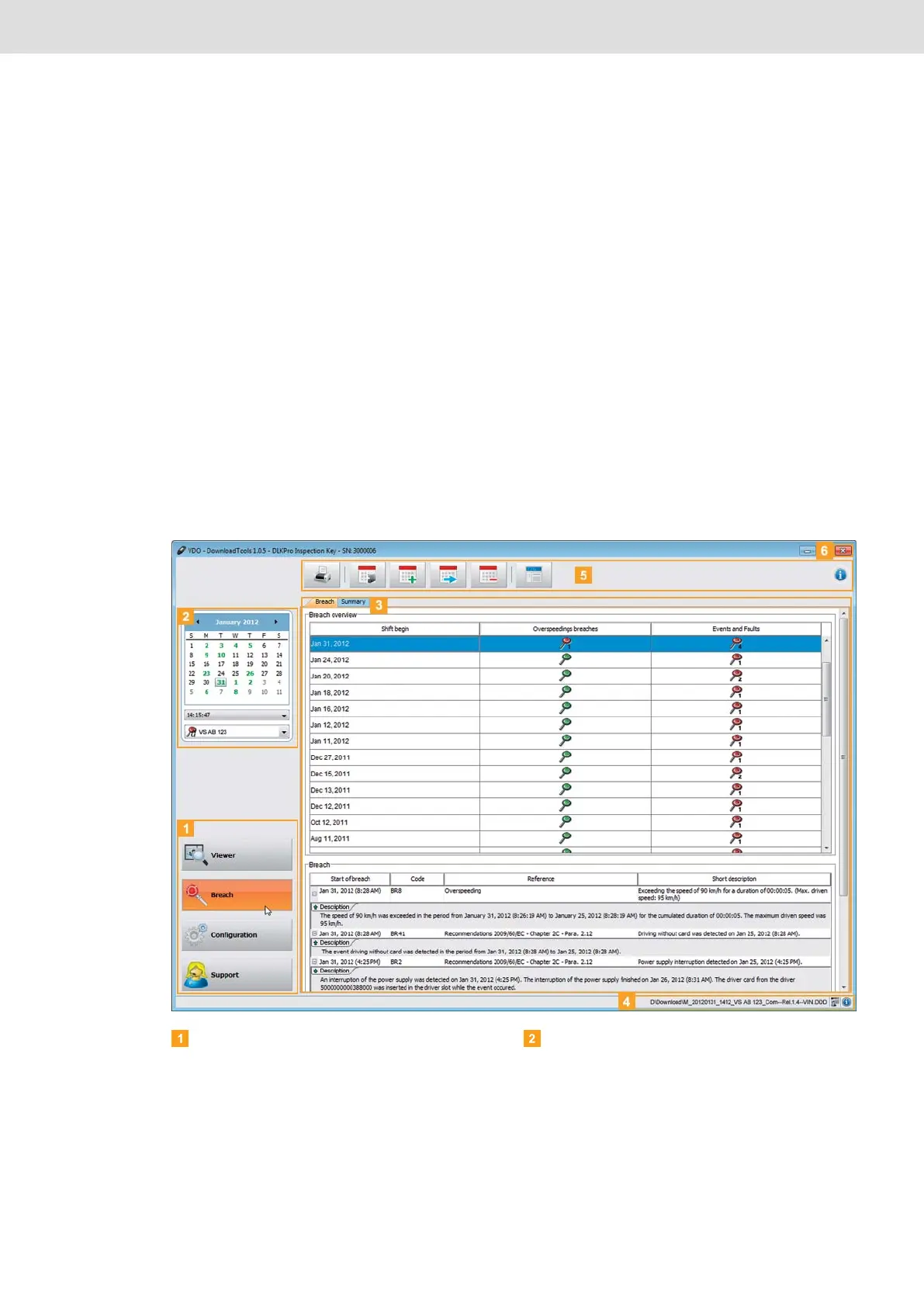
Module buttons
You can start the following modules using the
module buttons:
• Breach,
• Configuration and
• Support.
The button for the currently enabled module is
highlighted.
Overview pane
In this pane (if you are in the Breach module), you
can select a date from the calendar on which vehicle
and/or driver card data was downloaded.
If several downloads were carried out on a particular
day, the area below the calendar shows
• the times on which data was downloaded and
then
• the associated vehicle and driver card files.
For more information please refer to page 28.


 To Next Page