DLKPro Inspection Key • Operating Instructions – Edition 03/2012 24
7 Connecting to the computer
First-time connection to a computer
(without Autostarter)
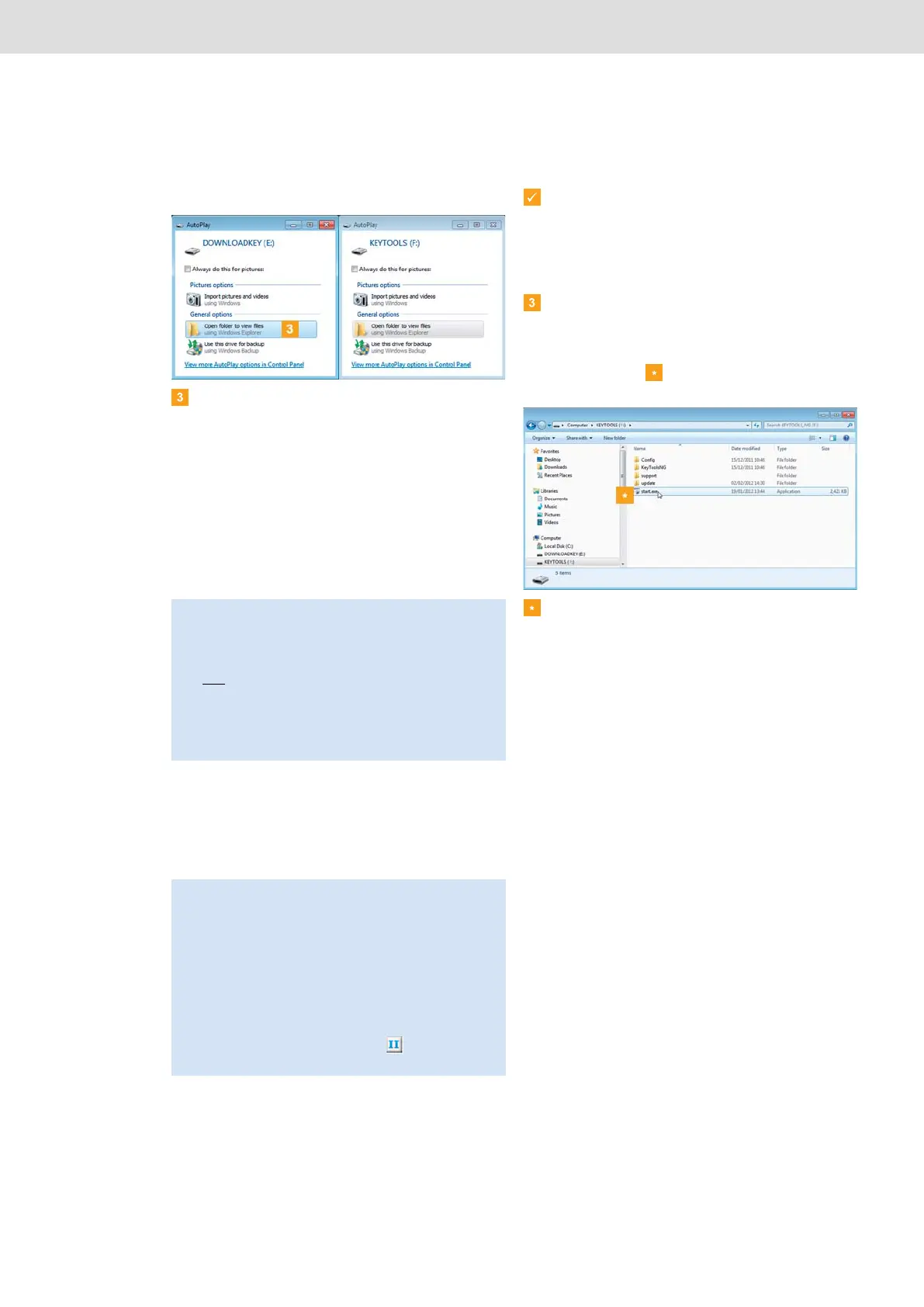
The operating system opens two dialogue boxes.
Here you can choose the programme to be used for
displaying the contents of the drive. If an SDHC™
card is inserted, three dialogue boxes will be
displayed.
• In all three dialogue boxes, choose Open folder
to view files (Windows
®
Explorer) under General
options.
Windows
®
Explorer opens and displays the
contents of the KEYTOOLS, DOWNLOADKEY
and SDHC™ card drives (if available).
• Double-click on “start.exe” to start the
PC programme.
The startup screen of the “DownloadTools”
PC programme appears.
Connecting to the same computer again
Prerequisite:
• The Autostarter must be installed on your
computer.
• The DLKPro must be connected to the
computer.
Windows
®
Explorer opens and displays the
contents of the KEYTOOLS and DOWNLOADKEY
drives.
The Autostarter starts the “DownloadTools”
PC programme.
If the PC programme does not start automatically,
start Windows
®
Explorer, open the KEYTOOLS
drive and start the programme by double-clicking on
“start.exe”.
The startup screen of the “DownloadTools”
PC programme appears.
Note: If all of the programme selection dialogue boxes
don’t open, assign new drive letters to the DLKPro
using Disk Management.
Please note that if the DLKPro is password-protected,
only
one programme selection dialogue box will be
displayed.
Access to the DOWNLOADKEY drive and the data
stored on the SDHC™ card (if inserted) will be blocked
until the password has been entered.
Tip: If you often use this computer to start the
PC programme, then you should install the Autostarter:
• When you’ve started the programme, switch to the
Support module and click on the relevant button;
see page 40.
Alternatively:
• Go to the KEYTOOLS drive and open the
“KeyToolsNG” folder. Now install the Autostarter by
double-clicking on “AutoStarterSetup.exe”.
The Autostarter is installed and the icon appears in
the notification area of the taskbar.


 To Next Page