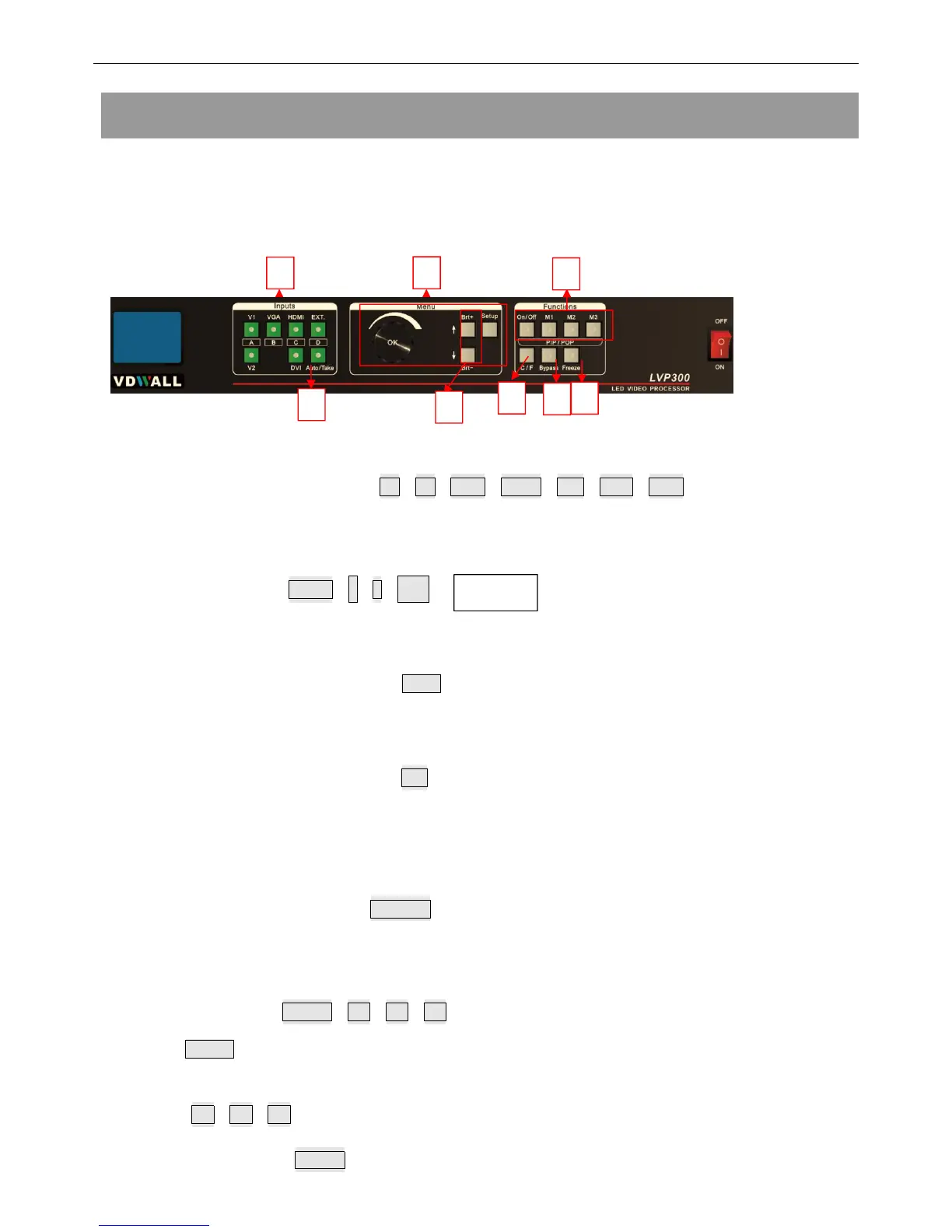
1 Input signal selection buttons(V1,V2,VGA,HDMI,DVI,EXT.,Take):
select the input signal.
2 Setup buttons( Setup,↑,↓,旋钮 )
Set the output image parameters.
3 VGA auto adjustment button ( Auo )
automatically adjust the VGA input signal.
4 Switching time setup button
(
C/F
):
select seamless switching time including 0 second (cut), 0.5 second,1.0 second and
1.5 second ( fade in fade out) and blend switching function.
5 PC signal bypass output ( Bypass ):
Switch between part and full display of PC signal. The indicator shows the current state
of the input signal.
6 PIP/PBP keys(On/Off,M1,M2,M3):
On/Off : PIP/PBP turn on/ off button. When the indicator is on, press input signal
selection to choose different group input or current input itself as the PIP signal.
M1,M2,M3: Switch PIP/PBP model.
7 Freeze button(Freeze)


 To Next Page