EasyManua.ls Logo

Vdwall LVP300 - PIP; PBP Setting

Vdwall LVP300
43 pages
Print Icon
To Next Page IconTo Next Page
To Previous Page IconTo Previous Page
Loading...
LVP300 LED HD Video Processor
28
7. PIP / PBP setting
D.PIP/PBP Mode=M1
--------------------------------------
D.1 PIP Width 640
D.2 PIP Height 320
D.3 PIP H_Start 16
D.4 PIP V_Start 16
D.5 MAIN Width 1920
D.6 MAIN height 1080
D.7 MAIN H_Start 0
D.8 MAIN V_Start 0
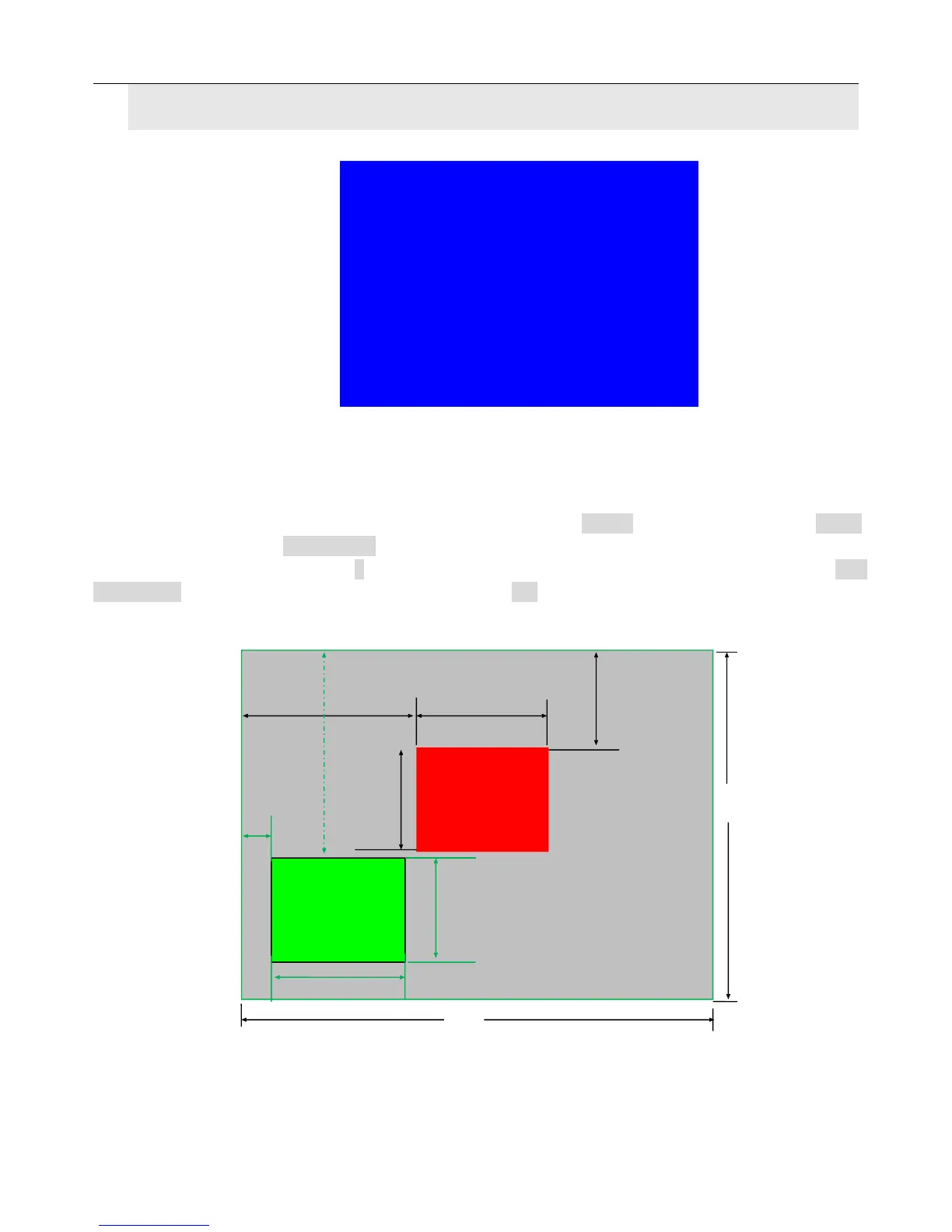
The setup option is used to set LVP300’s three user defined PIP/PBP mode. Operation as below:
When LVP300’s PIP/PBP status is open (the indicator light on “On/Off” button is lit up), press Setup
button, LVP300 enters “D. PIP/PBP” menu. Then press mode button (M1, M2 or M3) to select a
mode to save parameters, press to select parameter option needed to adjust. For example “D.1
Main Width”, rotate knob to change parameter, press OK button to save.

00
PIP H_start
PIP Width
PIP V_Start
PIP height
Main out image
LVP300 output resolution = 1920×1080
1920
1080
Pip out image
Main V_start
Main height
Main width
main H_start

Related product manuals