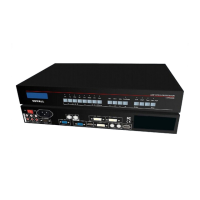
LVP300 LED HD Video Processor
Contents
Chapter 1: Safety precautions............................................................................................................................................. 1
Chapter 2: Item list.................................................................................................................................................................. 2
Chapter 3: Hardware connection........................................................................................................................................ 3
1
.
Rear view................................................................................................................................................................................ 3
2
.
Port description...................................................................................................................................................................... 3
3
.
Hardware connection diagram............................................................................................................................................ 4
4. Specifications
........................................................................................................................................................................5
5
.
Product dimensions...............................................................................................................................................................7
Chapter 4: Front panel........................................................................................................................................................... 9
Chapter 5: Basic user instructions...................................................................................................................................11
1
.
Input signal selection...........................................................................................................................................................11
2
.
PIP / PBP operation............................................................................................................................................................ 14
3
.
Other basic user instruction............................................................................................................................................... 15
Chapter 6: Setup menu instructios...................................................................................................................................18
1
.
Output image setting...........................................................................................................................................................18
2
.
Input video signal setting....................................................................................................................................................20
3
.
Text overlay setting..............................................................................................................................................................22
4
.
Image quality setting........................................................................................................................................................... 25
5
.
Language setting................................................................................................................................................................. 25
6
.
Advance setting....................................................................................................................................................................26
7
.
PIP / PBPsetting.................................................................................................................................................................. 29
Chapter 7: LVP300 PC control software instruction
...............................................................................................30
Chapter8: Copyright information
..................................................................................................................................41
Appendix:modify the record table...................................................................................................................................... 42


 To Next Page