CAMIP21
V . 01 – 04/02/2015 12 ©V elleman nv
iO S
®
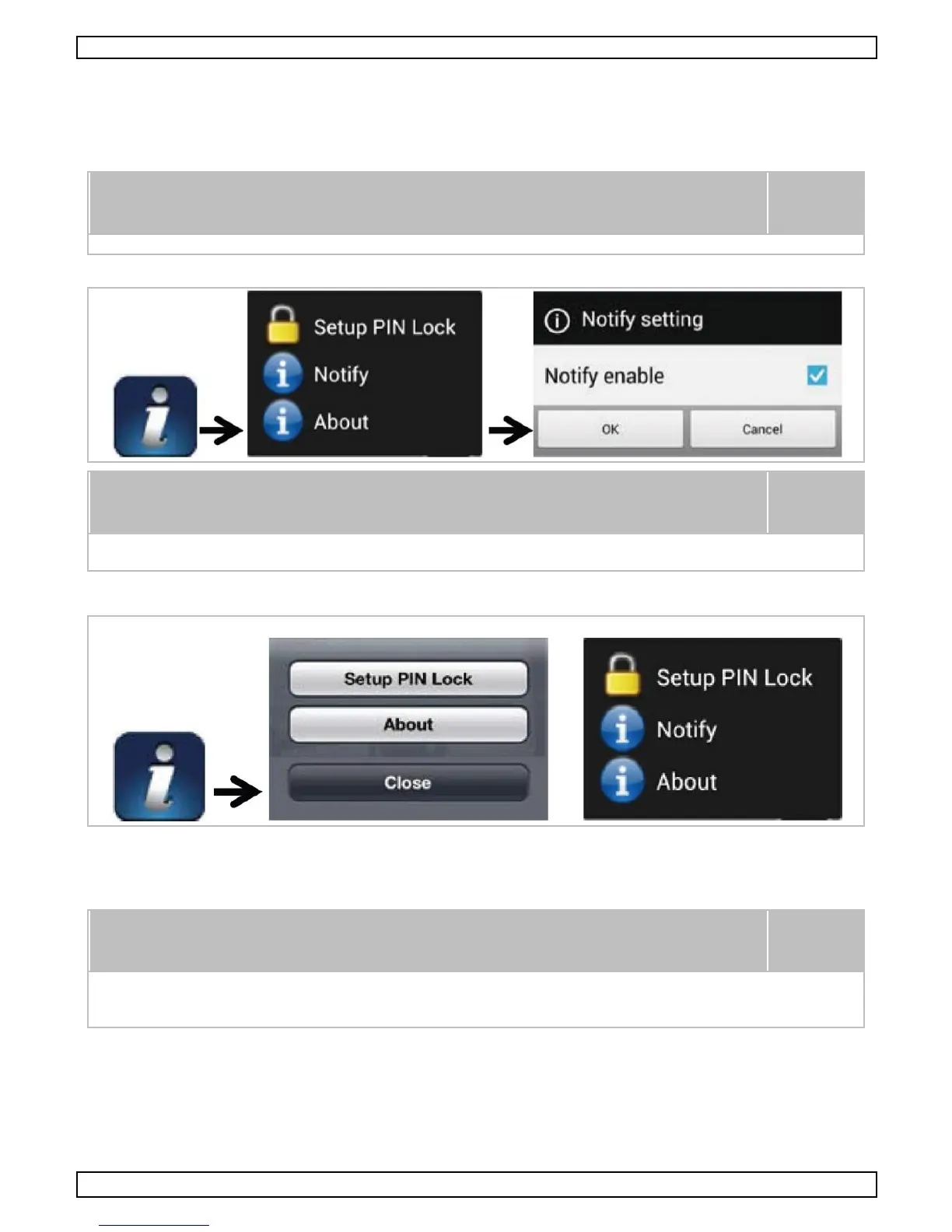
1. Launc h the Settings menu for your home sc reen.
2. C lic k on N otifications.
3. Scroll down to find the O M Guard HD app and c lick it.
4. Switc h the button in the Notification C enter to on.
It us ually takes a couple of hours for the modific ations to be activated.
T he I nternet connection and wireless network interference may influence
the performanc e of the notify func tion.
7.8 Advanced Settings
T his c hapter explains the advanced s ettings, only accessible by the adminis trator who owns the
adminis trator passwords and has full c ontrol over the C AMIP21.
Routers may take more than one minute to update the registered devices.
P lease be patient when returning to the devic e list after c ompletion of the
advanc ed s ettings while the router finis hes the c amera registration.
Admin Password
T he admin password is a specific security code for the adminis trator. T he default password is 123456.
For security, it is advisable to c hange this password periodically.


 To Next Page