CAMIP21
V . 01 – 04/02/2015 9 ©V elleman nv
T he video is us ing FFmppeg c odes and us es the H .264 video compression format.
Y our network environment c onditions, e.g. the upload or download s peed, may caus e improper video
playback (black screen). If this happens, pleas e quit the playback mode and try again.
T he app layout may vary depending on the panel s ize of your mobile device.
7.6 Downloading and Deleting Video Files
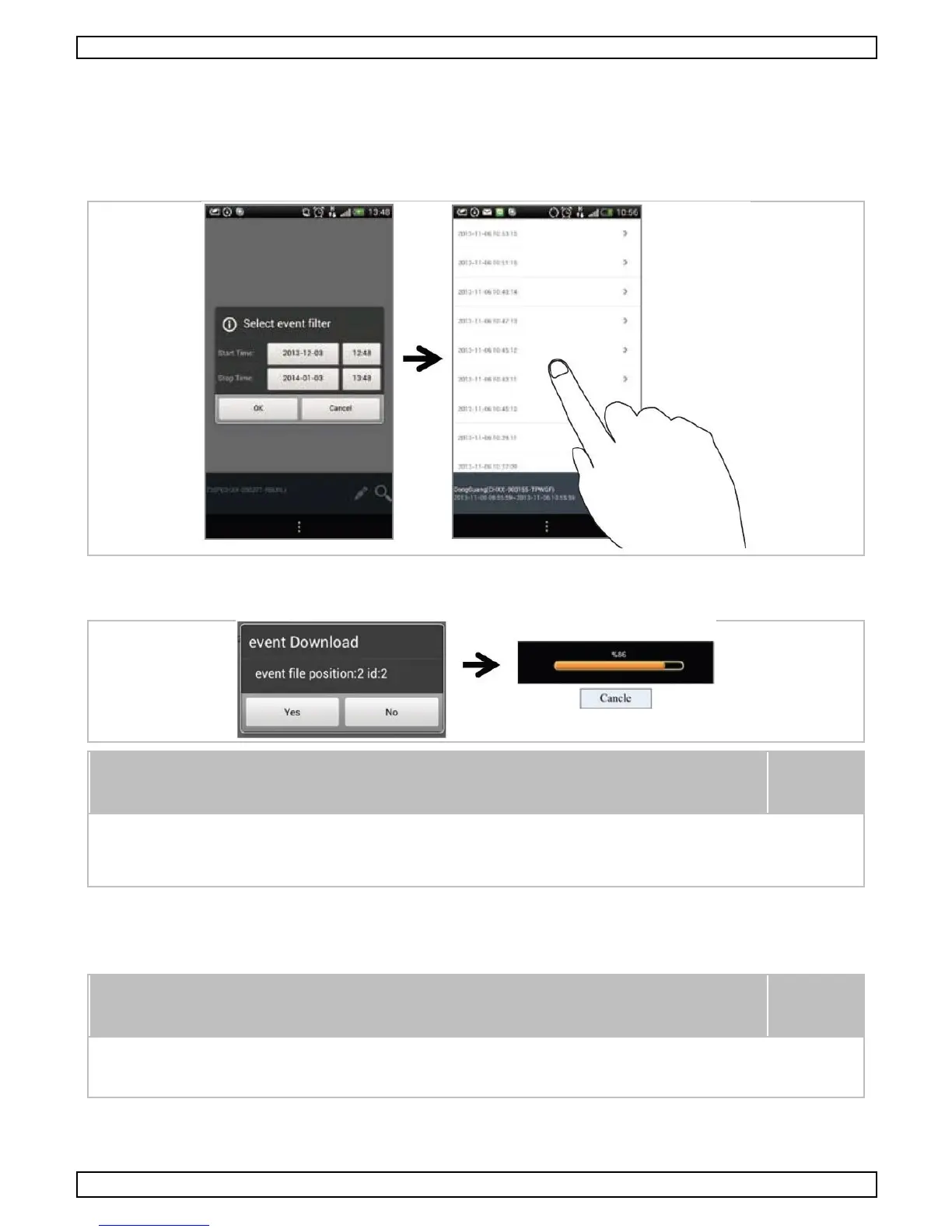
Downloading
Long pres s the video c lip to download the file onto your mobile devic e.
During the download process, the s ystem will both stop the live view and
the rec ording functions. T he app will automatically inform any user
ac c essing the camera that the system is busy and the connection has been
terminated.
T his function will help you to download the rec orded files from the memory c ard. I t is s trongly advised to
download the files from your WLA N network, meaning the mobile device is connected to the same Wifi
router as the camera. M inimum bandwidth requirement is 1 M b/s . T he download process may be force-
stopped if the bandwidth bec omes too s low.
O n A ndroid
®
, us e the free M X P layer available from Google Play.
If you are experienc ing s cattering video image, switch the dec oder
func tion to S/W Dec oder.


 To Next Page