54
PHTM II
Installation, Operating & Service Instructions
110331-01 - 5/20
16 Operation (continued)
Press "" or "" buttons to switch between menus A, b,
C, and PAS, press "enter" to Select. The following items
are available in the A menu.
A Quick Menu
Table 16-8: Quick Menu (with no Password entered)
Display Range Description
A01
On/Off Boiler On/Off Switch
A02
On/Off DHW Comfort Mode
A03
60 -140°F
(16 - 60°C)
DHW Setpoint
A04
60 - 190°F
(16 - 88°C)
Central Heat 1 Setpoint
A05
60 -190°F
(16 - 88°C)
Central Heat 2 Setpoint
A01 Boiler Switch
Allows an installer to prevent boiler starts while
reviewing boiler settings.
A02 DHW Comfort Mode
DHW Comfort Mode monitors recirculation sensor and
controls a recirculation pump wired to Auxiliary Pump
terminals. Comfort mode helps keep water warm that
is immediately available at fixtures.
A03 DHW Setpoint
Desired temperature of DHW produced by boiler.
A04 Central Heating 1 Setpoint
Desired water temperature of CH1.
A05 Central Heating 2 Setpoint
Desired water temperature of CH2.
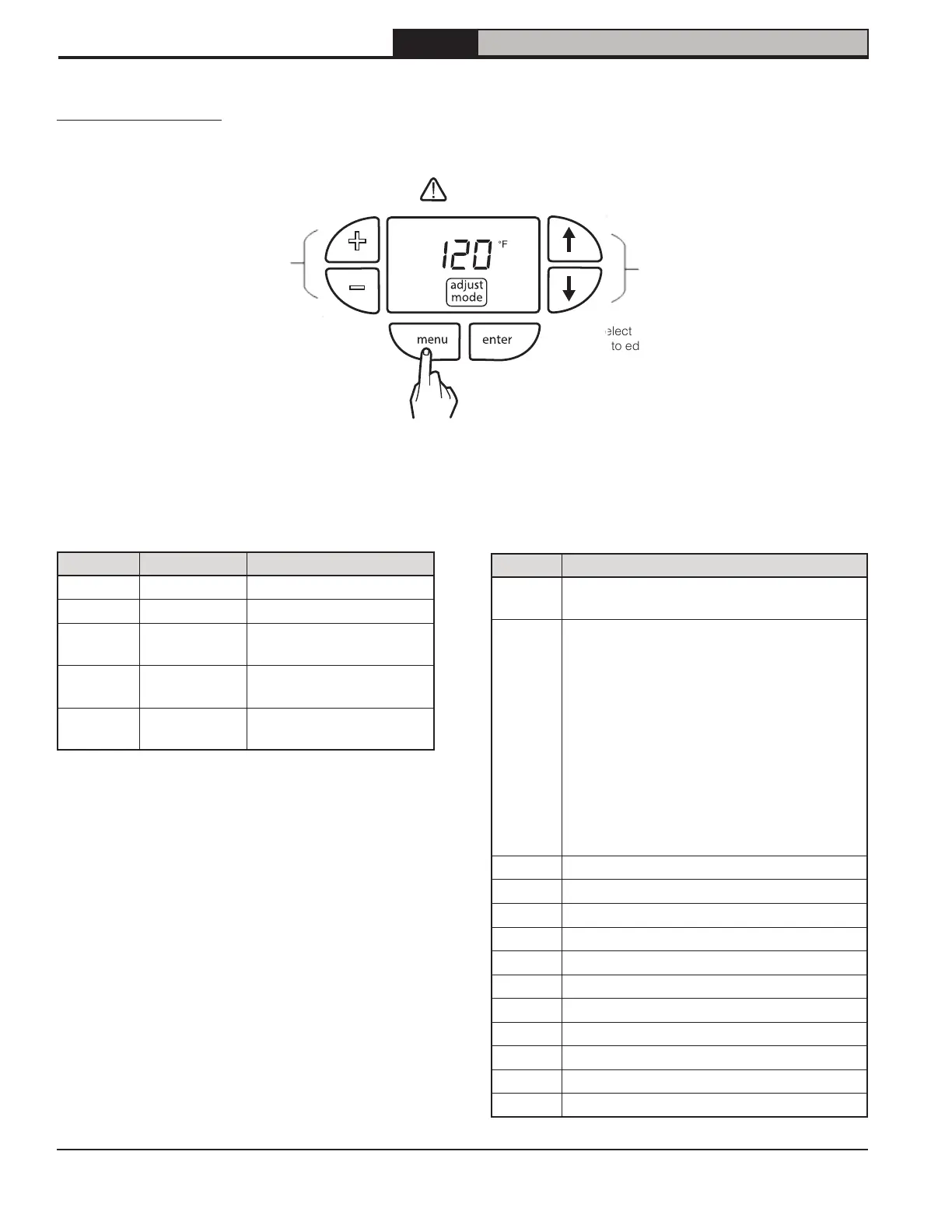
Figure 16-7: Adjusting Parameters
C Diagnostic Menu
Table 16-9: Diagnostic Menu
Display Description
C01
Active Detailed Fault Code
(see Table 19-5)
C02
Demand Source
1 Standby
2 Central Heat 1
3 Central Heat 2
4 Domestic Hot Water
5 Sequencer Control
6 CH Frost Protection
7 DHW Frost Protection
8 Boiler On/Off Switch
9 Warm Weather Shutdown
C03
Fan Speed Demanded (RPM x 100)
C04
Fan Speed Feedback (RPM x 100)
C05
Three Way Valve Status (0) DHW, (1) CH
C06
System Pump On/Off Status
C07
Boiler Pump On/Off Status
C08
Auxiliary Pump On/Off Status
C09
Flame Signal
C10
Safety Software Revision
C11
Application Software Revision
C12
Parameter Revision
C13
Boiler Size Status: (1) 136 combi
+
–
Press to select menu or
parameter to edit.
Press buttons to
view next menu or
parameter.
Press buttons to
adjust parameters.
b Lockout/Hold History Menu
b01 to b08 are lockout or Hold history records. b01 is
latest entry.
Adjust Mode Menu
Diagnostic information and Quick Menu parameters are available without entering a password. Press and Hold
“menu” button for 3 seconds to access Adjust Mode.
Press and hold for three seconds
to access Adjust Mode
Press to exit current menu or
cancel current editing session
reset


 To Next Page