13
7.1 SETTINGS
Remember that, for security reasons, the charger settings can only
be changed if you are connected to the device by Bluetooth, never
remotely.
You can watch its progress on the screen. It is VERY IMPORTANT to stay
within the charger’s Bluetooth range of action (8-10 metres) and that you
don’t close the App until the process has been completed.
Once the update has nished, the light indicator on the charger will
change from ashing purple to continuous green and the device will
automatically restart, you don’t have to do it manually.
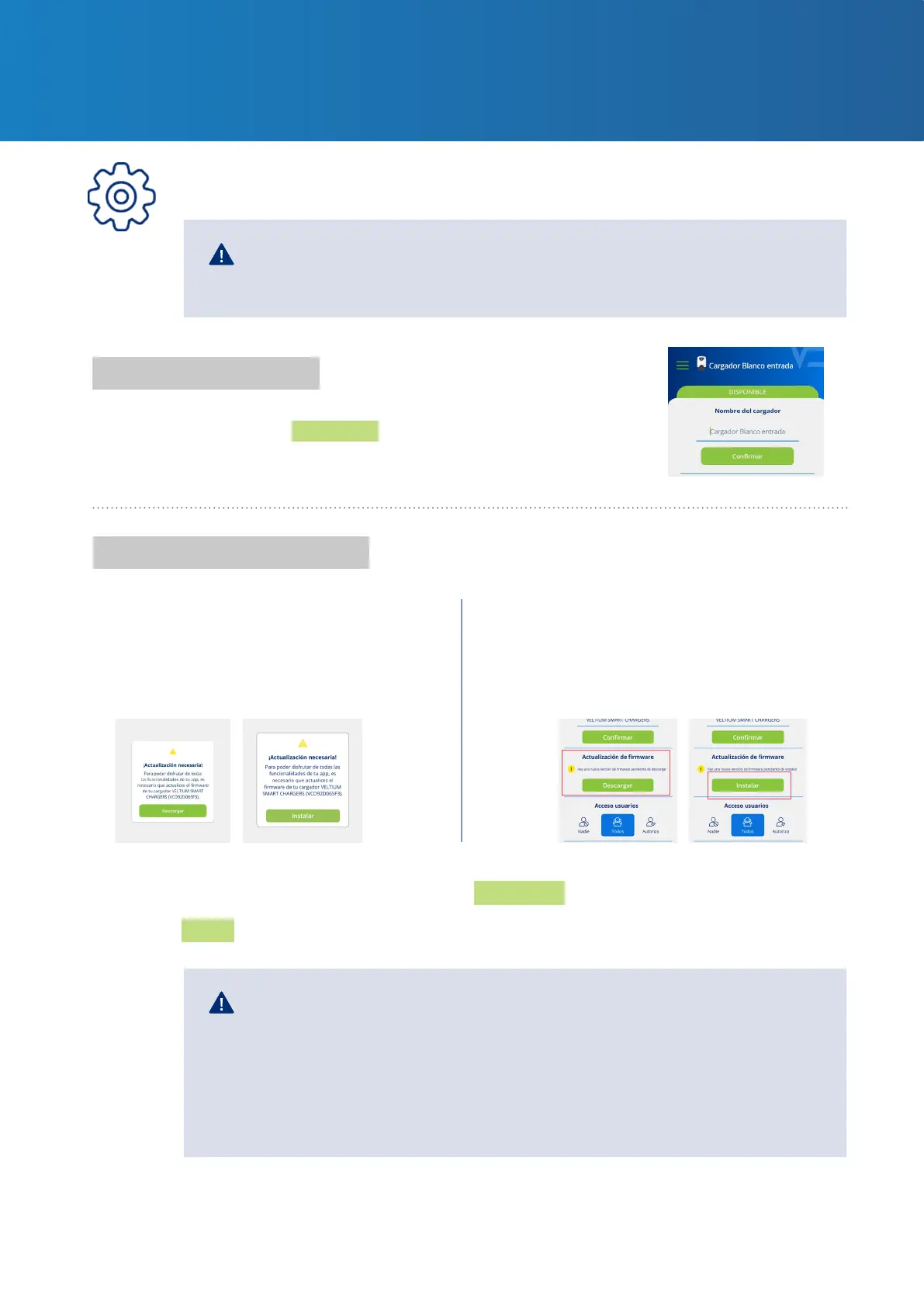
Charger name
Firmware update
1- Forced update 2- Recommended update
Assign the name of your choice to your charger for easy
identication, and press Conrm.
A rmware update is required
to make it compatible with the
current version of the App.
Although it is not strictly necessary
to update the rmware to make
it compatible with the current
version of the App, it is advisable.
In a place with Internet connection, press the Download button. The new version will be saved
in your phone memory. Stand beside the charger with Bluetooth connected, open the App and
press the Install button.
7. MANAGING THE CHARGER
FROM THE VELTIUM APP



 To Next Page