18
Installation (Cont.)
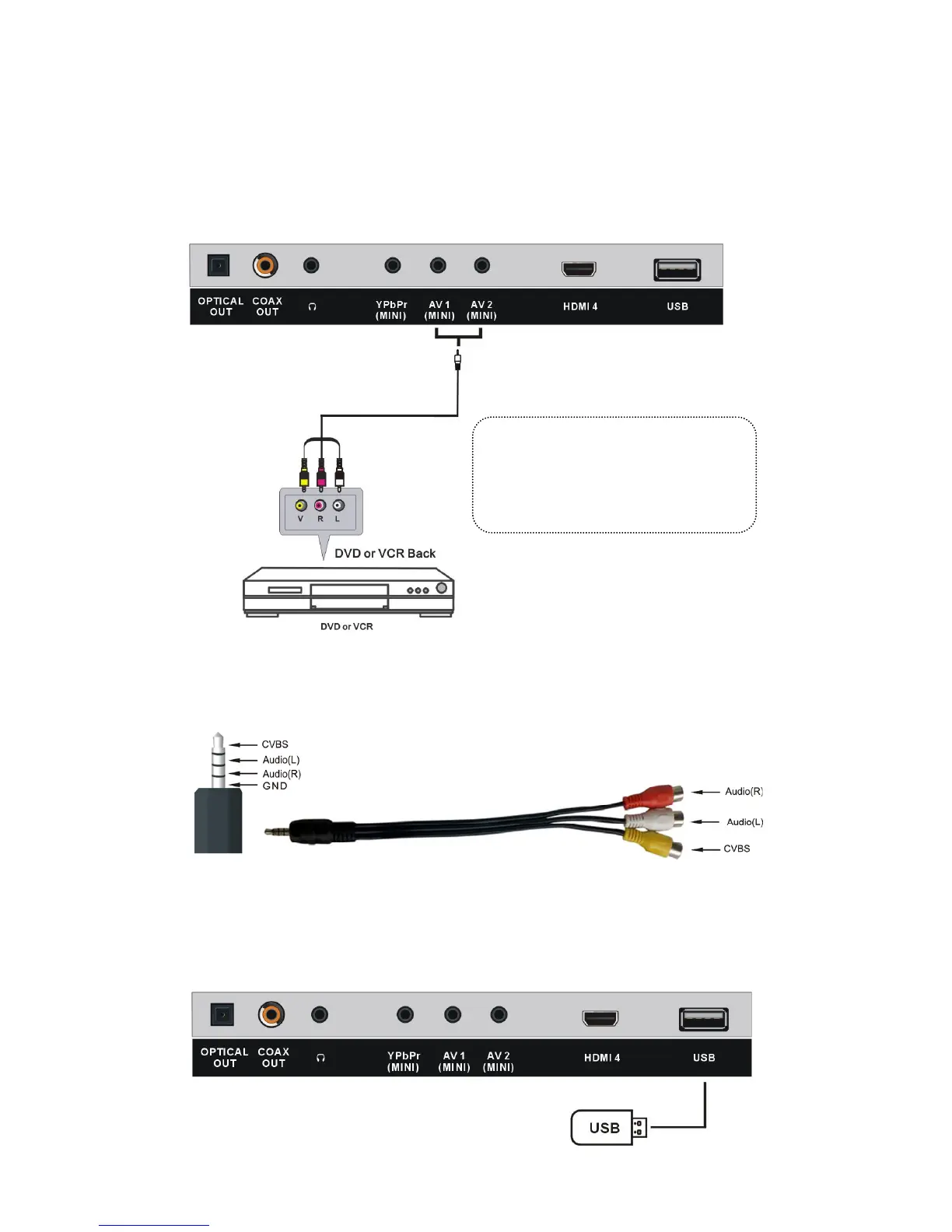
Composite Video (AV) Connection
For basic connection, use the composite Audio L/R (white/red) and CVBS (yellow)
cable to connect the unit with other devices.
NOTE: As your TV contains a mini Y/Pb/Pr and a mini AV terminal, you may need
to use the special cable (supplied), with a 3.5mm head on one end and 3 male RCA
terminals on the other end, to connect this TV with external devices.
USB (Media) Connection
Connect a portable USB storage device for multimedia file playback. Select USB input
source using the SOURCE or MEDIA button on the remote control.
AV (COMPOSITE VIDEO) CONNECTION
NOTE: As your TV contains a mini YPbPr and a mini AV terminal, you may need to use the
special adaptor cable (supplied), with a 3.5mm head on one end and 3 female RCA
terminals on the other end, to connect this TV with external devices.
For basic connection, use the
composite Audio L/R (white/red) and
CVBS (yellow) cable to connect the
unit with other devices.
AV cable
(Not included)
AV adaptor cable
COAXIAL CONNECTION
OPTICAL CONNECTION
USB CONNECTION
EARPHONE CONNECTION
Earphone cable
(Not included)
USB Memory Device
(Not included)
Use coaxial cable (not included) to connect the unit with amplifier
or other audio decoding devices for coaxial audio signal output.
Use coaxial cable (not included) to connect the unit with amplifier
or other audio decoding devices for coaxial audio signal output.
AV (COMPOSITE VIDEO) CONNECTION
NOTE: As your TV contains a mini YPbPr and a mini AV terminal, you may need to use the
special adaptor cable (supplied), with a 3.5mm head on one end and 3 female RCA
terminals on the other end, to connect this TV with external devices.
For basic connection, use the
composite Audio L/R (white/red) and
CVBS (yellow) cable to connect the
unit with other devices.
AV cable
(Not included)
AV adaptor cable



 To Next Page