19
Remote Control
The buttons on the remote control and similarly marked ones on the main unit perform
similar functions.
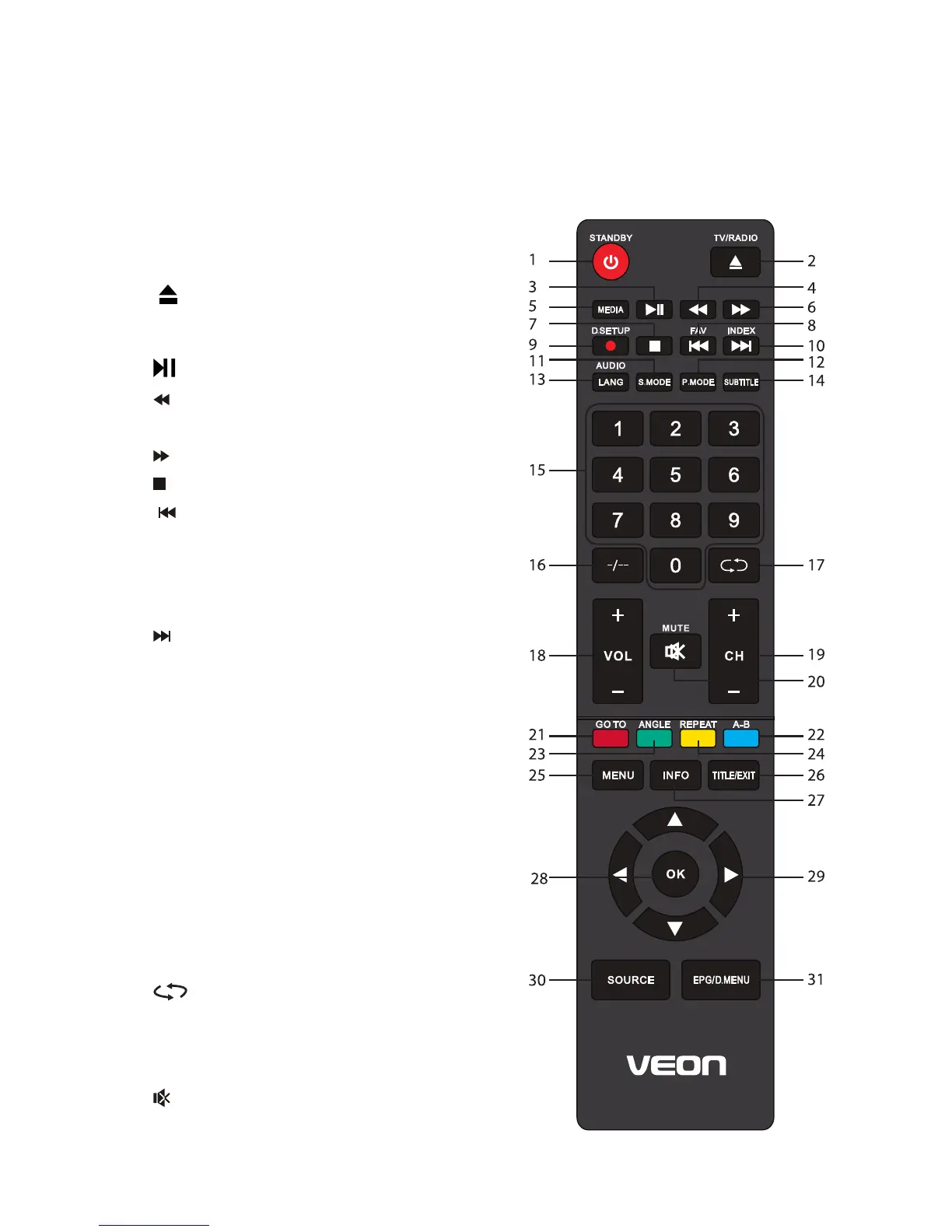
1 POWER / STANDBY: Set the unit in
standby mode; press it again to switch it
on.
2 : Load/unload a disc (DVD)*. TV /
RADIO: Switch the unit between TV and
radio; EJECT is not available for this model.
3 : Start or pause playing.
4 : Move fast backward.
5 MEDIA: Select USB mode.
6 : Move fast forward.
7 : Stop playing.
8 / FAV: Play the previous file; display the
list of favourite channels.
9 RECORD / D.SETUP: Record in DTV
mode; D.SETUP is not available for this
model.
10 / INDEX: Play the next file; display the
record program list (DTV).
11 S.MODE: Cycle though the different sound
modes.
12 PMODE: Press to change the picture
mode.
13 AUDIO / LANG: Switch available
soundtrack (TV); LANG is not available for
this model.
14 SUBTITLE: Enable/disable subtitles.
15 NUMBER BUTTONS (0-9): Press to select
a TV channel directly when watching TV.
The channel changes after 2 seconds.
16 -/--: Switch the digits.
17 : Return to the previous channel.
18 VOL +/-: Turn the volume up/down.
19 CH +/-: Press to play the next or previous
channel.
20. MUTE: Mute the sound. Press again to
restore the sound.


 To Next Page