20
Remote Control (Cont.)
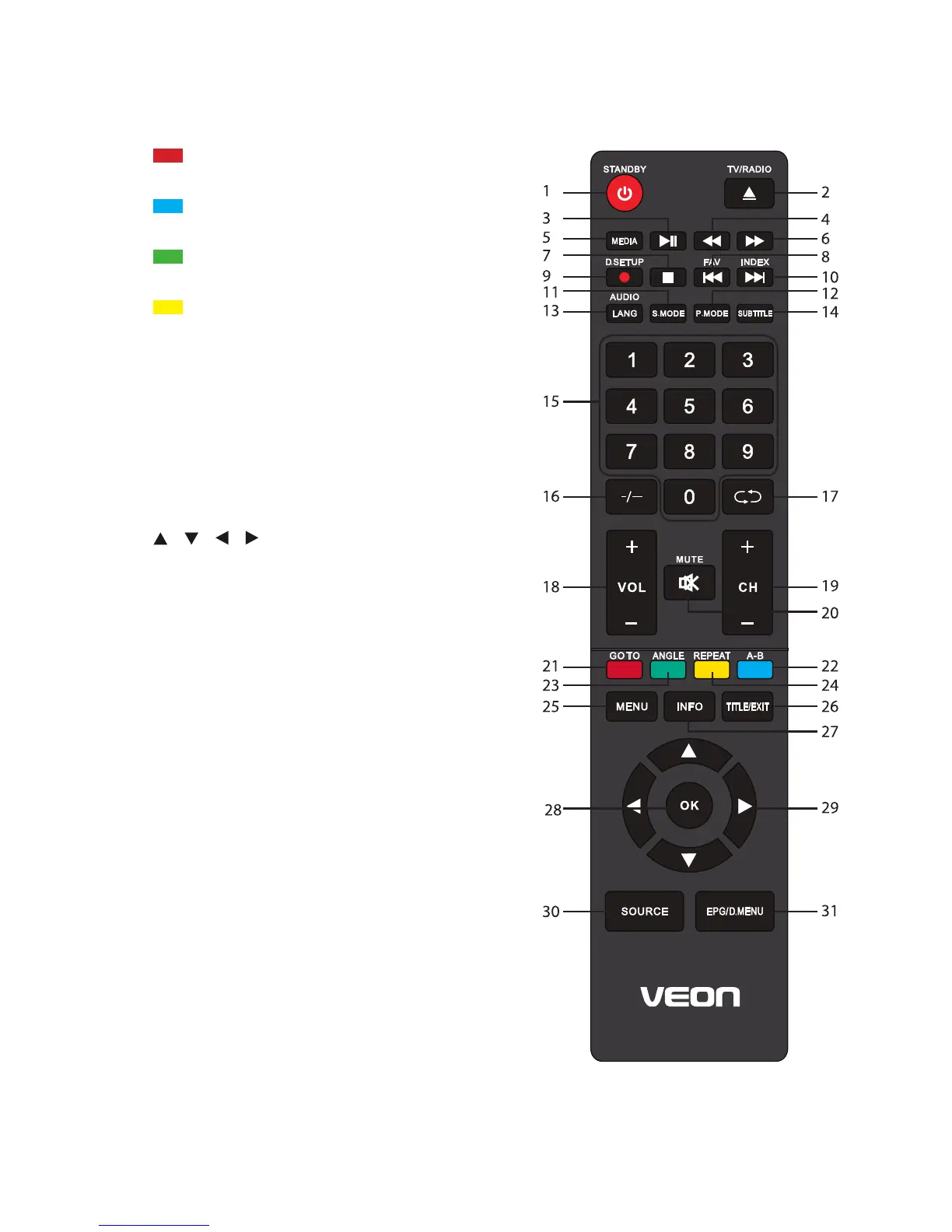
21 / GOTO: Jump to a different chapter of
the DVD.
22 / A-B: Repeat DVD scenes of your
preference, from selected points A-B.
23 / ANGLE: View DVD playback from
different angles, if the DVD has this feature.
24 / REPEAT: Repeat a different chapter/
title or the entire DVD.
25 MENU: Display the main TV menu.
26 TITLE/EXIT: Exit from the main TV menu
displayed on the screen; TITLE is not
available for this model.
27 INFO: Display information of the current
program.
28 OK: Confirm selection.
29 / / / : Press the LEFT/RIGHT/UP/
DOWN button to navigate the on-screen
menus and adjust the system settings to
your preference. Press OK to confirm your
selection.
30 SOURCE: Switch the input source.
31 EPG / D. MENU: Display electronic
program guide; D.MENU is not available for
this model.
NOTES: DVD related functions are ineffective on
the V55UHDS model TV.


 To Next Page