32
Menu Settings (Cont.)
IMPORTANT!
The factory password is “0000”.
If you forget your password, enter the master password “4711” to reset it.
Set Password
Press the / buttons to select this item and press the OK/ button to enter it.
Enter the old password first and then enter your new password twice to finish setting.
Block Program
Press the / buttons to select this item and press the OK/ button to enter the
submenu. Then press the / buttons to select a program and then press the
GREEN button to block it.
Parental Guidance
Press the / buttons to select this item and press OK to enter the submenu. Then
press the / buttons to select the desired parental guidance level: OFF, 4-18. Press
the OK button to confirm.
Key Lock
The Key Lock is used to lock/unlock TV buttons. Press the / buttons to select this
item and press the / buttons to turn it on/off.
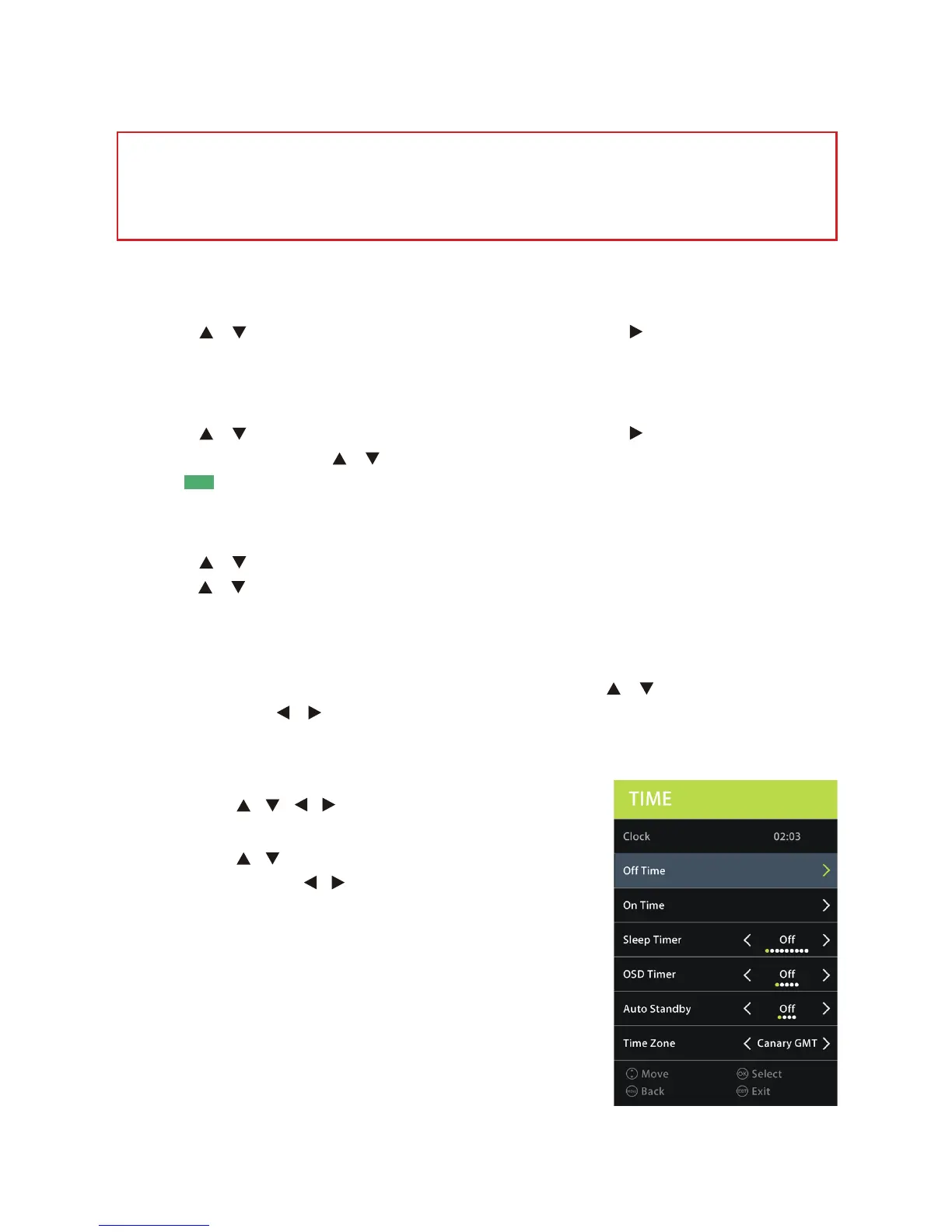
TIME menu
• Press the / / / buttons to select TIME menu,
and press OK to enter the submenu.
• Press the / buttons to select each submenu
option, and press / buttons to adjust your
selection, then press OK to confirm.
• Press the MENU button to go back to the previous
menu page.
• Press the EXIT button to exit the current menu.



 To Next Page