28
Menu Settings (Cont.)
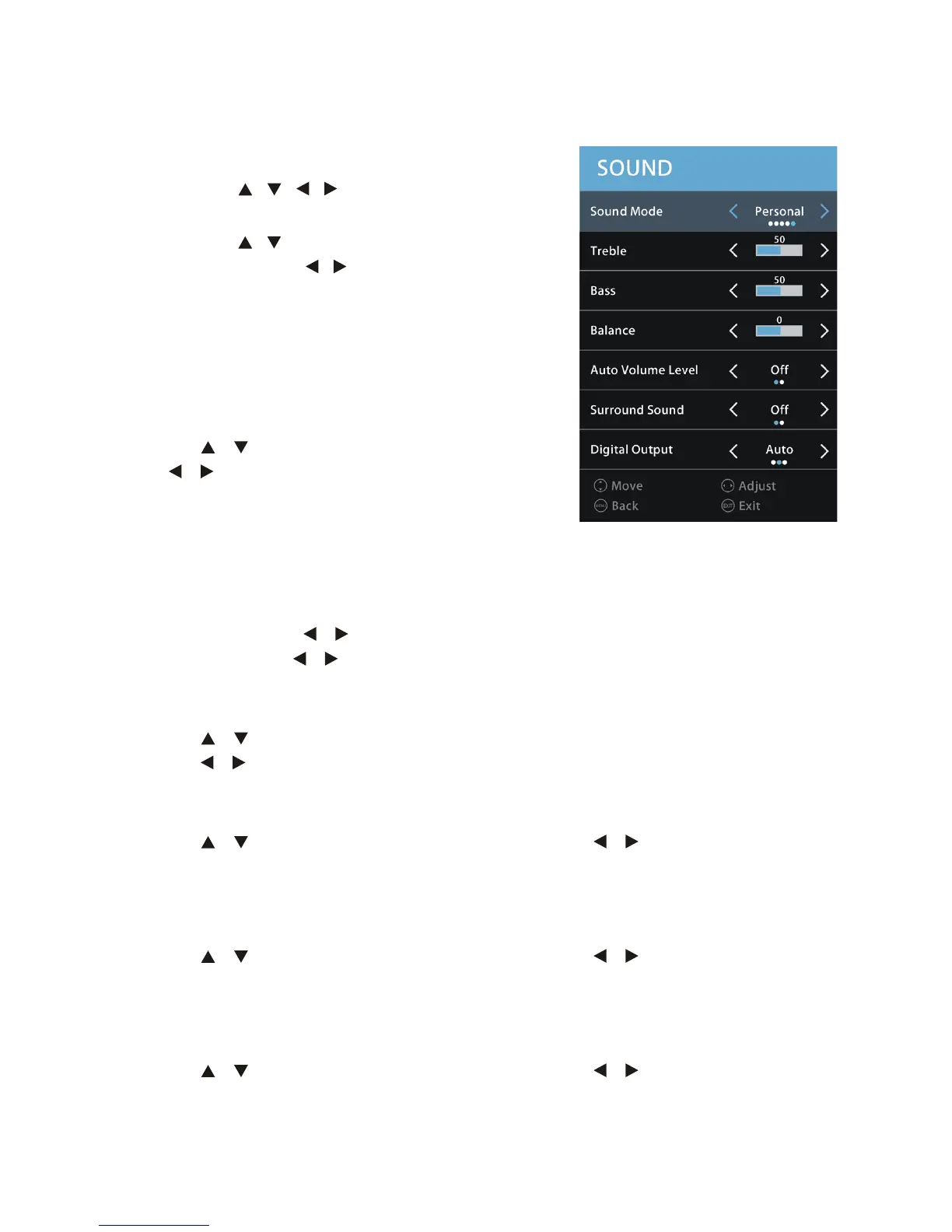
SOUND Menu
• Press the / / / buttons to select SOUND
menu, and press OK to enter the submenu.
• Press the / buttons to select each submenu
option, and press / buttons to adjust
selection, then press OK to confirm.
• Press the MENU button to go back to the
previous menu page.
• Press the EXIT button to exit current menu.
Sound Mode
Press the / buttons to select this item and
press / to select the desired picture mode:
Standard, Movie, Music, Sport and Personal.
Tips
• Press the S-MODE button on the remote control to change the sound mode
directly.
• The values for Treble and Bass can only be adjusted in Personal sound mode.
Treble: Press the / buttons to adjust the treble value between 0-100.
Bass: Press the / buttons to adjust the bass value between 0-100.
Balance
Press the / buttons to select this item and press OK to enter the submenu. Then
press the / buttons to balance your left and right speakers from -50 to 50.
Auto Volume
Press the / buttons to select this item and press the / buttons to turn it on or
off.
Surround Sound
Press the / buttons to select this item and press the / buttons to turn it on or
off.
Digital Output
Press the / buttons to select this item and press the / buttons to select the
desired digital output: Auto, PCM, Off.



 To Next Page