CONFIGURATION
B000856
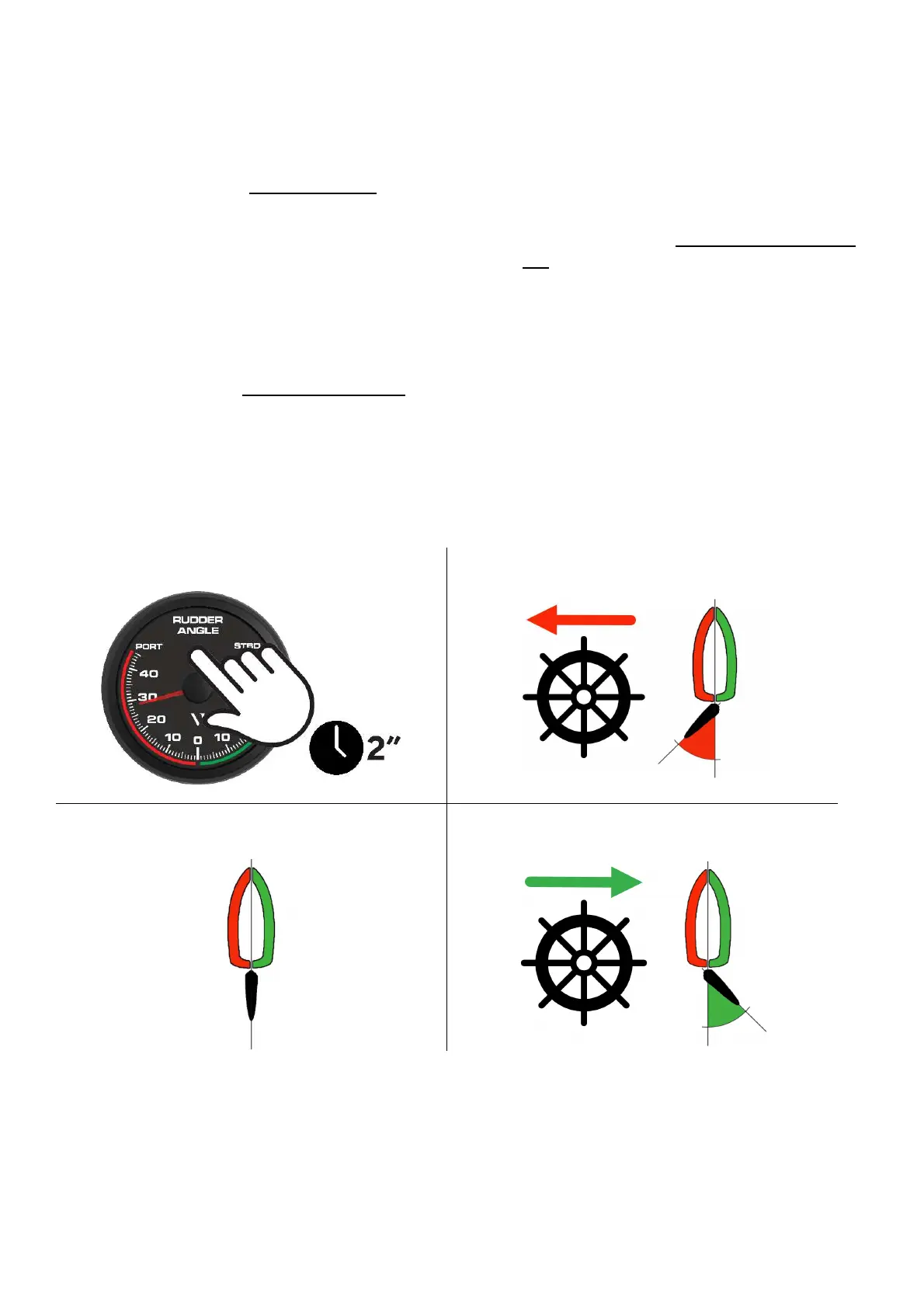
1. Keep pushing the infrared pushbutton (IR) to
start the calibration process. [
A
]
2. The illumination now blinks every 1 sec and
the pointer indicates 20° PORT
3. Move the rudder to 20° PORT. [
B
]
4. Keep “pushing” the IR button to store the
PORT reading. [
A
]
5. The illumination will blink twice every 1 sec
and the pointer indicates the center position
(0°).
6. Move the rudder to the center. [
C
]
7. Keep “pushing” the IR button to store the
CENTER reading. [
A
]
8. The illumination will blink three times every 1
sec and the pointer indicates the 20° STBD.
9. Move the rudder to 20° STBD. [
D
]
10. Keep “pushing” the IR button to store the
STBD reading. [
A
]
11. The gauge resets and the adjusted calibration
is now stored.
A B
C
D


 To Next Page