84
Embroidery Preparation
v
The rst time to set up
Before setting up, please conrm that
the environment is equipped with the
WiFi router and make sure it is connected
to the internet in order to starting the
connection.
Please set the SSID of your WiFi access
station in English letters or digital
numbers then re-connect again.
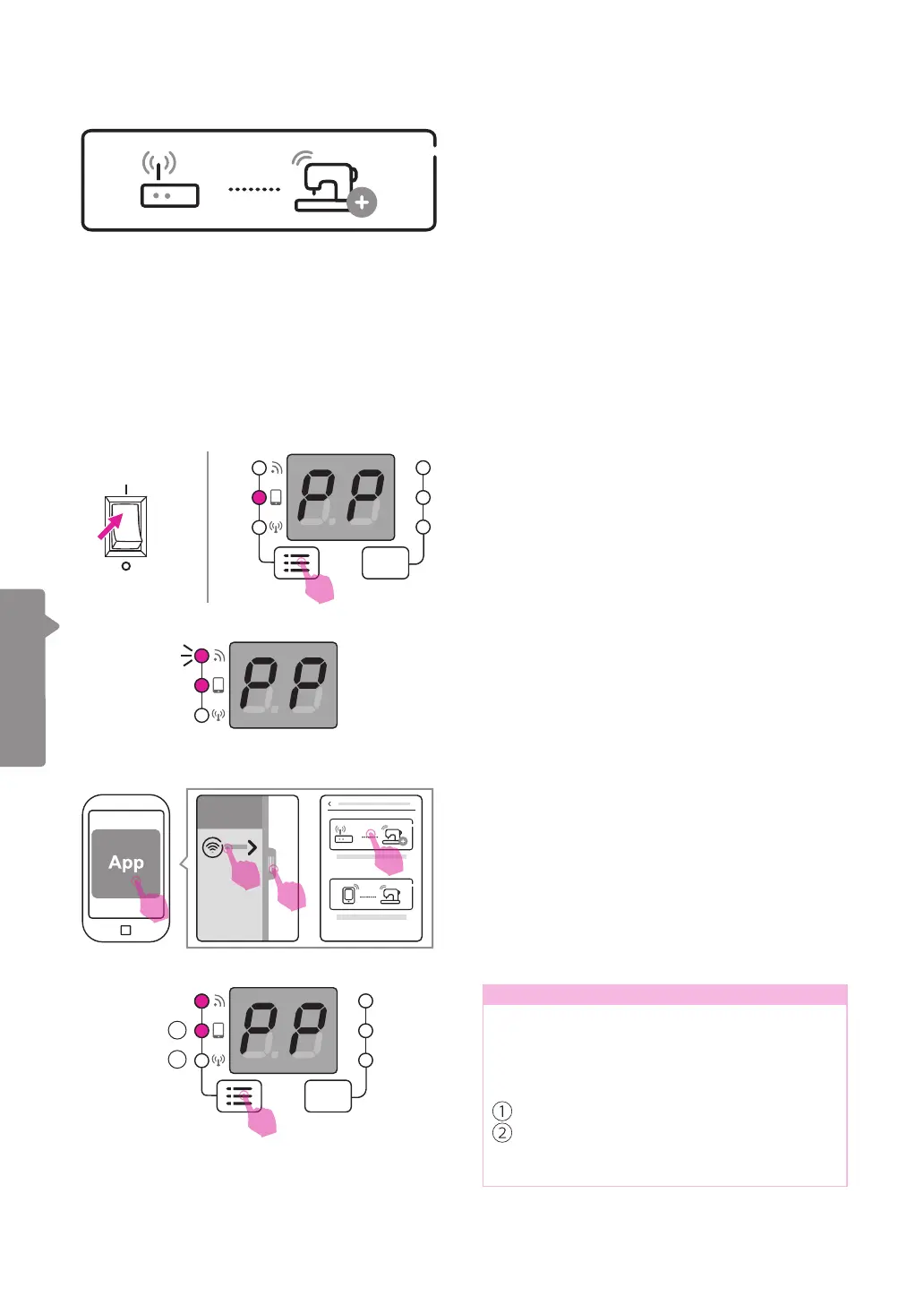
Please open the app on your portable device.
(smart phone or tablet)
Please slide or press the bar at the left side,
and press "Add a new connection". Then
choose "Set up the Router Mode connection."
The WiFi light will start ashing, which means
ready to connect machine.
Connection mode: Router
Turn on the power, and check if the screen
shows "PP" and the second light is on. If it is
not, please long press the connection mode
switch button to switch the light.
Note
In embroidery mode, long pressing the
group switch button can change the
connection mode according to your
demand.
The connection mode is including:
Point-to-point mode(PP)
Router mode(AP)
Note: the connection mode switch button
could not apply until AP mode was set up.
ON
OFF
1
2
3
4
1
2


 To Next Page