86
Embroidery Preparation
n
Attention
In this connection mode, the internet
function of the portable device itself cannot
be used and the cloud download function
cannot be used as well.
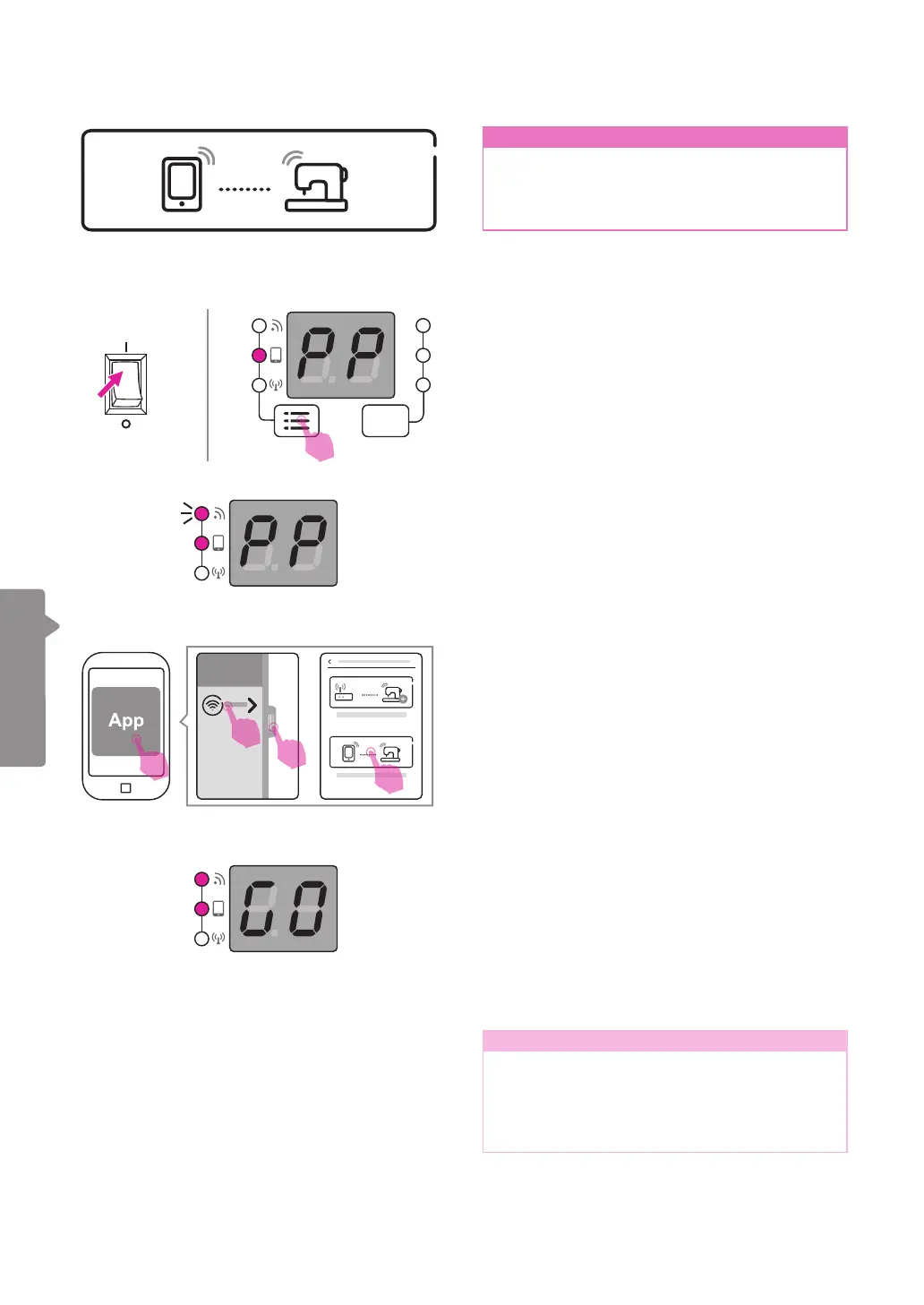
Once it has successfully connected to the
APP, the screen will show GO, which means
that the embroidery function can now be
normally executed.
Note
Point-to-point mode is recommended for
performing embroidery when there is a lot
of wireless signal interference environment,
this will reduce the interference among
different devices.
Please open the app on your portable device.
(smart phone or tablet)
Please slide or press the bar at the left side,
and press "Add a new connection". Then
choose "Set up the point-to-point Mode
connection."
The WiFi light will start ashing, which means
ready to connect machine.
Connection mode: Point-to-point
Turn on the power, and check if the screen
shows "PP" and the second light is on. If it is
not, please long press the connection mode
switch button to switch the light.
ON
OFF
1
2
3
4


 To Next Page