www.versitron.com -20- SG71090
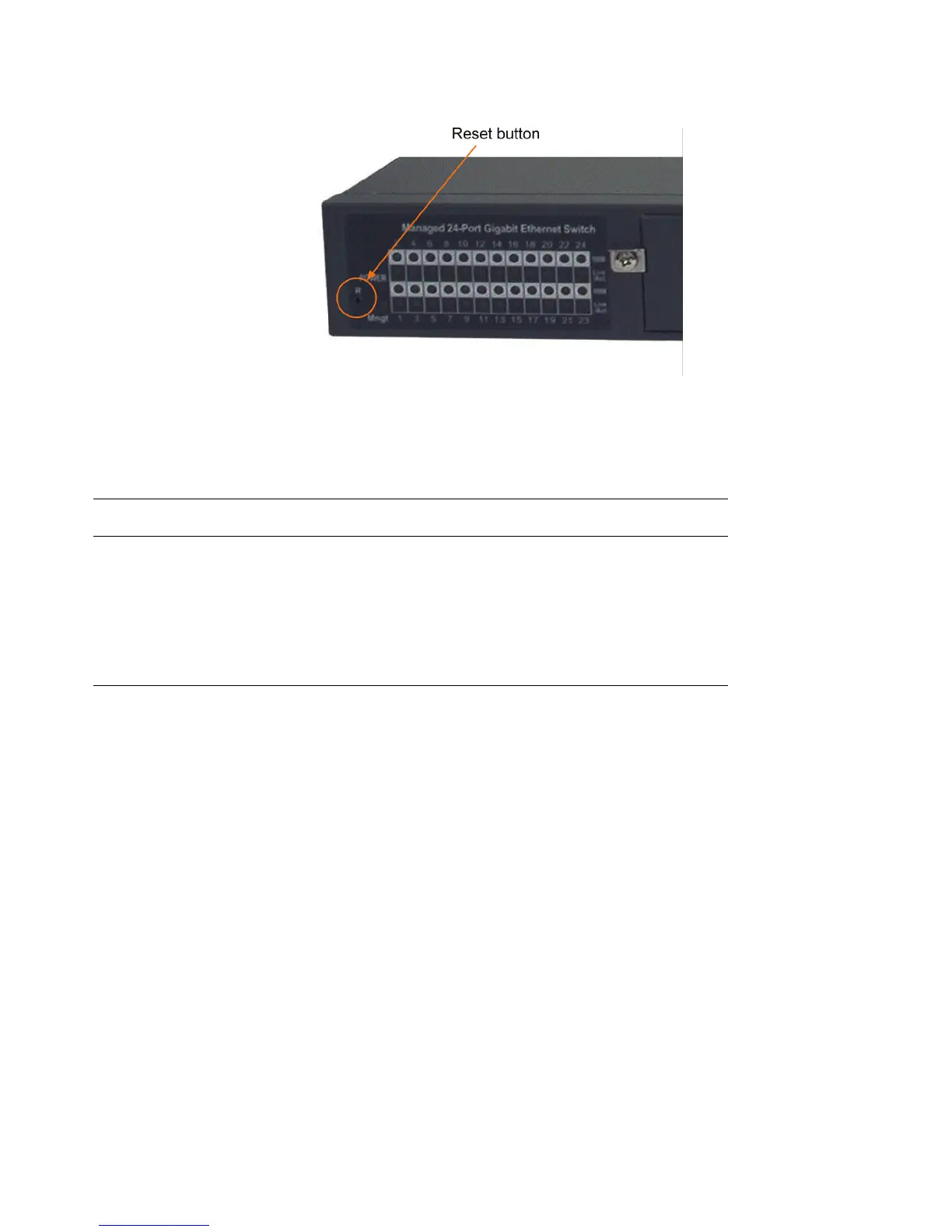
2.8 Reset Button
The reset button is used to perform a reset of the switch. It can be used for diagnostic purpose or if the network
performance has an issue. The button can also be used to restore the software configuration settings to factory
default values. The operations are as follows:
Operation Function
Press the button during system boot-up and release Restore factory default settings
it after boot-up. The boot-up takes about 17 seconds
and ends with LED diagnostics.
Press the button and release during switch operation Re-boot the switch unit
2.9 Making UTP Connections
The 10/100/1000 RJ-45 copper ports support the following connection types and distances:
Network Cables
10BASE-T: 2-pair UTP Cat. 3, 4, 5, EIA/TIA-568B 100-ohm
100BASE-TX: 2-pair UTP Cat. 5, EIA/TIA-568B 100-ohm
1000BASE-T: 4-pair UTP Cat. 5 or higher (Cat.5e is recommended), EIA/TIA-568B 100-ohm
Link distance: Up to 100 meters
Auto MDI/MDI-X Function
This function allows the port to auto-detect the twisted-pair signals and adapts itself to form a valid MDI to
MDI-X connection with the remote connected device automatically. No matter a straight through cable or
crossover cable are connected, the ports can sense the receiving pair automatically and configure themselves to
match the rule for MDI to MDI-X connection. It simplifies the cable installation.


 To Next Page