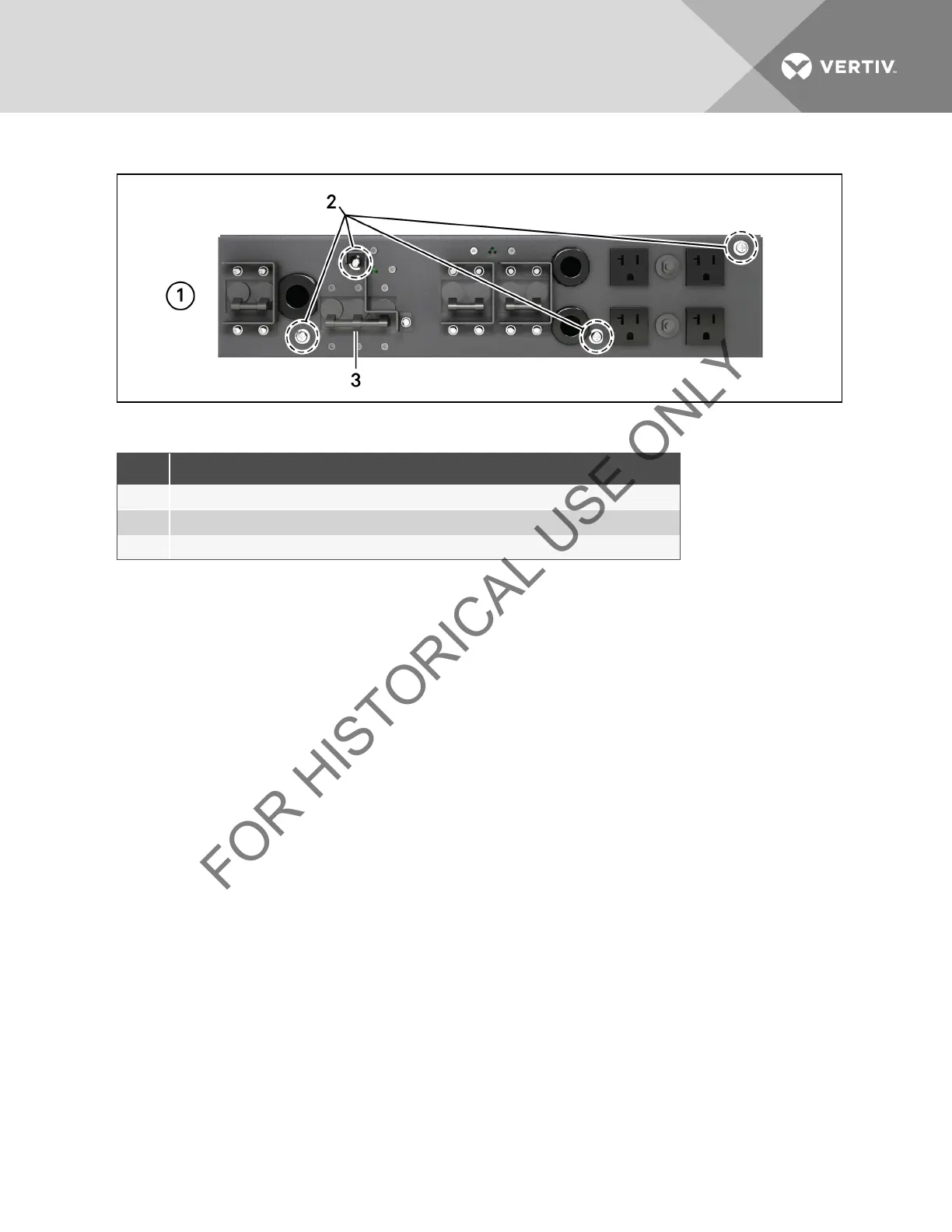
Figure 5.7 Power distribution box removal from 5000 and 6000VA models
ITEM DESCRIPTION
1 Pigtails removed for clarity
2 Extract these four captive screws
3 Maintenance Bypass Breaker
Table 5.6 Power Distribution Box Removal Descriptions
5.3.2 Remove the Power Distribution Cover from 8000 and 10,000VA Models
1. Shut down the Liebert GXT3 by pressing the Standby/Manual Bypass button twice while the UPS is in Bypass
Mode, each time holding the button down for about 2 seconds. (For help, refer to Shut Down the Liebert GXT3
on page 42.)
2. Loosen the captive screw over the maintenance bypass breaker (see Figure 3.5 on page16 for the breaker’s
location).
3. Turn the maintenance bypass breaker On.
NOTICE
The load is unprotected from disturbances in the power supply while the UPS is on bypass.
4. Turn the output and input breakers Off.
5. Support the power distribution box and remove the two screws at the top of the box.
6. Remove the cover or power distribution box from the UPS and set it aside.
7. If removing a power distribution box, carefully pull apart the power distribution box connector and the UPS
connector.
Vertiv | Liebert® GXT3 ™ Installer/User Guide | 30



 To Next Page