7.1.1 Battery Replacement Procedures
Read all safety cautions before proceeding. A trained user can replace the internal battery pack when the
UPS is always in a restricted access location (such as a rack or server closet). Contact your local dealer or
Vertiv representative to obtain the pricing of the appropriate replacement battery pack.
CAUTION: Risk of explosion if battery is replaced by an incorrect type. Dispose of used
batteries according to the instructions.
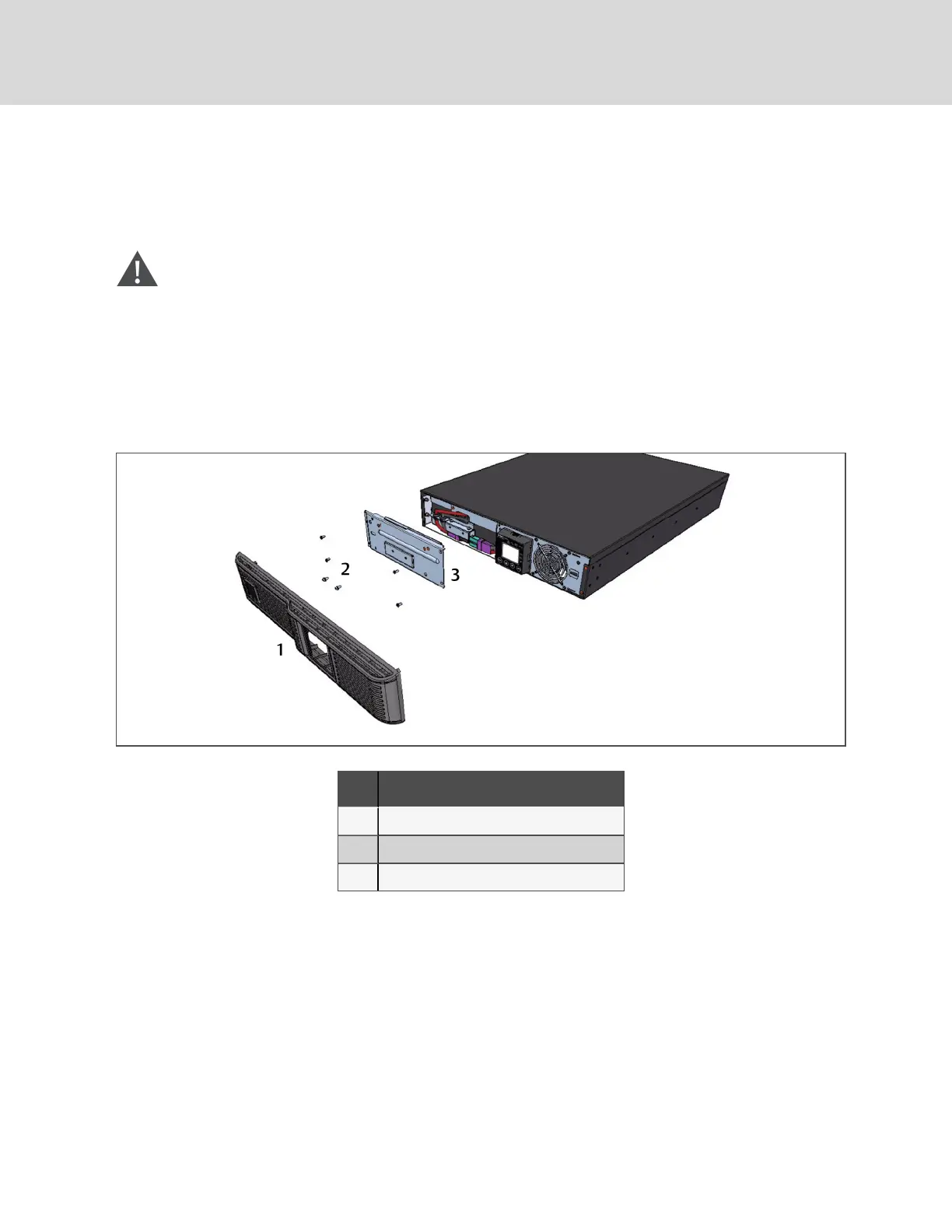
1. Remove the front plastic bezel cover from the UPS.
2. Loosen and remove the screws on the battery door, as shown in Figure 7.1 below.
3. Lay the battery door and screws aside for reassembly.
Figure 7.1 Removing the front bezel cover and battery door
NO. DESCRIPTION
1 Front, plastic bezel cover
2 Screw (4 pieces)
3 Battery door
Vertiv | Liebert® GXT4™ Installer/User Guide
44







 To Next Page