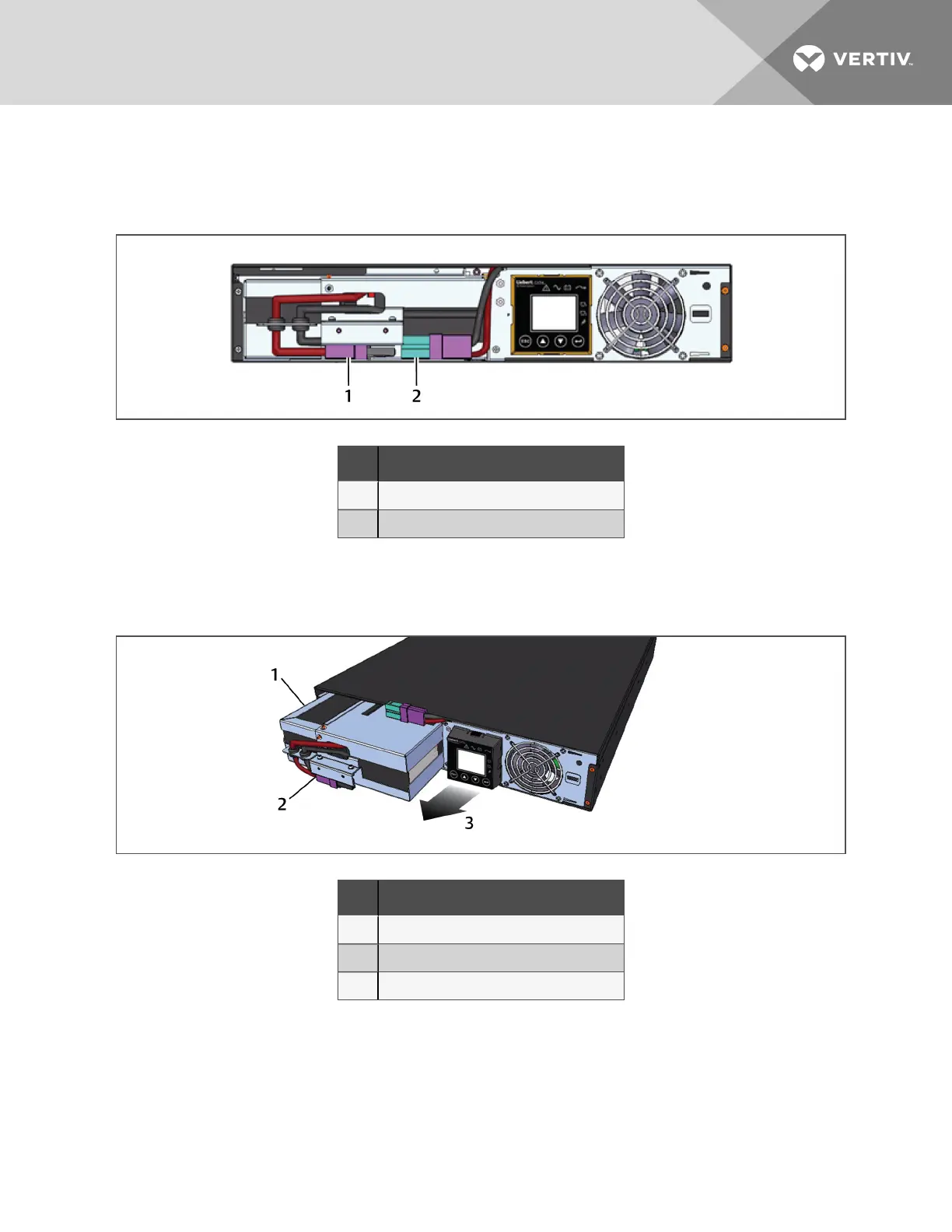
4. Gently pull the battery wire out and disconnect the battery plug and battery receptacle, as
shown in the following figure.
Figure 7.2 Disconnecting the battery plug and battery receptacle (front view)
NO. DESCRIPTION
1 Battery connector
2 Battery receptacle
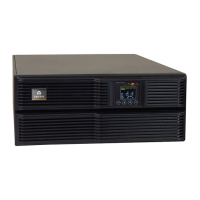
5. Grasp the battery handle, and pull the internal battery pack out of the UPS, as shown in the
following figure.
Figure 7.3 Pull out the battery
NO. DESCRIPTION
1 Internal battery pack
2 Battery handle
3 Pull battery out using handle.
6. Unpack the new internal battery pack. Take care not to destroy the packing.
Compare the new and old internal battery pack to make sure they are the same type and
model. If so, proceed with 7. If they are different, stop and contact your Vertiv representative, or
Technical Support.
7. Line up and slide in the new internal battery pack.
8. Reconnect the battery plug and battery receptacle.
7 Maintenance
45







 To Next Page