EasyManua.ls Logo

VEVOR ALK-T2 - Operation Buttons

VEVOR ALK-T2
51 pages
Print Icon
To Next Page IconTo Next Page
To Previous Page IconTo Previous Page
Loading...
- 11 -
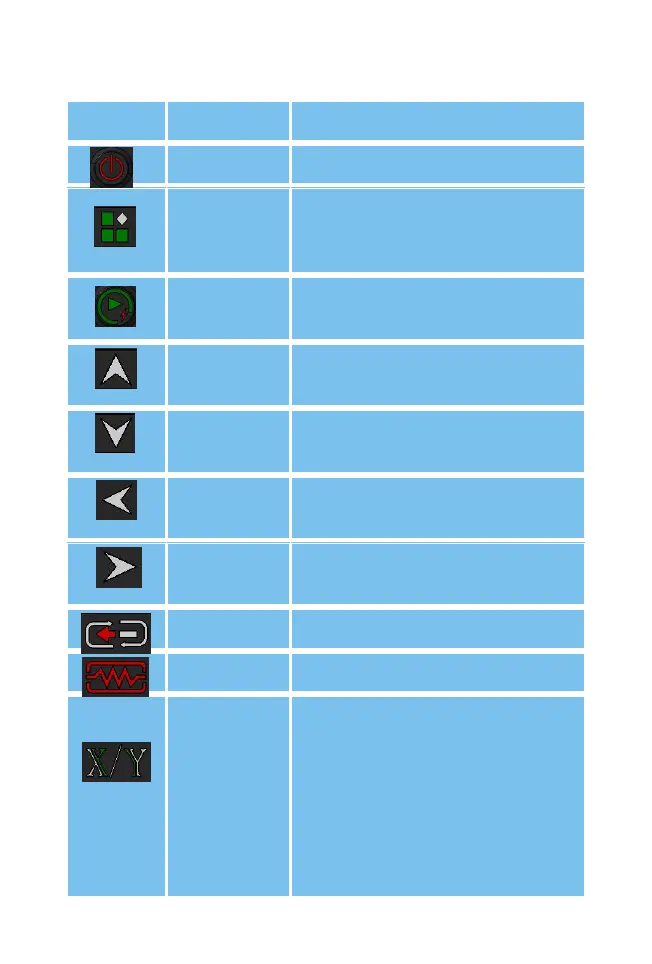
1.4 Operation buttons
Picture
Name
Button function details
Power
Device on or off
Menu
Access to the menu,
confirmation key under the
menu
Start
Start of alignment, start of
discharge fusion, etc.
Up
Menu cursor up, work screen
shortcuts
Down
Menu cursor down, work
screen shortcuts
Left
Menu cursor left, work screen
shortcuts
Right
Menu cursor right, work
screen shortcuts
Reset
Fusing interface motor reset
Heat
Start heating
X/Y
switch/exit
Switching between X and Y
fields of view in fiber optic
alignment mode, long press
for 2 seconds to quickly
switch between left and right
fiber optics in manual mode,
menu screen to return to
previous screen

Related product manuals