Chapter 4 Password Control Function (Optional)
4.1 Management options interface
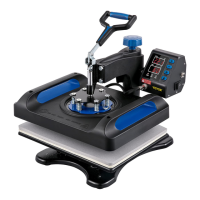
Enter the management interface through "Management
Options" under the "System Settings" interface. Functions
such as the validity period of the fusion splicer, the number of
valid times of use, and the power-on password can be
controlled through the management options.
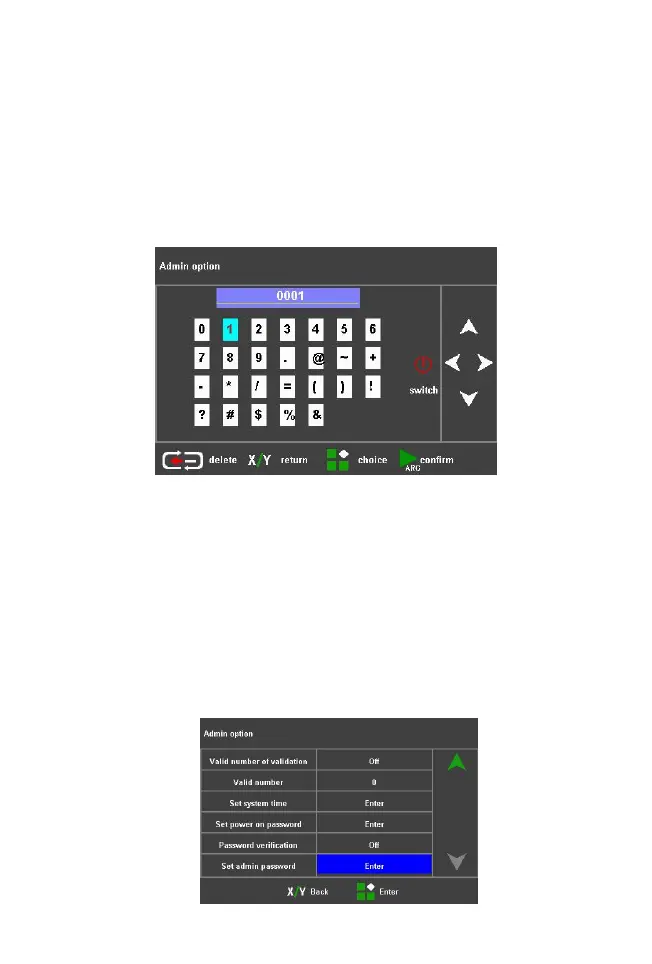
The management password supports 1~16 digits, and
the factory default value of the management password is
8888. Press the up, down, left, and right keys to adjust the
character to be input; press the menu key to use the selected
character as the current input. Press the reset button to
cancel the current input password; press the start button to
confirm the password input, if the input is correct, it will
directly enter the management interface, otherwise it will
prompt an input error. Press and hold the key continuously
for quick adjustments.



 To Next Page