2. Switch the machine ON by pressing the Green ON button.
3. If using the belt, check to ensure it is tracking properly adjust if necessary.
4. Holding the workpiece firmly, place it on the table and gently slide it into contact
with the belt or disk. DO NOT force it, a light force only is necessary.
IMPORTANT!
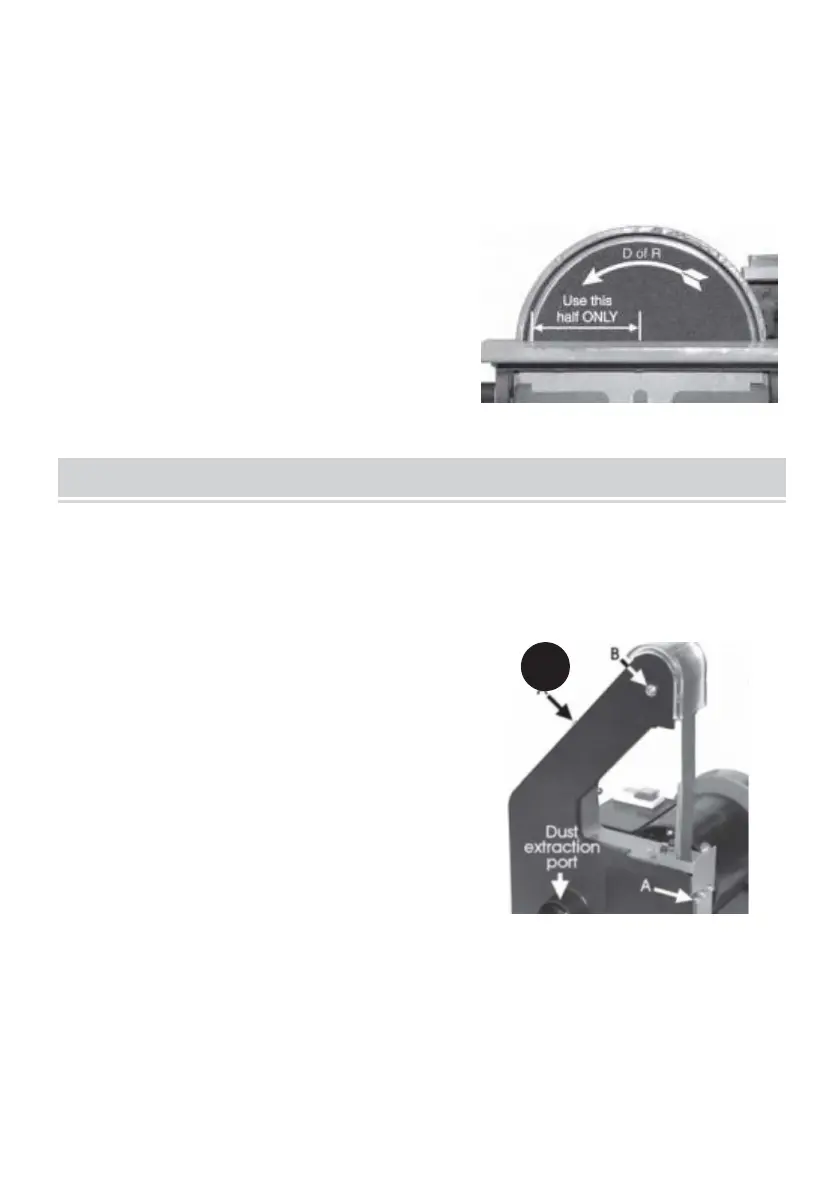
When using the sanding disk, ALWAYS use the
left half of the disk ONLY, i.e. that , side where
the direction of rotation of the disk is down
towards the table.
IMPORTANT!
Whenever making adjustments or carrying out maintenance tasks, ALWAYS
switch OFF the machine and disconnect from the power supply.
1. Changing the Sanding Belt
1. 1 Remove the belt table completely by
unscrewing and removing the table locking
lever.
1.2 Remove the two side cover securing
screws (9A), followed by the upper roller pivot
screw (9B), then pull off the side cover.
1.3 Turn Adjuster (10C) anticlockwise sufficiently for the sanding belt to be
slipped off the rollers.
1.4 Replace the sanding belt ensuring it is central about the rollers, and the
arrow (10D) is pointing down towards he table.
1.5 Turn the belt by hand and observe how it moves on the rollers, indicated by
its position on the support. This will determine whether not it is



 To Next Page