6.7.2 Mounting the block holder in the work-
ing chamber
If you only want to machine blocks in 1 block holder,
directly mounting the block holder in the working
chamber is faster than using the blank changer.
1. Open the working chamber door.
2. Open the blank holder by selecting the
depicted icon in the Machining view in
DENTALCNC.
3. Remove the blank in the blank holder if any.
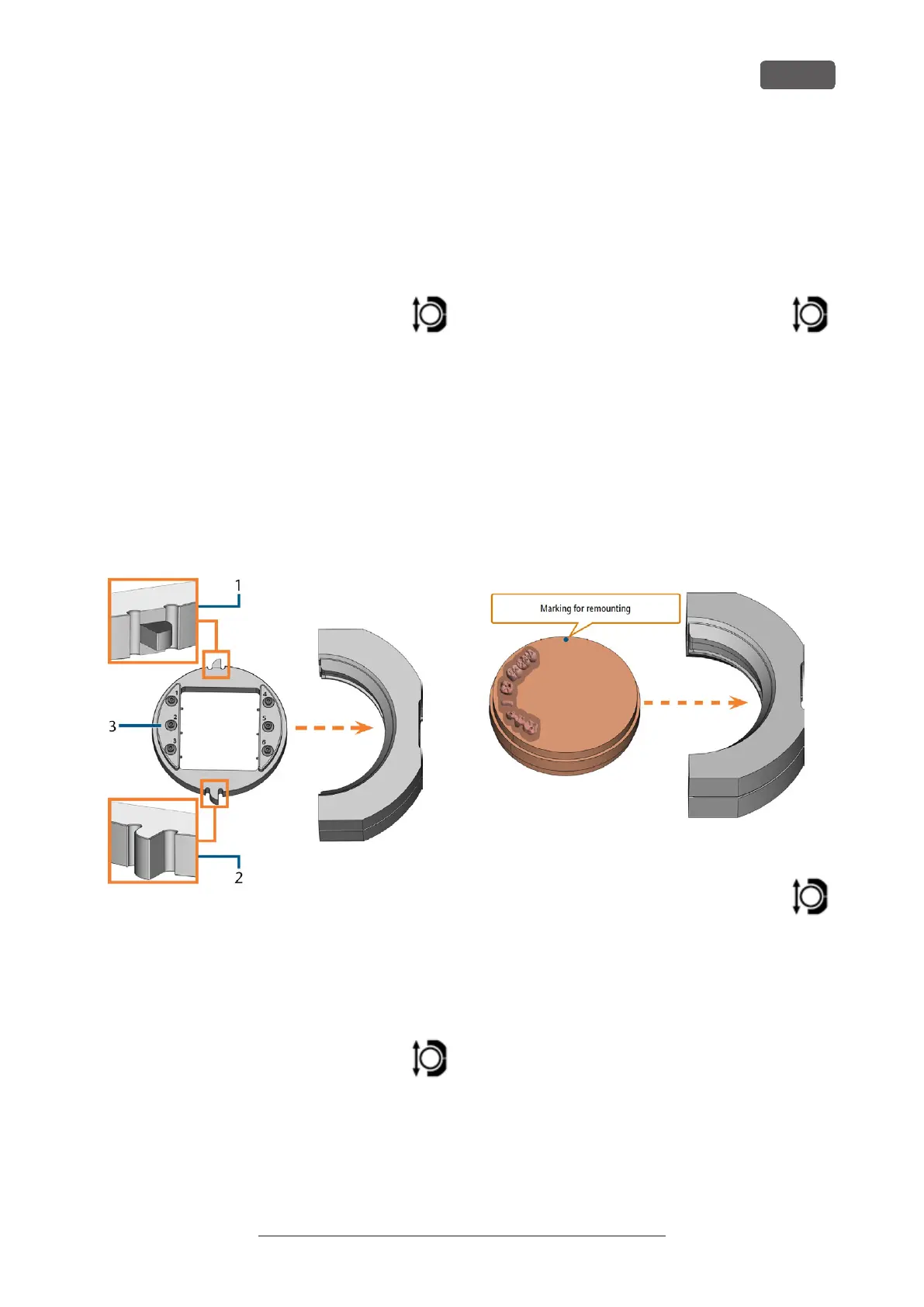
4. Correctly orient the block holder:
n
The numbers labeling the block positions
must face upwards.
n
The positioning aid with reduced height must
be positioned in the rear.
n
The positioning aid with full height must be
positioned in the front.
5. Push the block holder into the blank holder.
FIG. 48 INSERTING THE CORRECTLY ORIENTATED BLOCK HOLDER INTO
THE BLANK HOLDER
1. Rear positioning aid (reduced height)
2. Front positioning aid (full height)
3. Upper side of the block holder
6. Close the blank holder by selecting the
depicted icon in the Machining view in
DENTALCNC.
6.7.3 Mounting discs in the working cham-
ber
If you only want to machine 1 disc, directly mounting
the disc in the working chamber is faster than using
the blank changer.
1. Open the working chamber door.
2. Open the blank holder by selecting the
depicted icon in the Machining view in
DENTALCNC.
3. Remove the blank from the blank holder if any.
4. If the blank is a multilayer blank, orientate the blank
so that the top color layer is on top.
5. If the disc has been processed before, ensure the
following:
n
The original top side faces upwards.
n
If the disc has been marked for safer remount-
ing by DENTALCNC, ensure that the marking
is in the position shown below.
6. Push the disc into the blank holder.
FIG. 49 REMOUNTING AN ALREADY PROCESSED DISC TO THE BLANK
HOLDER (MARKINGS FOR SAFER REMOUNTING IN BLUE)
7. Close the blank holder by selecting the
depicted icon in the Machining view in
DENTALCNC.
R5 – Operation: Preparing jobs
EN 39
Original Operating Instructions:R5
Version: 12/16/2021



 To Next Page