6.7.7 Mounting discs & block holders to the
blank magazine
You can mount blanks and block holders to the blank
magazine while the machine is operating.
To relocate blanks to different blank magazine
positions, do not simply swap them around. The
blanks in the blank magazine must correspond
to the blanks in the virtual blank magazine in
DENTALCNC.
1. Open the multi-purpose compartment.
2. Move the desired blank magazine slot into the
change position via DENTALCNC.
3. Pull the clamping lever downwards.
FIG. 52 PULLING DOWN THE CLAMPING LEVER
4. Remove the blank from the blank changer slot if
any.
5. If you want to mount a disc of a height of 40mm,
ensure that the discs in the adjacent blank
magazine slots are of a maximum height of 25mm.
Otherwise, the disc will not properly fit into the
blank magazine.
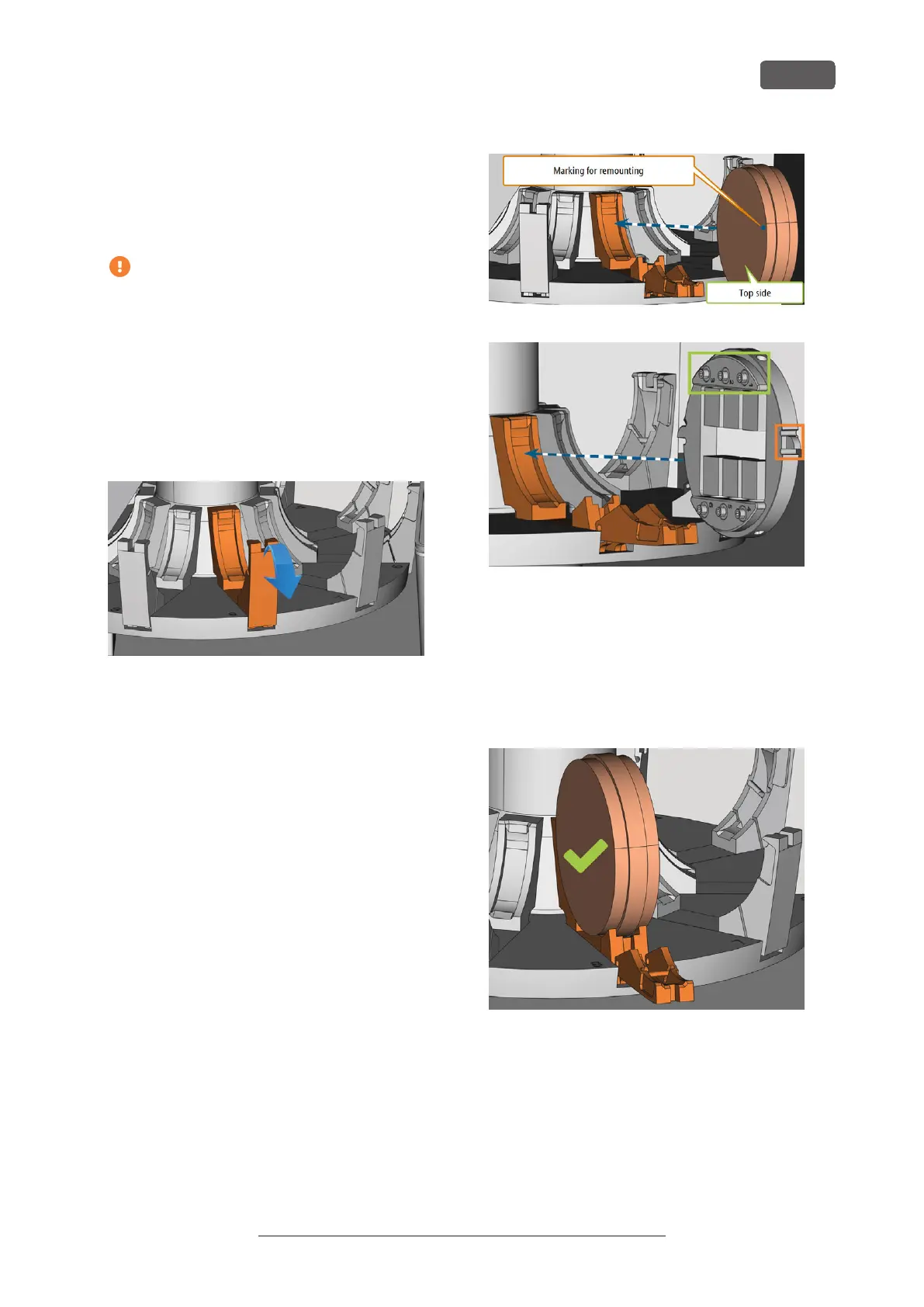
6. Correctly orientate the disc or block holder:
n
Block holder: The numbers for the block pos-
itions 1 – 3 must be on top and the pos-
itioning aid of half-height must be in front.
n
Discs: If the blank is a multilayer blank, ori-
entate the blank so that the top color layer is
on the left side. If the disc has been marked
for safer remounting by DENTALCNC, ensure
that the marking is in the position shown
below.
FIG. 53 (A) INSERTING A DISC INTO THE CHANGE POSITION; (B)
INSERTING A BLOCK HOLDER INTO THE CHANGE POSITION (BLOCK
POSITIONS 1 – 3 MARKED GREEN, FRONT POSITIONING AID MARKED
ORANGE)
7. Insert the blank or block holder into the change
position of the blank changer. Ensure that you pos-
ition it fully upright and not in a slanted position.
Otherwise, the loading process will fail.
R5 – Operation: Preparing jobs
EN 41
Original Operating Instructions:R5
Version: 12/16/2021



 To Next Page