Servicing
46
12.2 Boiler Setting
Boiler emissions:
Natural gas:
CO
2
– minimum boiler output CO
2
value – 8,5 %
– nominal boiler output CO
2
value – 8,5 %
Propane:
CO
2
– minimum boiler output CO
2
value – 9,5 %
– nominal boiler output CO
2
value – 9,5 %
When the set parameters do not correspond with the values shown above follow the instructions in the Servicing Manual.
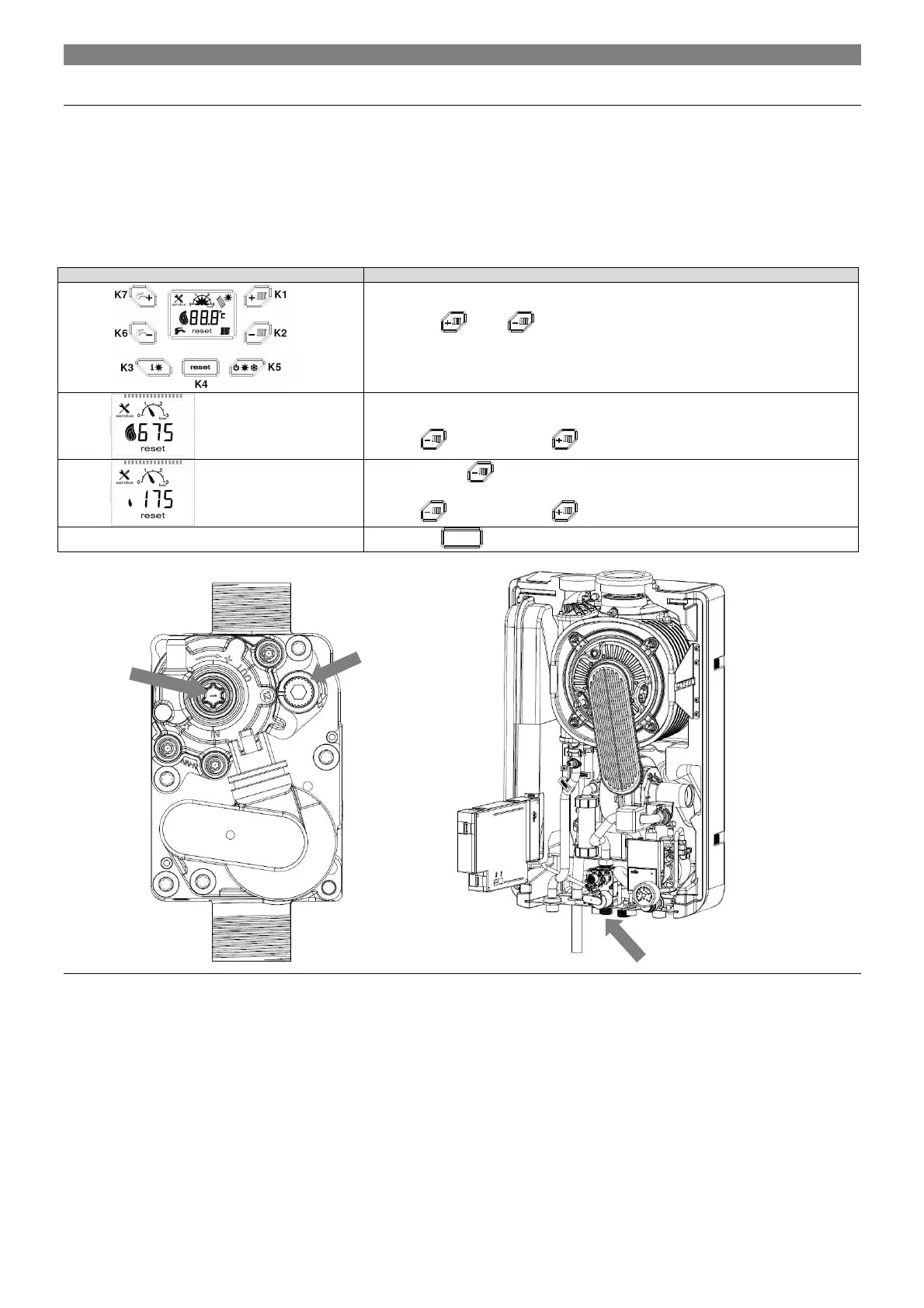
Activation of the “chimney-sweeper” function:
By pressing
and
push button for 10 seconds, is possible to enter the
chimney-sweeper function.
After 10 s to be displayed fan speed (x10).
Can adjust burning at maximum performance.
Operate
(decrease) and
(increase) pushbuttons to adjust fan speed.
By long pressing
push button the fan speed slows down to a minimum (x10).
Can adjust burning at minimum performance.
Operate
(decrease) and
(increase) pushbuttons to adjust fan speed.
By pressing
K4
push button to exit the chimney-sweeper function.
Fig. . 31 Gas valve adjusting screw
CO
2
setting at
min. power
output
CO
2
setting at
max. power
output


 To Next Page