56 OLP-87/OLP-87P
8 PROBE/PCM OPERATION
QUICKCAPTURE™ KEY
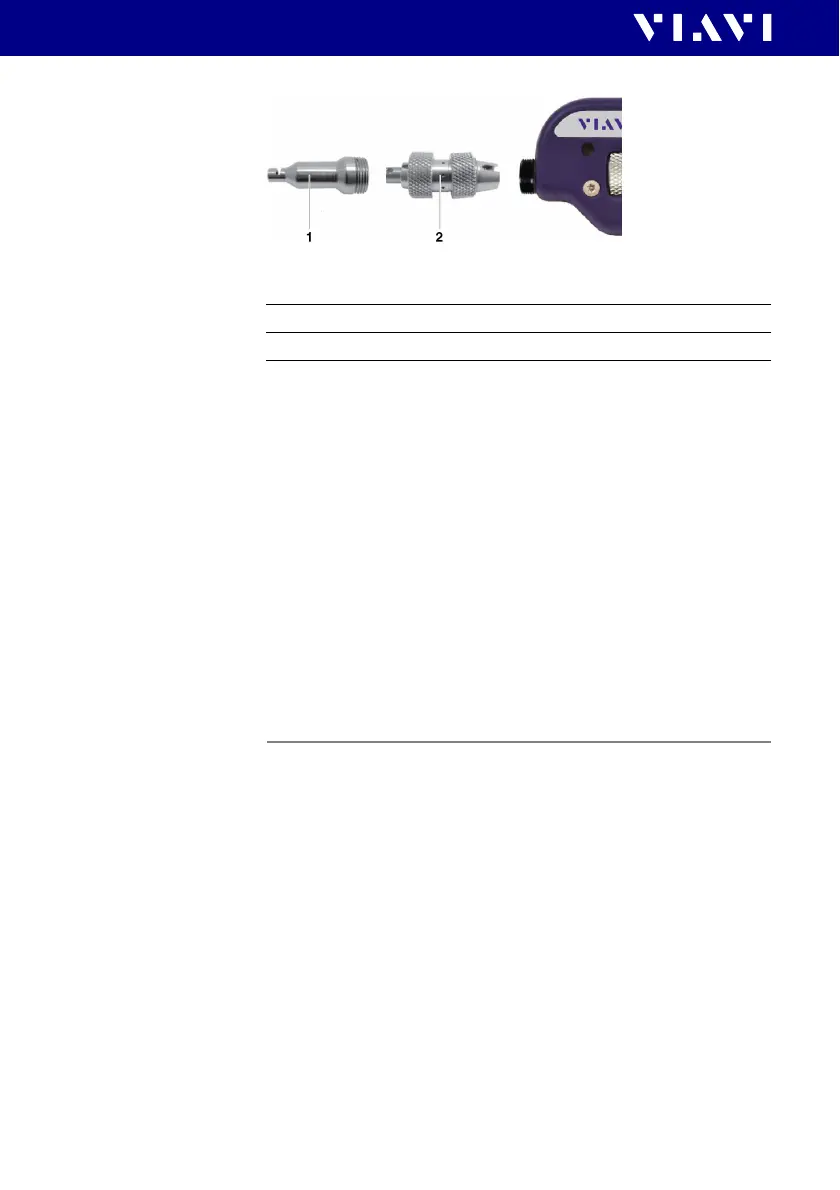
Fig. 22 FBPT series tips for the P5000i
P5000i connection
The Probe application requires a P5000i Digital Probe in order to
be fully functional (see the list of all accessories in “Digital Probe
Microscope” on page 89).
1. Plug your P5000i into an USB port.
2. Connect the P5000i with the fiber being inspected.
3. Press the
[C] key, then tap the [Probe] button or use the
arrows keys.
– or –
Press the [H] key, to toggle between the measurement view
and the inspection view.
The P5000i will display the live view.
QuickCapture™ key
In order to support different workflows the functionality of the
QuickCapture™ key is configurable. Pressing the key will either
freeze the live image or start a test:
Camera mode
Set the QuickCapture™ key on the Digital Probe to get a live
picture of the result.
NOTE: Use the Focus Control key to adjust the focus of the image.
I The Digital Probe is connected to the instrument.
1 Inspection tip
2 Barrel assembly
Test Pressing the key will automatically freeze the live
image and perform a test.
Freeze Pressing the key will automatically freeze the live
image.


 To Next Page