11
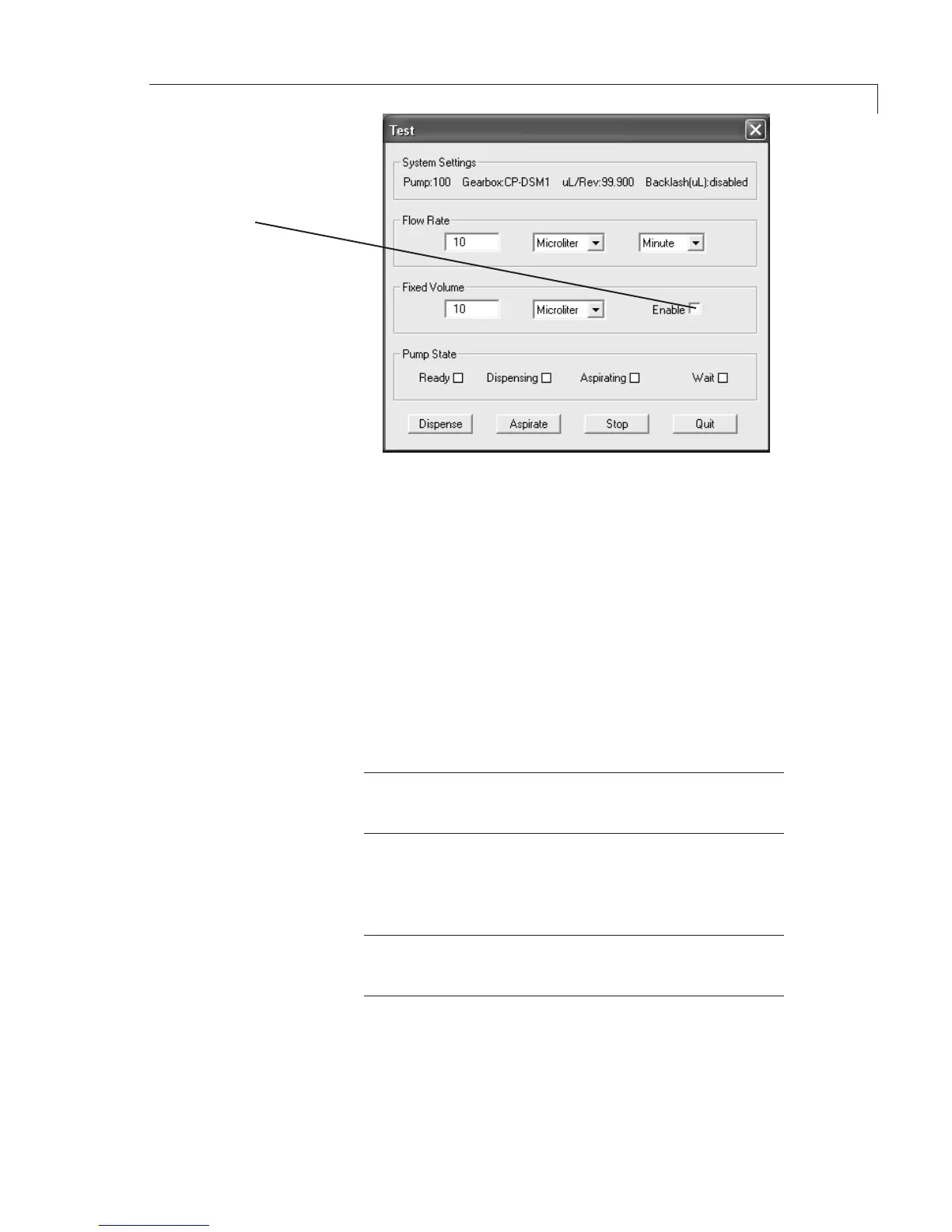
1. IfthescreeninFigure 9 is not already open, go to the main menu, and
choose Utility > Test.
2. IfthetubingIDis0.010”orless,enter
FlowRate: 200µL/min
FixedVolume: 1000µL
Click the Enable box
IfthetubingIDislargerthan0.010”,enter
FlowRate: 9000µL/min
FixedVolume: 1000µL
Click the Enable box
(In the Test Mode, user-entered flow parameters cannot be saved; when you
exit the program, these values will revert to defaults.)
NOTE:SmallerIDandlongerlengthtubingcancauseexcessive
restriction. Adjust flow rates accordingly. Maximum backpressure
is100psi.
3. ClicktheDispensebutton.Thedesignatedvolumeofisopropylalcohol
should move through the tubing and into the receiver bottle, removing
any air bubbles and priming the system. If it does, the pump is primed
and ready for use.
NOTE: If a buffer will be used, flush all the isopropyl alcohol out of
the lines by placing the inlet tube in a vessel of water, changing the
xedvolumeto2000µL,andclickingtheDispensebutton.
4. If the pump doesn’t seem to draw any isopropyl alcohol into the tubing:
(a) Check for leaks around the fittings and make sure the tubing is well
seated in the pump head.
(b) Make sure the end of the tubing is free to draw liquid into the pump.
(TIP:Cutthetipendthatgoesintotheisopropyl
alcohol reservoir at a 45° angle.)
(c) Touch the pump to make sure it is on.
Ifthepumpstilldoesn’tseemtofunctionproperly,consultthefactory.
Figure 9:PrimingthepumpintheTestMode(M6valuesshown)
CLICKTHEBOX
FOR A ONE TIME
FIXEDVOLUME
ASPIRATEOR
DISPENSE.
LEAVETHEBOX
UNCLICKEDFOR
CONTINUOUS
PUMPINGATTHE
ENTEREDFLOW
RATE.


 To Next Page