iCNC XT
3-20 INSTALLATION Manual 0-5299
3.16 Drive Configuration
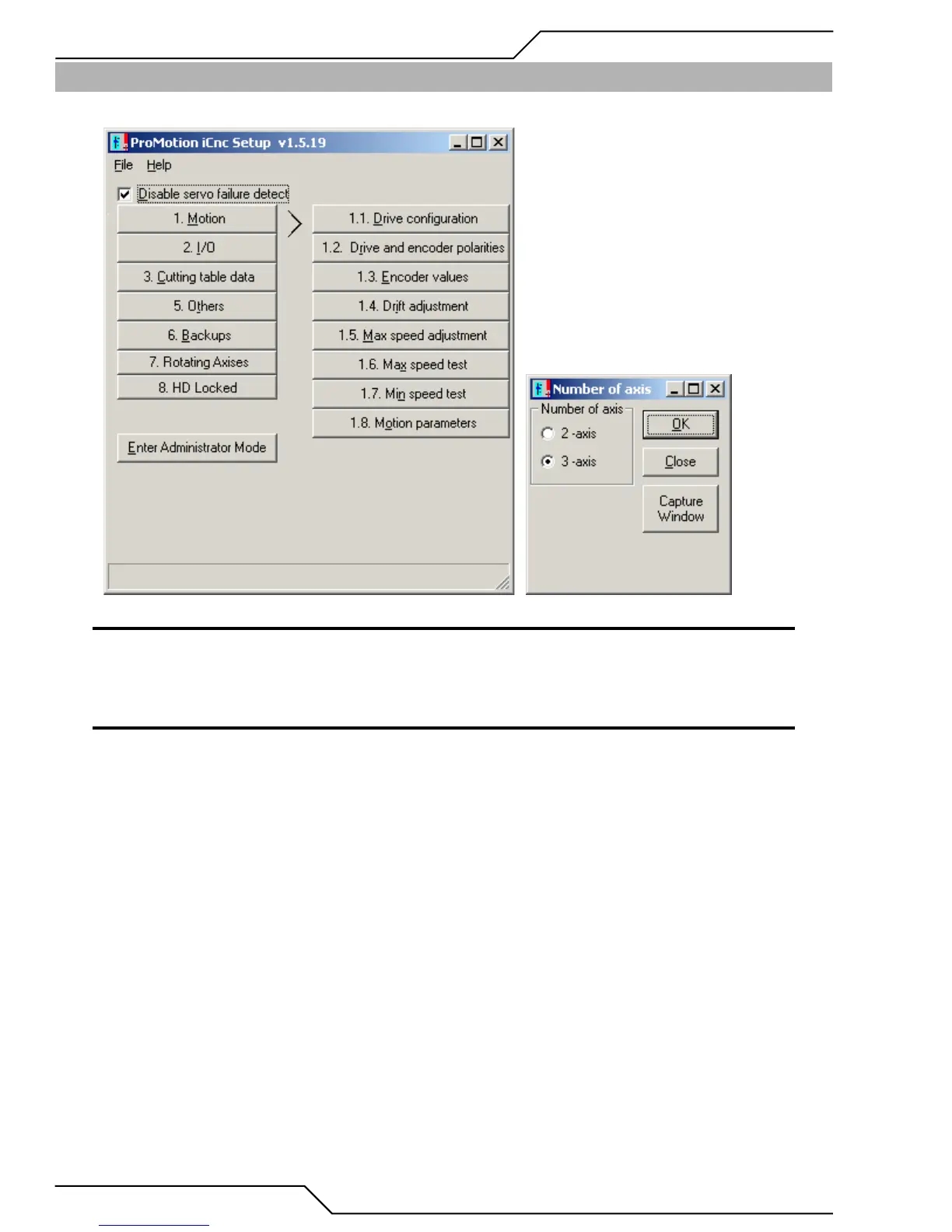
Select 1. Motion --> 1.1. Drive Configuration: choose 2 or 3 axis depending on your machine.
NOTE
You must go through each of the 8 steps in the right column, 1.1, 1.2, 1.3 etc. through 1.8..
1. Changing the drive configuration to a 3-axis system, demands doing a Total Restart to make the change valid. Follow the on-screen
prompts and wait for the system to shut down and to restart again.
NOTE
Total Restart is located in System Status --> File --> Restart System Software.
2. When the controller reboots, you will be prompted to transfer the newly modified ROBOPRM1.DAT file to the background CPU. You
this action. When completed, restart iCNC Setup as explained above.


 To Next Page