FACTORY RESET
Quickly press the multi-function button 3 times to factory reset the turntable. This will remove any
previously paired Bluetooth devices. The LED will ash blue and turntable will power off.
TROUBLESHOOTING
BLUETOOTH WILL NOT PAIR:
- Place your Bluetooth device closer to the turntable during initial pairing.
- Ensure your Bluetooth device has not paired to its maximum number of devices.
TURNTABLE WILL NOT SPIN OR SPINNING IS INCONSISTENT:
- Ensure the belt is properly installed around the motor spindle.
- Ensure the belt is not twisted.
CAN’T HEAR AUDIO:
- If using Bluetooth, ensure the volume is turned up on your Bluetooth device.
- If using RCA output, ensure you are using the correct pre-amp output setting.
REMOVING THE STYLUS FROM THE TONEARM:
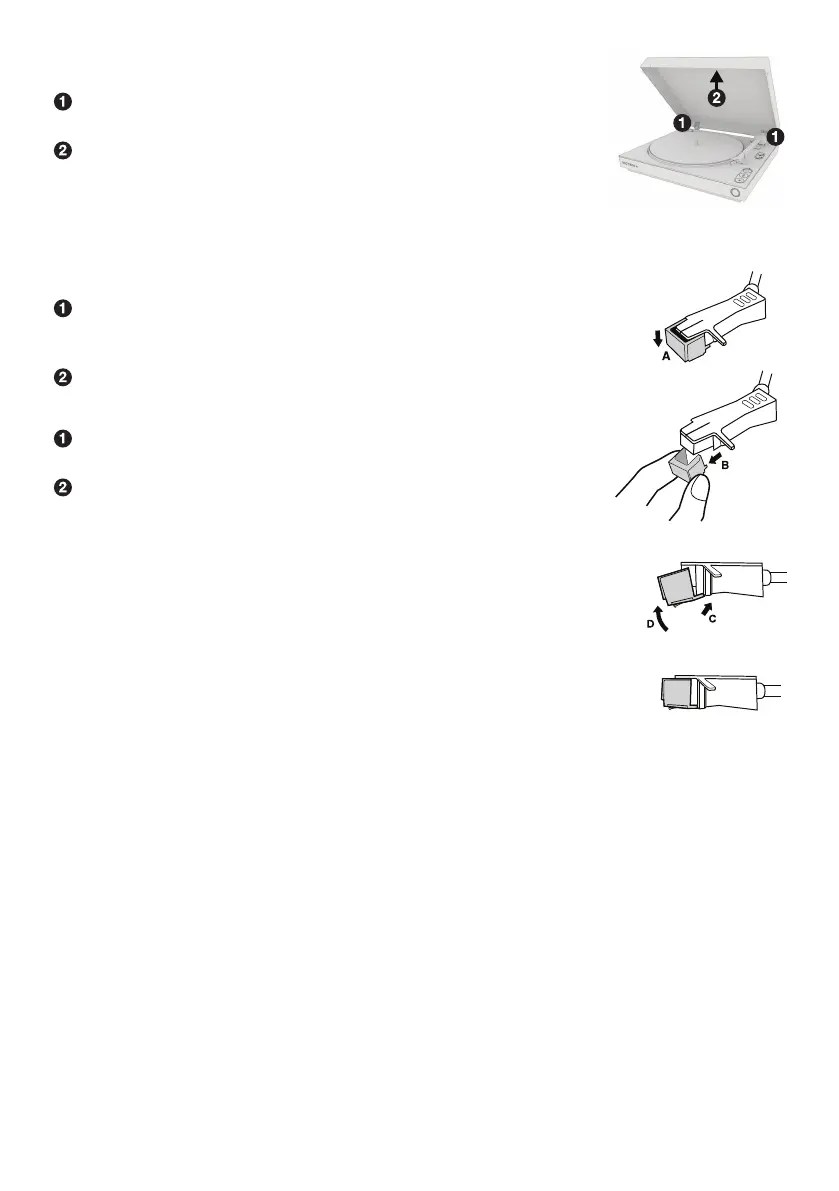
Place your ngers at the tip of the stylus and push down to the direction “A”.
WARNING: When applying force to stylus, too much may damage
or break the cartridge.
Pull the stylus out toward the direction “B”.
INSTALLING THE STYLUS: (Replacement Stylus # ATN3600L)
Hold the tip of the stylus and insert the other edge by pressing
toward direction “C”.
Push the stylus up toward direction “D” until it locks at the tip.
CAUTION:
-Do not bend or force the stylus into the cartridge.
-Do not touch the stylus needle to avoid injury to your hand.
-Turn off the unit’s power before you replace the stylus.
-Keep out of reach of children.
NOTE: The stylus should last about 300 hours under normal use.
It is recommended that the stylus be replaced as soon as you notice
a change in sound quality. 78 RPM records may accelerate stylus wear
and may have to be changed sooner.
REPLACING THE STYLUS
With the dust cover open, rmly grasp both sides of the
dust cover near the hinges.
Pull the dust cover straight up and away from the turntable,
hinges will come off with dust cover.
REMOVING THE DUST COVER


 To Next Page