CONNECT TO SPEAKERS
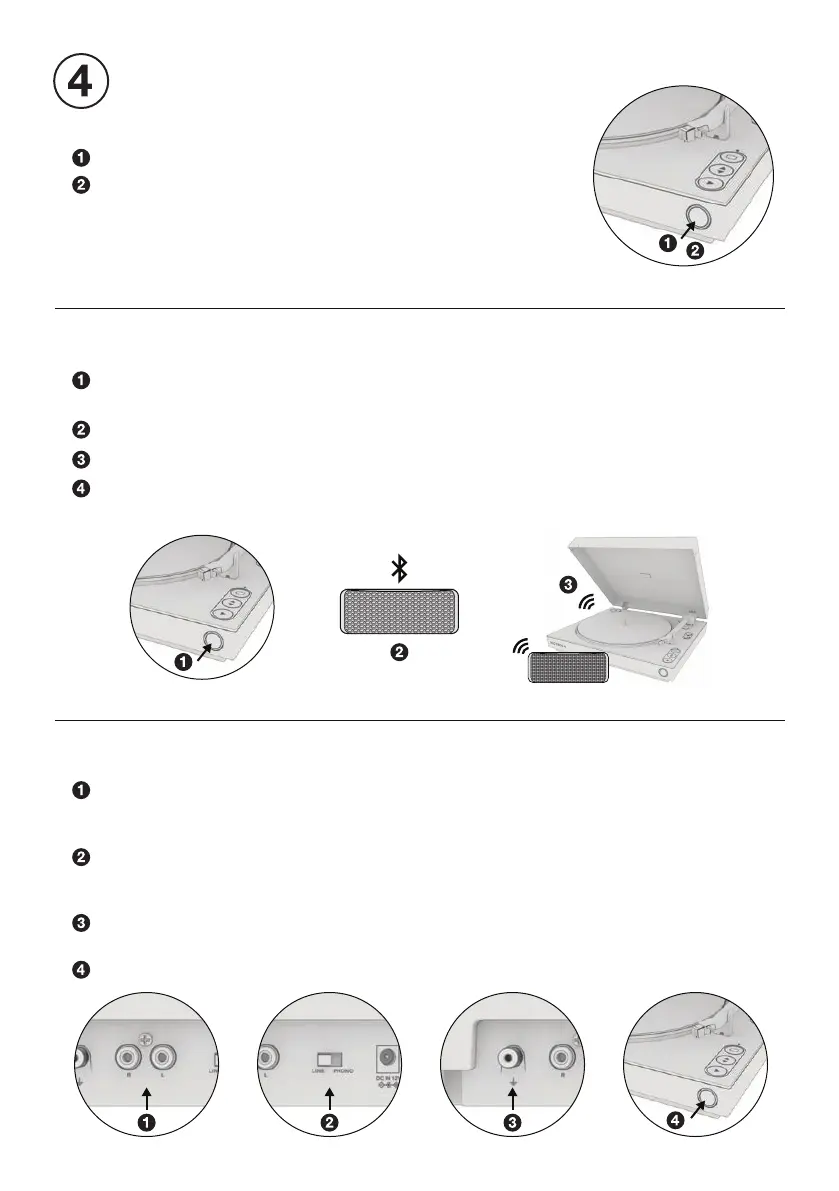
Press and hold to power ON / OFF.
Single press to switch output modes:
RCA OUTPUT - LED: Flashes white, then solid white.
VINYLSTREAM
™
(BLUETOOTH OUTPUT) - LED: Flashes blue.
Note: When powering back ON, the turntable will return to the
last used output mode.
MULTI-FUNCTION BUTTON
Enter VINYLSTREAM (Bluetooth output) mode and turntable will
automatically enter pairing mode. LED: Flashes blue.
Make sure your Bluetooth device is in pairing mode.
Turntable will automatically pair to your Bluetooth device.
Once paired, LED will turn solid blue for one second, then turn solid white.
Note: Volume is controlled by Bluetooth device.
PAIR BLUETOOTH SPEAKER OR HEADPHONES
CONNECT RCA OUTPUT
Connect the turntable to external speakers or receiver using the included RCA cable.
RED PLUG - Insert into the RED (RIGHT) JACK
WHITE PLUG - Insert into the WHITE (LEFT) JACK
Set pre-amplier switch to the correct output:
LINE - If connecting to a line-level input.
PHONO - If connecting to an phono-level input.
For PHONO output, it is recommended to use a grounding wire (not included)
to connect the ground pin between the turntable and the external component.
Enter wired (RCA) output mode. LED: Flashes white, the solid white.


 To Next Page