2. Introduction
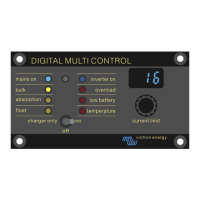
The Digital Multi Control 200/200A enables remote monitoring and control of inverter/charger systems in stand-alone, parallel,
and 2- or 3-phase configurations. It seamlessly integrates with the helm, dashboard or control panel of your vessel, vehicle, or
home system.
Note: "System" refers to interconnected inverter/chargers through RJ45 UTP cables.
2.1. Compatibility
The control panel is compatible with these inverter/charger models:
• MultiCompact.
• MultiPlus, MultiPlus-II and MultiPlus-II GX.
• Quattro and Quattro-II.
• EasySolar and EasySolar-II GX.
• Legacy (pre-VE.Bus) Multi, MultiCompact, MultiPlus and Quattro (2008 and earlier).
2.2. Quick start guide
Installing the Digital Multi Control panel is straightforward. Simply connect the control panel to the inverter/charger system using
an RJ45 UTP Cable. In most cases, no further setup is needed.
For expedited installation instructions, find your system type in the list below and click the appropriate link:
System types:
• MultiPlus system with 1 AC source [4].
• Quattro system with 2 AC sources [4].
• MultiPlus system with 2 AC sources and transfer switch [4].
• MultiPlus system with 2 AC sources [4].
• Legacy pre-VE.Bus systems [11].
For comprehensive details about the control panel, including features, configuration, and operational information, consult the
complete manual.
2.3. What's in the box
• Digital Multi Control 200/200A.
• Four mounting screws.
Digital Multi Control
Page 2 Introduction


 To Next Page
 Loading...