EasyManua.ls Logo

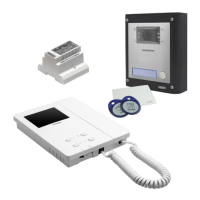
Videx VRVK Series - User Manual

Videx VRVK Series
16 pages
Print Icon
To Next Page IconTo Next Page
Loading...
66251130 - V2.0 - 31/05/18
- 1 -
6200 Series
Art.6256 - Installation instructions
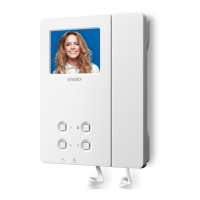
Art.6256 3.5" colour videophone
27 mm 144 mm
182 mm
Fig. 1
+V
-
1
2
V1
V2
24Vac
0Vac
SW1
SW2
PT3 PT2
PT1
SW1
LB
SB
LD
2A
3A
4A
5A
A
D
B
C
E
GF
Fig. 2
DESCRIPTION
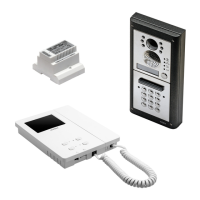
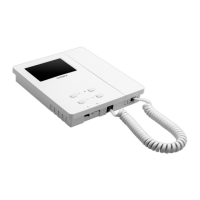
Surface mount videophone incorporating a 3.5” Hi-Res full
colour active matrix LCD monitor specic for “6 wire videokit
(VK4K, VRVK and VK8K range). It includes 4 buttons: camera re-
call”, “open door , “service” and “privacy”.
2 LED’s* indicate the privacy activated and open door. Program-
mable privacy duration and number of rings. Intercommunicat-
ing call and door call. Adjustments: call tone volume switch (3
levels), picture hue, contrast and brightness.
* The operation of some LED’s and the functions described may require additional cabling
LEGEND
A
Connection terminals
B
8 Way dip switch bank
C
2 Way dip switch bank
D
Contrast adjustment trimmer
E
Hue adjustment trimmer
F
Brightness control
G
Call tone volume switch
PUSH BUTTONS
Service push button
Shorts the “SB terminal to GROUND (open collector 24Vdc 100mA max) while the button remain pressed.
Camera recall button
Pick up the handset then press the button (Press once for door/gate 1, twice for 2 and so on up to a maximum of 4 entranc-
es): the relevant LED switches ON and the monitor switches on showing the video from the door panel. The speech is also
live and the door can be opened by pressing .
Door-open / intercommunicating call button
With the handset lifted and speech lines open to the entrance panel, press this button to open the door. If the terminal “LD”
is properly connected the relevant LED remains switched ON until the door is closed.
Intercommunication only works when the system is in stand-by condition.
Switch 4 of the SW1 dip-switch selects the type of intercommunication:
OFF Intercommunication between two apartments - pick up the handset and press the key button to call the videophone(s)
in the other apartment. A busy tone will signal that the other videophone is in conversation with the door station and
so cannot be called.
ON Intercommunication between videophones in the same apartment
- pick up the handset and press the key button one, two, three or four times to call videophone with extension address 1, 2,
3 or 4 (Set on dip-switch 2&3 of SW1).
Any intercommunicating conversation is always interrupted by an external call (i.e. External calls take priority).
Privacy ON-OFF button
When the system is in stand-by, the pressing of this button activates (LED switched on) or disables (LED switched o) the
“privacy” service. The service is automatically disabled when the programmed privacy time expires. When the service is
enabled the videophone does not receive calls.

Other manuals for Videx VRVK Series

Questions and Answers

  • P
    pfoxSep 15, 2025
    How to increase speech volume on Videx VRVK?
    • C
      Calvin PhillipsSep 15, 2025
      If you're experiencing low speech volume on your Videx Intercom System, the volume trimmers of the door station may require adjustment. Adjust the trimmers until the required volume is reached.
  • S
    Steven GreenAug 25, 2025
    Why is the intercommunicating call not working on my Videx Intercom System?
    • M
      Megan CarterAug 25, 2025
      If the intercommunicating call feature is not working on your Videx Intercom System, it could be because the ”Key” button was pressed a number of times different from the videophone address value. To solve this, check the address of the videophone you are calling and try again, pressing the “Key” button the correct number of times.
  • D
    Danielle RyanAug 26, 2025
    What to do if local call does not work on Videx VRVK Intercom System?
    • J
      Jack WhiteAug 26, 2025
      If local calls are not working on your Videx Intercom System, it could be due to a wrong connection or a broken call button. To resolve this, check the connection or replace the button.
  • D
    Dylan HuntAug 26, 2025
    How to fix Videx Intercom System when door station doesn't call extension?
    • D
      Daniel Dunlap DVMAug 27, 2025
      If your Videx Intercom System's door station isn't calling the extension and the bell LED is on for 2 seconds, the issue could stem from several causes: * Incorrect wiring between the door station and videophone: Check the 6 common wire connections, especially wire “1” (speech line/data). * Insufficient cable size: Increase cable size or double up using two wires for each connection. * Incorrectly programmed videophone address: Verify the videophone address on the dip-switches. * Address change without system reboot: Power down the system and then power it up again to detect the new videophone address.
  • J
    Jessica WilliamsSep 16, 2025
    What to do if Videx Intercom System external call works but communication fails?
    • C
      Christopher HernandezSep 16, 2025
      If your Videx Intercom System's external call works but the communication fails when answered, the cause may be that the cable size is too small. The suggested solution is to increase the cable size or double up using two wires for each signal.
  • M
    Mrs. Makayla GreenSep 23, 2025
    How to fix low volume of speech on Videx VRVK Intercom System?
    • T
      Tiffany RoweSep 23, 2025
      If you are experiencing low volume of speech on your Videx Intercom System, it could be that the volume trimmers of the door station require adjustment. Adjust the trimmers until the required volume is reached.
  • M
    Mark AyalaSep 7, 2025
    Why can't I open the door on my Videx Intercom System even though the key LED is on?
    • W
      Wendy HarmonSep 8, 2025
      If you cannot open the door during a conversation on your Videx Intercom System, but the key LED on the door station activates, there could be a few reasons: * The J2 jumper might be in the wrong position. * The electric lock wires might be unconnected or shorted. * The electric lock type might be incorrect. To resolve this: 1. Check the J2 position on the door station. 2. Check the electric lock wire connections. 3. Ensure the electric lock type (AC or DC) is suitable for the chosen J2 position.
  • D
    Dean DuncanSep 8, 2025
    Why is speech only working from outside to inside on my Videx VRVK?
    • L
      lindsay58Sep 9, 2025
      If you can only hear speech from outside to inside on your Videx Intercom System, it is possible that wire “2” is broken or shorted. You should check the connection of wire “2”.
  • C
    christopher18Sep 2, 2025
    How to fix bad video quality on Videx VRVK Intercom System?
    • T
      Tommy JimenezSep 2, 2025
      If the video shown on the monitor of your Videx Intercom System is of bad quality and the image is distorted or double, it could be due to several reasons: * V1, V2 signals unconnected, reversed, or shorted. * The switches of the two-way dip-switch are not both in the ON position. * V1, V2 of the last Art. 316N (if present) not closed with a 75 Ohm resistor. To solve this: * Check that the wires are not broken or shorted. * Set both switches to the ON position. * Use 2x 75 Ohm resistors to connect V1 & V2 to 0V.
  • D
    David KennedyAug 31, 2025
    How to fix Videx VRVK Intercom System when it's not possible to open the door during conversation?
    • S
      Steven MckenzieAug 31, 2025
      If you can't open the door during a conversation on your Videx Intercom System, the cable size might be too small. Increasing the cable size or doubling up using two wires for each signal may resolve this issue.

Videx VRVK Series Specifications

General IconGeneral
Protection ClassIP54
Audio Frequency Response300Hz - 3.4kHz
Number of Buttons1
Operating Voltage12V DC
Operating Temperature-20°C to +50°C
Microphone Sensitivity-40dB

Related product manuals