EasyManua.ls Logo

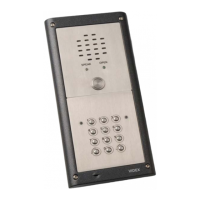
Videx VR4KGSM-1 - User Manual

Videx VR4KGSM-1
60 pages
Print Icon
To Next Page IconTo Next Page
Loading...
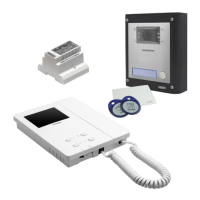
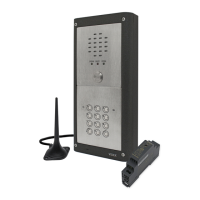
VR GSM AUDIO INTERCOM KIT
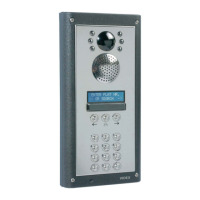
4000 Series Vandal Resistant GSM Audio Intercom
with Proximity Facility
66250675-EN
V1.0 - 05/09/17
We recommend
This equipment is installed by a
Competent Electrician, Security or
Communications Engineer.
Technical Manual
ENG
GSMVRK
GSMVRKC

Questions and Answers

  • C
    clinemichelleAug 14, 2025
    What to do if my Videx Intercom System does not respond to SMS messages?
    • P
      Pamela HernandezAug 14, 2025
      If your Videx Intercom System isn't responding to SMS messages, first ensure the SIM card has an SMS service centre number stored by checking it in a mobile phone. If you're unsure, contact your SIM card provider. Also, verify that the number you're sending the message to is correct, matching the mobile number of the SIM card in the GSM intercom panel. If problems persist, try resetting the 4-digit master code to 1111 by powering up with the blue (c) and yellow (6) wires shorted.
  • J
    Joseph TurnerAug 17, 2025
    Why can't I open the gate/door from the telephone during a call with my Videx VR4KGSM-1 Intercom System?
    • J
      John SloanAug 17, 2025
      If you're unable to open the gate or door from your telephone during a call with your Videx Intercom System, the ED# function may not be enabled. Send the SMS command 1111ED#? to the GSM intercom to check its status. If DTMF tones aren't working reliably, send the SMS command 1111AT1”AT#DTMFCFG=8,2500,1500”? to the GSM intercom.
  • J
    Jennifer CarpenterAug 20, 2025
    Why is there interference on the speech on my Videx VR4KGSM-1?
    • W
      Wendy EllisonAug 21, 2025
      Interference on speech in your Videx Intercom System can occur due to several reasons. It could be that the signal strength is too low, causing the GSM module to increase its power and interfere with speech circuits. Check the signal strength 1111SIG? and consider relocating the antenna or using a more powerful one. Also, ensure antenna cables aren't running close to power supply cables or microphone wires. Poor coverage from your current service provider could also be the culprit; try a different SIM card from another provider.
  • K
    Kevin PatelAug 25, 2025
    Why does my Videx GSM intercom not respond to SMS messages, but all other functions appear to operate ok?
    • T
      thomas08Aug 25, 2025
      If your Videx GSM intercom isn't responding to SMS messages but other functions work, the SMS messaging input method on your smartphone might be the issue. Check that it is not set to UNICODE; instead, use GSM alphabet or Automatic.
  • S
    Shawn BellAug 27, 2025
    How to fix speech echoes and feedback on Videx VR4KGSM-1 Intercom System?
    • M
      Miss Alicia MarshallAug 27, 2025
      To address speech echoes and feedback on your Videx Intercom System: * Try lowering the speaker volume using the dip-switches on the back of the GSM intercom. * Adjust the volume using the programmable settings during a call. Also, check that the microphone is correctly fitted in the intercom panel and that the mic hole is not blocked.
  • R
    Rodney VillarrealAug 30, 2025
    What to do if my Videx Intercom Panel repeatedly beeps twice?
    • M
      Margaret WestAug 31, 2025
      If your Videx Intercom Panel repeatedly beeps twice, check that the power supply has adequate voltage. You can also try a full reset by powering up with the violet (d) and yellow (6) wires shorted, and try a different SIM card. Note that the GSM intercom module itself may have a fault.
  • S
    Samuel WallaceSep 2, 2025
    What does it mean when a long beep is heard when the button is pressed on Videx Intercom System?
    • M
      Michael KelleySep 3, 2025
      If you hear a long beep when the button is pressed on your Videx Intercom System, it means there is no telephone number set up for that button. Check the programming. Also, check the SIM card is fitted correctly.
  • E
    Elizabeth ParkSep 6, 2025
    Why does the call keep dropping out on my Videx VR4KGSM-1?
    • R
      Robert TaylorSep 6, 2025
      To stop the call from dropping out on your Videx Intercom System, you can increase the call time (SPT) in programming. Also, check the signal strength and, if necessary, move or change the antenna or try a different SIM card provider.
  • M
    Melissa QuinnSep 9, 2025
    Why am I getting ERROR message returned in SMS when programming my Videx VR4KGSM-1 Intercom System?
    • K
      kevin41Sep 10, 2025
      If you're getting an ERROR message via SMS when programming your Videx Intercom System, or no SMS is returned, double-check the message you sent against the examples, paying attention to common errors such as using two apostrophe marks side by side instead of “ or using lower case letters instead of upper case.

Summary

Introduction

System Introduction

Details the features and capabilities of the 4000 series vandal resistant GSM system.

Precautionary Advice

Important safety and installation tips to ensure correct setup and operation.

Technical Information

VR4 KGSM Module Overview

Diagram showing the layout of connections and controls on the VR4KGSM module.

Terminal and Harness Connections

Detailed explanation of all terminal connections and harness interfaces.

VR4 KGSM Technical Specification

Key technical specifications including voltage, current, dimensions, and operating temperature.

VR4 KCLM-1 Programming Guide

Step-by-step guide for initial programming of the VR4KCLM-1 codelock via keypad.

Re-programming the Codelock

Instructions on how to change existing access codes and relay times for the codelock.

Wiring Diagrams

GSMVRK Wiring Connections

Wiring diagram for GSMVRK-1 / GSMVRK-1S audio kits.

GSMVRKC Wiring Connections

Wiring diagram for GSMVRKC-1 / GSMVRKC-1S audio kits.

USB Connection

PC Connections and Software

Instructions for connecting the GSM module to a PC for programming and data download.

General Directions for Installation

General Installation Notes

Essential precautions and guidelines for a safe and correct installation.

Mains Connection and Safety

Guidelines for safe mains power connection, including circuit breaker requirements.

Power Supply Installation

Step-by-step instructions for fitting the 12Vdc power supply unit.

Fitting the SIM & Connecting Power

SIM Card and Power Connection

Step-by-step guide for installing the SIM card and connecting the power supply.

Reset Procedure

Resetting GSM Module to Factory Defaults

Overview of the two reset options available for the GSM module.

Resetting Master Code

Procedure to reset only the master code to the factory default.

Full System Reset

Procedure to reset all settings, including stored user information.

4000 Series Back Box Installation

Installing a Surface Mount Door Station

Step-by-step guide for mounting the door station using a surface back box.

Installing a Flush Mounting Door Station

Step-by-step guide for installing the door station using a flush back box.

Programming the GSM Intercom

Programming by Text Message

Explains how to configure the GSM intercom using SMS text commands.

Storing Dial-In Door Release Numbers

Programming numbers for the dial-in door release feature.

System Operation

Door;Gate Release

How to activate the door/gate release relay, including latching.

Using the Proximity Reader

Instructions on how to use the proximity reader with programmed fobs/cards.

User Commands

Troubleshooting

System Checks and Testing

A diagnostic table to help identify and resolve common installation and system issues.

Troubleshooting SMS and DTMF Errors

Guidance on resolving issues with SMS messages and DTMF tone recognition.

Videx VR4KGSM-1 Specifications

General IconGeneral
TypeGSM Intercom
ModelVR4KGSM-1
ManufacturerVidex
Communication TypeGSM
GSM SupportYes
SIM Card Slots1
Door ReleaseYes
Relay Outputs2
Power Supply12V DC
Operating Temperature-20°C to +55°C
Number of apartments1
Night VisionYes

Related product manuals