EasyManua.ls Logo

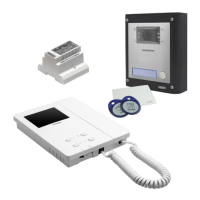
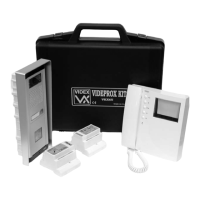
Videx VK4KC - User Manual

Videx VK4KC
36 pages
Print Icon
To Next Page IconTo Next Page
Loading...
66250457-EN - V5.1 - 31/08/20
VIDEOKIT
VK4K/6256 SERIES
“6 Wire bus one way, two way videokit
Installation handbook
VK4KR04A
VK4KXR04A
VK4KCRev.0.5
6256
We recommend
This equipment is installed by a
Competent Electrician, Security or
Communications Engineer
.

Questions and Answers

  • D
    Dennis ReidSep 15, 2025
    How to increase speech volume on Videx VK4KC?
    • C
      Carolyn NguyenSep 15, 2025
      If you're experiencing low speech volume on your Videx Intercom System, the volume trimmers of the door station may require adjustment. Adjust the trimmers until the required volume is reached.
  • L
    Laura HallAug 25, 2025
    Why is the intercommunicating call not working on my Videx VK4KC?
    • S
      Scott JamesAug 25, 2025
      If the intercommunicating call feature is not working on your Videx Intercom System, it could be because the ”Key” button was pressed a number of times different from the videophone address value. To solve this, check the address of the videophone you are calling and try again, pressing the “Key” button the correct number of times.
  • G
    gonzalezkyleAug 25, 2025
    What to do if local call does not work on Videx VK4KC?
    • S
      Stephanie Bond MDAug 26, 2025
      If local calls are not working on your Videx Intercom System, it could be due to a wrong connection or a broken call button. To resolve this, check the connection or replace the button.
  • G
    gbradyAug 26, 2025
    How to fix Videx VK4KC when door station doesn't call extension?
    • C
      christopher76Aug 27, 2025
      If your Videx Intercom System's door station isn't calling the extension and the bell LED is on for 2 seconds, the issue could stem from several causes: * Incorrect wiring between the door station and videophone: Check the 6 common wire connections, especially wire “1” (speech line/data). * Insufficient cable size: Increase cable size or double up using two wires for each connection. * Incorrectly programmed videophone address: Verify the videophone address on the dip-switches. * Address change without system reboot: Power down the system and then power it up again to detect the new videophone address.
  • K
    Kevin MartinezSep 16, 2025
    What to do if Videx Intercom System external call works but communication fails?
    • S
      Samantha WatkinsSep 16, 2025
      If your Videx Intercom System's external call works but the communication fails when answered, the cause may be that the cable size is too small. The suggested solution is to increase the cable size or double up using two wires for each signal.
  • D
    Dana MaddenSep 23, 2025
    How to fix low volume of speech on Videx VK4KC Intercom System?
    • L
      lindabeckerSep 23, 2025
      If you are experiencing low volume of speech on your Videx Intercom System, it could be that the volume trimmers of the door station require adjustment. Adjust the trimmers until the required volume is reached.
  • J
    Jeremy CooperSep 7, 2025
    Why can't I open the door on my Videx Intercom System even though the key LED is on?
    • J
      Jennifer HernandezSep 8, 2025
      If you cannot open the door during a conversation on your Videx Intercom System, but the key LED on the door station activates, there could be a few reasons: * The J2 jumper might be in the wrong position. * The electric lock wires might be unconnected or shorted. * The electric lock type might be incorrect. To resolve this: 1. Check the J2 position on the door station. 2. Check the electric lock wire connections. 3. Ensure the electric lock type (AC or DC) is suitable for the chosen J2 position.
  • J
    Justin HansonSep 8, 2025
    Why is speech only working from outside to inside on my Videx VK4KC?
    • N
      Natasha MercadoSep 8, 2025
      If you can only hear speech from outside to inside on your Videx Intercom System, it is possible that wire “2” is broken or shorted. You should check the connection of wire “2”.
  • S
    swardSep 2, 2025
    How to fix bad video quality on Videx VK4KC?
    • L
      Lindsay MartinSep 2, 2025
      If the video shown on the monitor of your Videx Intercom System is of bad quality and the image is distorted or double, it could be due to several reasons: * V1, V2 signals unconnected, reversed, or shorted. * The switches of the two-way dip-switch are not both in the ON position. * V1, V2 of the last Art. 316N (if present) not closed with a 75 Ohm resistor. To solve this: * Check that the wires are not broken or shorted. * Set both switches to the ON position. * Use 2x 75 Ohm resistors to connect V1 & V2 to 0V.
  • E
    Elizabeth ClaytonAug 31, 2025
    How to fix Videx VK4KC Intercom System when it's not possible to open the door during conversation?
    • J
      James BennettAug 31, 2025
      If you can't open the door during a conversation on your Videx Intercom System, the cable size might be too small. Increasing the cable size or doubling up using two wires for each signal may resolve this issue.

Videx VK4KC Specifications

General IconGeneral
BrandVidex
ModelVK4KC
CategoryIntercom System
LanguageEnglish

Related product manuals