22
You can set up a time program for the following func-
tions:
■
Central heating/central cooling: see page 27.
■
Heating the heating water buffer cylinder: see
page 27.
■
DHW heating: see page 34.
■
DHW circulation pump: see page 35.
■
Electric booster heater: see page 37.
■
Quieter operation of air/water heat pumps: see
page 39.
■
Mechanical ventilation (in conjunction with a ventila-
tion unit): see page 42.
The time program allows you to divide the day into
sections. These are called time phases. It is for you to
decide what happens in these time phases, e.g.
whether your rooms should be heated to the standard
room temperature. For this, set an operating status
for each time phase.
■
You can set the time program individually, to be the
same, or different, for every day of the week.
■
You can select up to 8 time phases per day.
■
For each time phase you set the start and end
points.
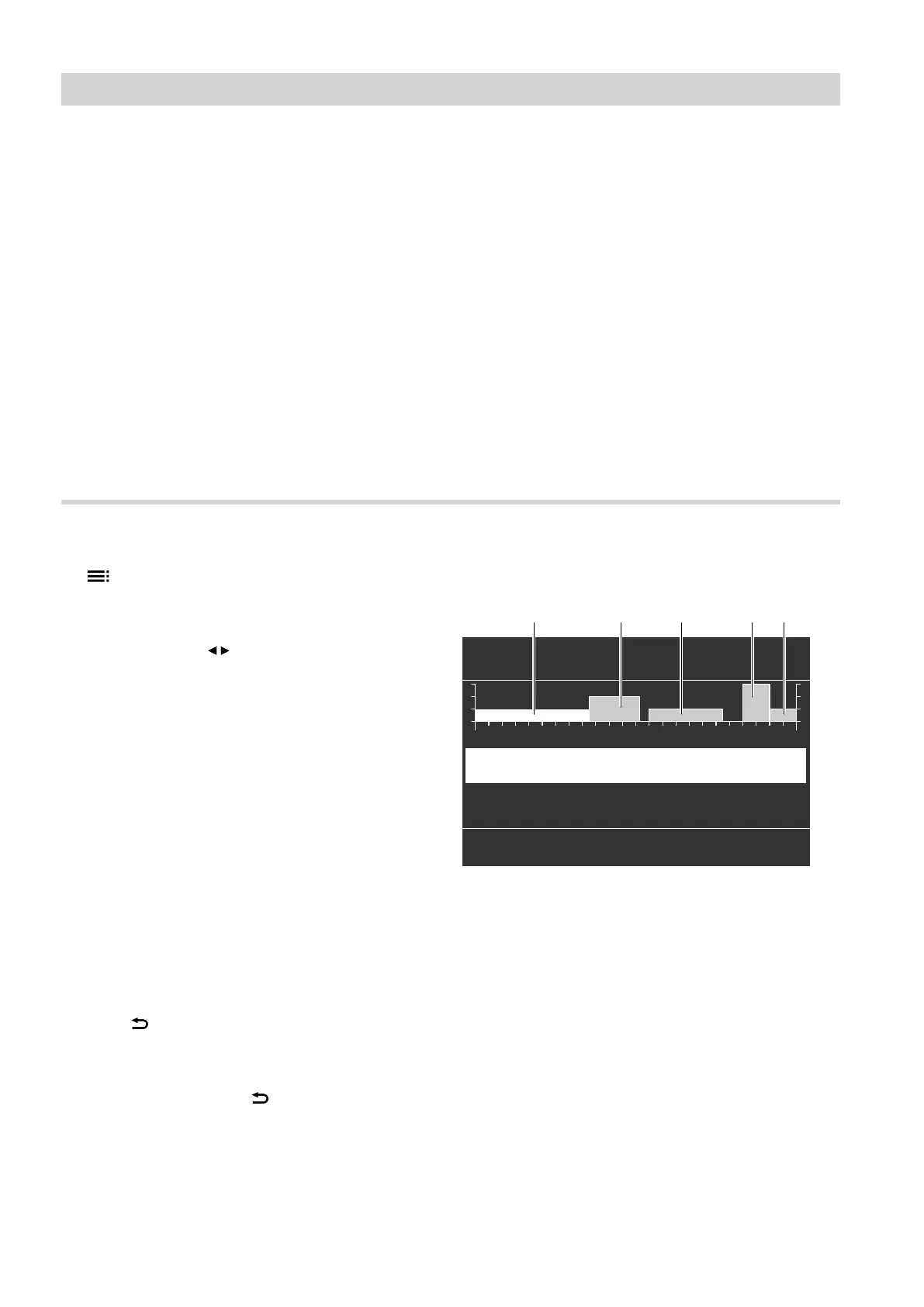
The selected time phase is illustrated by a white bar
on the time chart. The length of the bar reflects the
length of time.
■
The individual operating status is indicated on the
time chart by bars of different heights.
Where several time phases overlap, the operating
status with the highest bar takes priority.
■
In the extended menu, you can call up the time pro-
grams under "Information": see page 51.
Setting a time program using central heating/central cooling as an example
1. Extended menu:
2. "Heating/cooling"
3. If applicable, use / to select the required heating/
cooling circuit.
4. "Time proghtg/cooling"
5. Select part of the week or a day.
6.
Select a time phase
!
to
(
. The selected time
phase is illustrated by a white bar on the time
chart.
7. Set the start and end points for the relevant time
phase. The length of the white bar on the time
chart is adjusted accordingly.
8. Select the required operating status "Reduced",
"Standard" or "Fixd value". The individual oper-
ating status is indicated on the time chart by bars
of different heights.
9. Press to exit the menu.
Note
If you want to terminate a time phase setting process
prematurely, keep pressing until the required dis-
play appears.
Example of operating status and time phases in
the time program for central heating
Heating Mo-Su
?
08:30 - 12:10
u
Select with
Standard
(
!
00:00 - 08:30
u
0 2 4 6 8 10 12 14 16 18 20 22 24
Reduced
?!
HC1
§ $ %
Fig. 10
■
Time program for part of the week: "Monday–Sun-
day" ("Mo-Su")
■
Time phase
!
:
00:00 to 08:30 h: "Reduced"
■
Time phase
?
:
08:30 to 12:10 h: "Standard"
■
Time phase
§
:
13:00 to 18:30 h: "Reduced"
■
Time phase
$
:
20:00 to 22:00 h: "Fixd value"
■
Time phase
%
:
22:00 to 24:00 h: "Reduced"
Between the time phases, the "Standby" operating
status is active; in the example shown from 12:10 to
13:00 h and from 18:30 to 20:00 h.
Operation
Time program (cont.)
5790940









 To Next Page